

Model Context Protocol: How to use LLMs to query your analytics data

Most analytics tools make you choose: either get quick answers with surface-level insights, or dig deep but wait hours, maybe days, for meaningful analysis.
Model Context Protocol (MCP) eliminates that trade-off. Instead of clicking through dashboards or relying on the data team to write SQL queries, you can ask your analytics data complex questions in natural language and get deep, actionable insights instantly.
For product and marketing teams who need both speed and substance from their data, here's how MCP turns analytics conversations into faster, smarter decisions.
What is a Model Context Protocol (MCP)?
A Model Context Protocol (MCP) is an open standard that allows applications and large language models (LLMs) to communicate using structured context. Instead of treating an AI model like a black box, MCP creates a controlled framework where models can request and receive data securely, consistently, and in a digestible format.
For example, instead of manually coding integrations between an LLM and a data warehouse, MCP provides a universal “handshake” that makes context exchange reliable and reusable.
How MCP works
Think of MCP as the translator between your complex data and your AI assistant.
- Data source: This is where your analytics and business information live—such as Mixpanel or your data warehouse.
- MCP server: This acts as the bridge between the data source and the model, exposing only governed, approved context that the LLM can query safely.
- LLM: The AI model (like GPT-based systems) receives the structured data through MCP and translates that into language natural to the user.
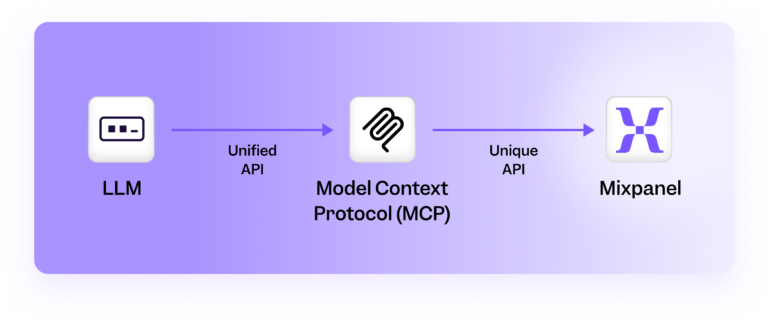
This workflow ensures that when a non-technical teammate asks, “What was our retention rate last quarter?,” they can trust the metrics they receive instead of guessing or relying on the data team.
Who should leverage MCP?
The beauty of MCP is that it isn’t designed for one type of user; it’s built to serve multiple roles across an organization. It ensures that everyone, from technical teams to executives, gets value in ways that match their needs.
Data team and analysts
Data engineers and analysts often spend time building custom or one-off requests, such as SQL queries or dashboards. MCP shrinks those efforts dramatically, enabling these teams to spend more time improving data quality and insights for self-serve analyses.
Product managers and marketers
These teams need quick answers about campaign conversions, funnel drop-offs, engagement rate, and much more. MCP makes it possible to ask these questions directly in natural language for fast decision-making without waiting for dashboards or analyst support.
Executives and decision makers
Leaders don’t have time to sift through dashboards or request new reports. With MCP, they can get self-serve analytics, enabling data-driven decisions without bottlenecks.
Benefits of MCP
When applied to digital analytics, an MCP can unlock a new layer of speed, trust, and accessibility in how teams interact with data. Teams across the organization can easily retrieve the same governed insights in seconds. Here are some of the distinct advantages:
Data democratization
Analytics shouldn’t be locked behind a vault that requires technical skills to access. By interacting with the MCP in natural language, non-technical teams gain access to the same trusted data that the data teams use, without needing SQL or BI expertise.
Faster insights
Traditional analytics often mean waiting in line for someone technical to pull numbers or update a dashboard. MCP speeds up this process. Since it provides AI assistants like Claude or Cursor a structured and approved way to query data, all teams can ask questions and get answers instantly.
Consistency and truth
Since only approved, governed data sources are pulled, everyone works off the same metrics and events data. No concern that the MCP is generating false answers.
A common MCP misconception: Security and control
There are some misconceptions about MCP because it sits on the cusp of AI and analytics. One common misconception is that MCP gives LLMs unlimited access to company data.
In reality, MCP does the opposite. It enforces structured, permission access so that only pre-approved metrics, reports, or fields are ever exposed. Data teams can configure what can be accessed through the MCP server, creating a single source of truth. Since it can only draw from these governed sources, the MCP outputs are based on approved data, not guesses.
MCP doesn’t open the floodgates to sensitive data. It builds a new possibility where analytics remains secure, accurate, and accessible, while giving teams the freedom to interact with the data conversationally.
How MCP compares to alternatives
Here’s a quick rundown of how MCP client integration compares to other options for accessing and analysing data.
MCP vs. traditional API integrations
Traditional APIs are the most common method to connect different software components and facilitate general application integration. Unlike APIs, MCP servers are purpose-built for AI, with standardized communication that maintains context during interactions with external systems.
MCP vs. custom analytics tools
Building custom analytics tools gives you the ability to create something tailored to your unique use case and needs, but it’s also expensive and time-consuming. MCP server setup is faster and requires less development time.
MCP vs. manual data analysis
Using an MCP server to query your product analytics with natural language is faster and more accurate than manual data analysis. Natural language queries eliminate technical barriers and improve accessibility for non-technical stakeholders. Manual data analysis has a steeper learning curve and also requires more technical expertise.
MCP use cases
To see the power of MCP in action, let’s walk through three common analytics questions you can answer faster and more effectively, especially when connected to Mixpanel data.
Query 1: Purchase conversion optimization
Analyze our purchase conversions, suggest data-driven strategies to optimize them from data in Mixpanel. Create visualizations to show the current conversions and potential impact areas.
This query analyzes conversion patterns, identifies user drop-off points, and recommends actionable improvements to increase purchases.
If you have a series of purchase events and want to understand how those different purchases are performing, the MCP server enables the LLM to run this analysis automatically. When queried, it can segment your users by geography, user metadata, or behavioral cohorts, giving you clarity on which cohort is most successful or who your power users are.
Compared to running a manual analysis, using a remote MCP server and LLM to query your data is both faster and smarter. It processes millions of events at once and surfaces correlations you might never have thought to test. These hidden insights are often too difficult to uncover manually, but MCP makes them instantly accessible.
Query 2: User engagement analysis
What are the key behaviors that differentiate our most engaged users from others?
Show me visualizations of these patterns and suggest ways to encourage these behaviors in less engaged users based on data from Mixpanel.
This helps identify successful user patterns and provides strategies to improve engagement across your user base.
With a relatively open-ended prompt like this, the LLM will try to understand all of the different patterns in the data, analyzing all of your events and learning which properties are relevant to your query.
This enables you to do discovery work without needing to know exactly which properties have the information you need or spending hours trying to locate the right information. You can perform discovery much more quickly, even when you aren’t familiar with analytics tools.
Query 3: Feature impact assessment
Analyze the impact of our recent feature launches on user retention and engagement from data in Mixpanel. Create visualizations showing before/after metrics and suggest which features we should prioritize next.
This helps measure feature success and guide product development decisions with data-backed insights.
It can be difficult to stitch together usage data with feature launch data, as they’re often siloed in different platforms. Using the Remote MCP Server and combining data from different sources (with a GitHub integration, for example, or by adding data from a separate file), you can track and correlate changes between feature releases and user engagement.
Advanced MCP use cases
In addition to the queries listed above, there are several other ways that MCP can make data analysis easier for your team.
Use case 1: Multi-source data correlation
MCP allows you to analyze your data using conversational AI. This includes combining data that comes from several sources and is stored in different places to find correlations that you might not otherwise see.
For example, an ecommerce business might store its purchase data in a spreadsheet. The information about the customers who made those purchases is stored in Mixpanel. With the Mixpanel MCP server, you can ask the AI to tie those datasets together to understand which items were purchased and how much revenue they generated, quickly and at scale.
Use case 2: Automated reporting
With the MCP server, you can use natural language to generate insights, visualizations, and dashboards in Mixpanel, eliminating the need for complex dashboard navigation or technical query language.
Use case 3: AI-driven insights generation
Using the MCP server allows you to do discovery work without having to identify in advance what’s important: The LLM can work to understand all of the different patterns in the data and share what it finds. You don’t need to know which property has the information you’re looking for, or which filter to use, to get the insights you need.
Best practices for better results
To get the most value from an MCP, especially the Mixpanel MCP server, it is best to be specific, clear, and proactive.
- Be specific with time ranges: Instead of asking about "recent data", specify "data from the past 30 days” for better performance and accuracy.
- Mention if you want visualizations: Explicitly ask for charts, graphs, or other visual representations. If you don’t want visualizations or prefer an alternative, specify that too.
- Request specific metrics: When relevant, include metrics like retention, conversion rates, or session duration.
- Ask for actionable recommendations: Get practical next steps by asking, "What should we do about this?"
- Use follow-up questions: Dive deeper into initial findings or create presentation-ready slides for sharing insights by asking, “What does x metric mean in this scenario?”.
- Flag issues: Proactively ask the AI to identify any potential issues with your data, analyze causes, and offer troubleshooting options if it encounters any. This ensures you aren’t making assumptions based on a data error.
Troubleshooting tips
Here are a few of the most common issues that users run into when using MCP, and a few tips on how to solve them. For more information on Mixpanel’s MCP, check out our MCP documentation.
Common technical issues and quick fixes:
- Node.js not found: Install using brew install node
- Authorization fails: Ensure proper Mixpanel account permissions
- Desktop app issues: Restart the application after configuration changes
- Free user limitations: Remote URL integrations are only supported in the desktop app
There are also some best practices you can apply to MCP work, especially in large datasets:
- Avoid oversupply of redundant data
- Break down large datasets into smaller chunks to make them more manageable
- Cache frequently-used resource contents within the MCP server to make it accessible more quickly
With these basics covered, you're ready to start having meaningful conversations with your data through MCP.
The future of MCP
Adoption of MCP is reshaping the way organizations leverage AI to interact and understand their data, making insights faster to access, easier to trust, and more widely accessible across teams.
As AI adoption grows, the need for consistency, security, and scalability will only increase. But it doesn’t stop there.
We’re excited about a future with agent-to-agent communication, where different AI agents for different platforms can communicate with each other autonomously to gain even deeper insights.
Now is the time to start powering your data with AI. Check out the Mixpanel MCP server today.