Template
Template
SaaS Business KPIs Template
SaaS Business KPIs Template
SaaS Business KPIs Template
Understand your MRR trends, what's driving month-over-month revenue changes, and where churn is concentrated.
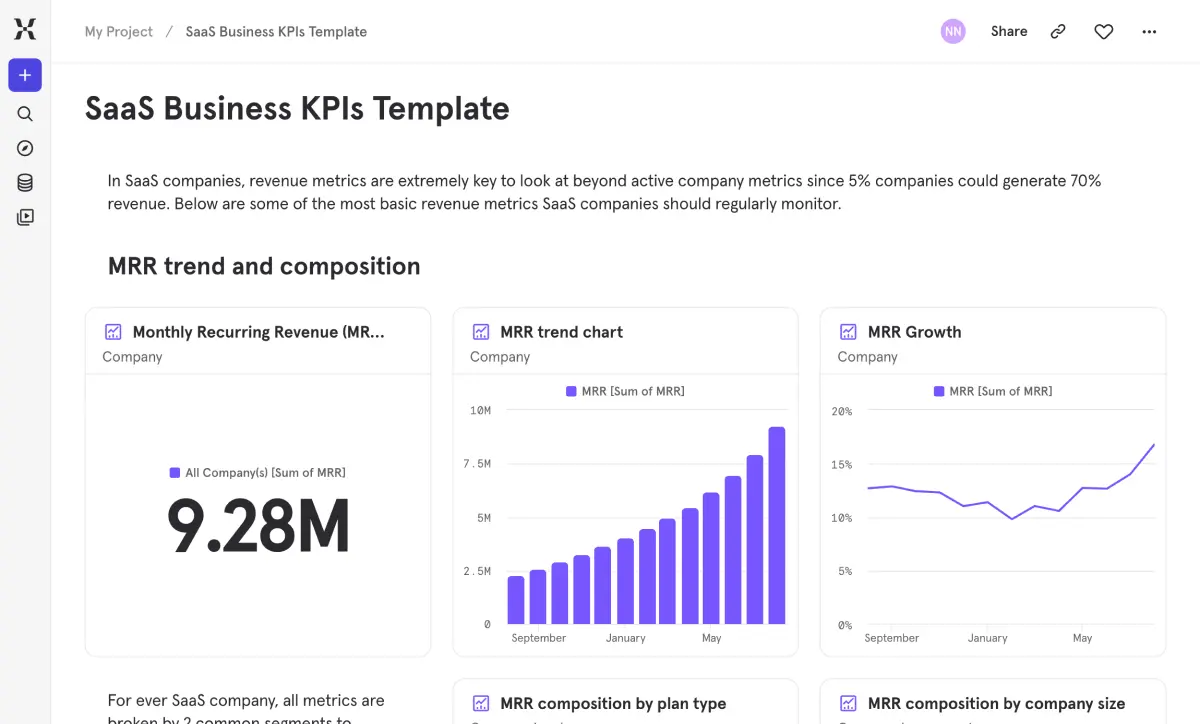
Every SaaS leadership team needs to answer the same core questions: is revenue growing efficiently, where is that growth coming from, and are we retaining the revenue we've already earned? This template helps you answer all three without stitching together spreadsheets or waiting on a finance team report.
Quickly spot whether growth is driven by new logos, expansion, or reactivation — and whether churn is eroding gains in specific segments. Understand which plan types and customer segments are your strongest revenue engines and which need attention. It's the dashboard you'll pull up in every board meeting, QBR, and planning cycle.
Every SaaS leadership team needs to answer the same core questions: is revenue growing efficiently, where is that growth coming from, and are we retaining the revenue we've already earned? This template helps you answer all three without stitching together spreadsheets or waiting on a finance team report.
Quickly spot whether growth is driven by new logos, expansion, or reactivation — and whether churn is eroding gains in specific segments. Understand which plan types and customer segments are your strongest revenue engines and which need attention. It's the dashboard you'll pull up in every board meeting, QBR, and planning cycle.
Pertanyaan yang Sering Diajukan
What SaaS metrics should I track in a product analytics dashboard?
The essentials: MRR (monthly recurring revenue), MRR growth rate, net revenue retention (NRR), gross revenue retention (GRR), and logo churn rate. But top-line MRR alone doesn’t tell you much — you need to understand composition (which plans and segments drive the most revenue) and what’s changing month over month (new business, expansion, contraction, churn). This template covers all of it in one place.
How do I calculate net revenue retention (NRR)?
NRR measures the percentage of recurring revenue you retain from existing customers, including expansions and contractions. Above 100% means your existing base is growing faster than it’s churning — which is the gold standard for SaaS. This template calculates NRR automatically and tracks it over time, broken down by plan type and customer segment so you can see exactly which parts of your base are expanding and which are contracting.
What is a healthy gross revenue retention rate for SaaS?
Above 80% is generally considered healthy, and best-in-class SaaS companies hit 90%+. GRR strips out expansion revenue, so it isolates how well you hold onto existing contract value — no upsells inflating the number. This template tracks GRR alongside NRR and logo churn, so you get the full picture of where revenue is leaking and whether it’s concentrated in specific plans or segments.
How do I break down what's driving changes in my MRR?
The net MRR section breaks it down clearly: delta MRR (the total month-over-month change), a composition view by revenue change type (new, upgrade, downgrade, churn), and deep dives into new MRR by plan and segment. It answers whether growth is coming from landing new logos, expanding existing accounts, or a specific segment punching above its weight. When MRR moves, you’ll know exactly why.
How do I track churn by customer segment in Mixpanel?
The template breaks down churn and retention by both plan type (premium, basic, trial, free) and company segment (SMB, Mid Market, Enterprise). NRR deep dives trend over time for each segment, so you can spot whether churn is concentrated in smaller accounts, specific tiers, or spreading across the base. That segmentation helps you aim retention efforts where they’ll have the most revenue impact instead of treating churn as one monolithic problem.
Can I use this template if my SaaS billing data lives in Stripe or another system?
Yes. Send billing and subscription data from Stripe or any billing system into Mixpanel via a CDP, direct integration, or warehouse import. Once your revenue events include properties like MRR amount, plan type, segment, and revenue change type, the reports populate automatically. Mixpanel’s warehouse connectors also let you sync subscription data directly from your data warehouse — no additional instrumentation required.
Pertanyaan yang Sering Diajukan
What SaaS metrics should I track in a product analytics dashboard?
The essentials: MRR (monthly recurring revenue), MRR growth rate, net revenue retention (NRR), gross revenue retention (GRR), and logo churn rate. But top-line MRR alone doesn’t tell you much — you need to understand composition (which plans and segments drive the most revenue) and what’s changing month over month (new business, expansion, contraction, churn). This template covers all of it in one place.
How do I calculate net revenue retention (NRR)?
NRR measures the percentage of recurring revenue you retain from existing customers, including expansions and contractions. Above 100% means your existing base is growing faster than it’s churning — which is the gold standard for SaaS. This template calculates NRR automatically and tracks it over time, broken down by plan type and customer segment so you can see exactly which parts of your base are expanding and which are contracting.
What is a healthy gross revenue retention rate for SaaS?
Above 80% is generally considered healthy, and best-in-class SaaS companies hit 90%+. GRR strips out expansion revenue, so it isolates how well you hold onto existing contract value — no upsells inflating the number. This template tracks GRR alongside NRR and logo churn, so you get the full picture of where revenue is leaking and whether it’s concentrated in specific plans or segments.
How do I break down what's driving changes in my MRR?
The net MRR section breaks it down clearly: delta MRR (the total month-over-month change), a composition view by revenue change type (new, upgrade, downgrade, churn), and deep dives into new MRR by plan and segment. It answers whether growth is coming from landing new logos, expanding existing accounts, or a specific segment punching above its weight. When MRR moves, you’ll know exactly why.
How do I track churn by customer segment in Mixpanel?
The template breaks down churn and retention by both plan type (premium, basic, trial, free) and company segment (SMB, Mid Market, Enterprise). NRR deep dives trend over time for each segment, so you can spot whether churn is concentrated in smaller accounts, specific tiers, or spreading across the base. That segmentation helps you aim retention efforts where they’ll have the most revenue impact instead of treating churn as one monolithic problem.
Can I use this template if my SaaS billing data lives in Stripe or another system?
Yes. Send billing and subscription data from Stripe or any billing system into Mixpanel via a CDP, direct integration, or warehouse import. Once your revenue events include properties like MRR amount, plan type, segment, and revenue change type, the reports populate automatically. Mixpanel’s warehouse connectors also let you sync subscription data directly from your data warehouse — no additional instrumentation required.
Pertanyaan yang Sering Diajukan
What SaaS metrics should I track in a product analytics dashboard?
The essentials: MRR (monthly recurring revenue), MRR growth rate, net revenue retention (NRR), gross revenue retention (GRR), and logo churn rate. But top-line MRR alone doesn’t tell you much — you need to understand composition (which plans and segments drive the most revenue) and what’s changing month over month (new business, expansion, contraction, churn). This template covers all of it in one place.
How do I calculate net revenue retention (NRR)?
NRR measures the percentage of recurring revenue you retain from existing customers, including expansions and contractions. Above 100% means your existing base is growing faster than it’s churning — which is the gold standard for SaaS. This template calculates NRR automatically and tracks it over time, broken down by plan type and customer segment so you can see exactly which parts of your base are expanding and which are contracting.
What is a healthy gross revenue retention rate for SaaS?
Above 80% is generally considered healthy, and best-in-class SaaS companies hit 90%+. GRR strips out expansion revenue, so it isolates how well you hold onto existing contract value — no upsells inflating the number. This template tracks GRR alongside NRR and logo churn, so you get the full picture of where revenue is leaking and whether it’s concentrated in specific plans or segments.
How do I break down what's driving changes in my MRR?
The net MRR section breaks it down clearly: delta MRR (the total month-over-month change), a composition view by revenue change type (new, upgrade, downgrade, churn), and deep dives into new MRR by plan and segment. It answers whether growth is coming from landing new logos, expanding existing accounts, or a specific segment punching above its weight. When MRR moves, you’ll know exactly why.
How do I track churn by customer segment in Mixpanel?
The template breaks down churn and retention by both plan type (premium, basic, trial, free) and company segment (SMB, Mid Market, Enterprise). NRR deep dives trend over time for each segment, so you can spot whether churn is concentrated in smaller accounts, specific tiers, or spreading across the base. That segmentation helps you aim retention efforts where they’ll have the most revenue impact instead of treating churn as one monolithic problem.
Can I use this template if my SaaS billing data lives in Stripe or another system?
Yes. Send billing and subscription data from Stripe or any billing system into Mixpanel via a CDP, direct integration, or warehouse import. Once your revenue events include properties like MRR amount, plan type, segment, and revenue change type, the reports populate automatically. Mixpanel’s warehouse connectors also let you sync subscription data directly from your data warehouse — no additional instrumentation required.
Pertanyaan yang Sering Diajukan
What SaaS metrics should I track in a product analytics dashboard?
The essentials: MRR (monthly recurring revenue), MRR growth rate, net revenue retention (NRR), gross revenue retention (GRR), and logo churn rate. But top-line MRR alone doesn’t tell you much — you need to understand composition (which plans and segments drive the most revenue) and what’s changing month over month (new business, expansion, contraction, churn). This template covers all of it in one place.
How do I calculate net revenue retention (NRR)?
NRR measures the percentage of recurring revenue you retain from existing customers, including expansions and contractions. Above 100% means your existing base is growing faster than it’s churning — which is the gold standard for SaaS. This template calculates NRR automatically and tracks it over time, broken down by plan type and customer segment so you can see exactly which parts of your base are expanding and which are contracting.
What is a healthy gross revenue retention rate for SaaS?
Above 80% is generally considered healthy, and best-in-class SaaS companies hit 90%+. GRR strips out expansion revenue, so it isolates how well you hold onto existing contract value — no upsells inflating the number. This template tracks GRR alongside NRR and logo churn, so you get the full picture of where revenue is leaking and whether it’s concentrated in specific plans or segments.
How do I break down what's driving changes in my MRR?
The net MRR section breaks it down clearly: delta MRR (the total month-over-month change), a composition view by revenue change type (new, upgrade, downgrade, churn), and deep dives into new MRR by plan and segment. It answers whether growth is coming from landing new logos, expanding existing accounts, or a specific segment punching above its weight. When MRR moves, you’ll know exactly why.
How do I track churn by customer segment in Mixpanel?
The template breaks down churn and retention by both plan type (premium, basic, trial, free) and company segment (SMB, Mid Market, Enterprise). NRR deep dives trend over time for each segment, so you can spot whether churn is concentrated in smaller accounts, specific tiers, or spreading across the base. That segmentation helps you aim retention efforts where they’ll have the most revenue impact instead of treating churn as one monolithic problem.
Can I use this template if my SaaS billing data lives in Stripe or another system?
Yes. Send billing and subscription data from Stripe or any billing system into Mixpanel via a CDP, direct integration, or warehouse import. Once your revenue events include properties like MRR amount, plan type, segment, and revenue change type, the reports populate automatically. Mixpanel’s warehouse connectors also let you sync subscription data directly from your data warehouse — no additional instrumentation required.
More templates




Bangun dengan cepat. Kirim dengan lebih cerdas. Ketahui apa yang berhasil dan mengapa.
Bangun dengan cepat. Kirim dengan lebih cerdas. Ketahui apa yang berhasil dan mengapa.
Bangun dengan cepat. Kirim dengan lebih cerdas. Ketahui apa yang berhasil dan mengapa.