Template
Template
Web Analytics Template
Web Analytics Template
Web Analytics Template
Get a complete view of your website's performance with essential user, session, and page-level metrics.
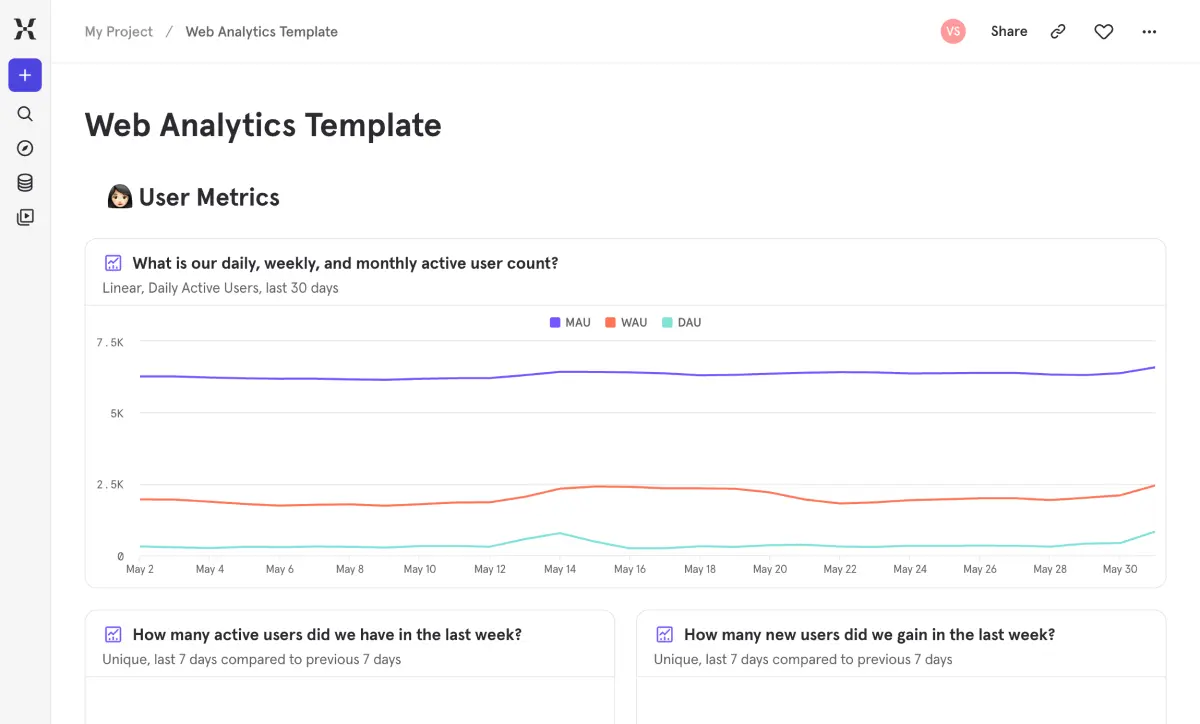
You need to know what's happening on your website without digging through five different tools to piece it together. This template gives you immediate answers to the fundamentals: how many people are visiting, how engaged are they during a session, and which pages are doing their job.
Spot problems like rising bounce rates or declining session depth before they impact conversion. Compare traffic sources side by side to see which ones bring engaged visitors versus drive-by clicks. Whether you're building your first analytics practice or replacing a legacy tool, this is the foundation every web team needs.
You need to know what's happening on your website without digging through five different tools to piece it together. This template gives you immediate answers to the fundamentals: how many people are visiting, how engaged are they during a session, and which pages are doing their job.
Spot problems like rising bounce rates or declining session depth before they impact conversion. Compare traffic sources side by side to see which ones bring engaged visitors versus drive-by clicks. Whether you're building your first analytics practice or replacing a legacy tool, this is the foundation every web team needs.
Pertanyaan yang Sering Diajukan
What are the most important web analytics metrics to track?
They fall into three buckets. User metrics: DAU, WAU, MAU, new user acquisition, and audience breakdown by geography and platform. Session metrics: total sessions, bounce rate, session duration, pages per session, and performance by traffic source. Page metrics: total views, pages per user, and individual page performance including landing page, exit page, and bounce rate. This template has reports for all of them, so you’re covered from day one.
How do I use Mixpanel for web analytics?
Mixpanel goes beyond traditional pageview counting. Install the JavaScript SDK or connect via a CDP, and Mixpanel automatically tracks page views, sessions, and user properties like geography and platform. This template gives you an instant dashboard with pre-built reports for user, session, and page metrics — the same foundation you’d build in any web analytics tool, plus Mixpanel’s segmentation and cohort analysis when you’re ready to go deeper.
How do I reduce my website's bounce rate?
Start by figuring out where it’s happening and why. This template shows your overall bounce rate alongside a page-level table that breaks it down for every individual page. You can also view session performance by traffic source to spot whether certain channels consistently produce higher bounce rates. Once you’ve identified the worst offenders, you can dig into content relevance, load speed, and whether the landing experience matches what visitors expected when they clicked.
How does Mixpanel track sessions for web analytics?
Mixpanel groups user activity into sessions based on a configurable timeout window — 30 minutes of inactivity by default. Each session captures page views, events, duration, and entry/exit pages. This template uses that as the foundation for bounce rate, session duration, pages per session, and performance by source. It works out of the box with no manual session configuration needed.
Can I see which traffic sources drive the best engagement?
Yes — the Session Metrics section includes a performance-by-source breakdown that shows how session behavior varies across your traffic channels. Compare bounce rates, session depth, and duration side by side to see which sources bring engaged visitors and which ones produce drive-by clicks. It’s one of the fastest ways to figure out where your marketing is actually working.
Pertanyaan yang Sering Diajukan
What are the most important web analytics metrics to track?
They fall into three buckets. User metrics: DAU, WAU, MAU, new user acquisition, and audience breakdown by geography and platform. Session metrics: total sessions, bounce rate, session duration, pages per session, and performance by traffic source. Page metrics: total views, pages per user, and individual page performance including landing page, exit page, and bounce rate. This template has reports for all of them, so you’re covered from day one.
How do I use Mixpanel for web analytics?
Mixpanel goes beyond traditional pageview counting. Install the JavaScript SDK or connect via a CDP, and Mixpanel automatically tracks page views, sessions, and user properties like geography and platform. This template gives you an instant dashboard with pre-built reports for user, session, and page metrics — the same foundation you’d build in any web analytics tool, plus Mixpanel’s segmentation and cohort analysis when you’re ready to go deeper.
How do I reduce my website's bounce rate?
Start by figuring out where it’s happening and why. This template shows your overall bounce rate alongside a page-level table that breaks it down for every individual page. You can also view session performance by traffic source to spot whether certain channels consistently produce higher bounce rates. Once you’ve identified the worst offenders, you can dig into content relevance, load speed, and whether the landing experience matches what visitors expected when they clicked.
How does Mixpanel track sessions for web analytics?
Mixpanel groups user activity into sessions based on a configurable timeout window — 30 minutes of inactivity by default. Each session captures page views, events, duration, and entry/exit pages. This template uses that as the foundation for bounce rate, session duration, pages per session, and performance by source. It works out of the box with no manual session configuration needed.
Can I see which traffic sources drive the best engagement?
Yes — the Session Metrics section includes a performance-by-source breakdown that shows how session behavior varies across your traffic channels. Compare bounce rates, session depth, and duration side by side to see which sources bring engaged visitors and which ones produce drive-by clicks. It’s one of the fastest ways to figure out where your marketing is actually working.
Pertanyaan yang Sering Diajukan
What are the most important web analytics metrics to track?
They fall into three buckets. User metrics: DAU, WAU, MAU, new user acquisition, and audience breakdown by geography and platform. Session metrics: total sessions, bounce rate, session duration, pages per session, and performance by traffic source. Page metrics: total views, pages per user, and individual page performance including landing page, exit page, and bounce rate. This template has reports for all of them, so you’re covered from day one.
How do I use Mixpanel for web analytics?
Mixpanel goes beyond traditional pageview counting. Install the JavaScript SDK or connect via a CDP, and Mixpanel automatically tracks page views, sessions, and user properties like geography and platform. This template gives you an instant dashboard with pre-built reports for user, session, and page metrics — the same foundation you’d build in any web analytics tool, plus Mixpanel’s segmentation and cohort analysis when you’re ready to go deeper.
How do I reduce my website's bounce rate?
Start by figuring out where it’s happening and why. This template shows your overall bounce rate alongside a page-level table that breaks it down for every individual page. You can also view session performance by traffic source to spot whether certain channels consistently produce higher bounce rates. Once you’ve identified the worst offenders, you can dig into content relevance, load speed, and whether the landing experience matches what visitors expected when they clicked.
How does Mixpanel track sessions for web analytics?
Mixpanel groups user activity into sessions based on a configurable timeout window — 30 minutes of inactivity by default. Each session captures page views, events, duration, and entry/exit pages. This template uses that as the foundation for bounce rate, session duration, pages per session, and performance by source. It works out of the box with no manual session configuration needed.
Can I see which traffic sources drive the best engagement?
Yes — the Session Metrics section includes a performance-by-source breakdown that shows how session behavior varies across your traffic channels. Compare bounce rates, session depth, and duration side by side to see which sources bring engaged visitors and which ones produce drive-by clicks. It’s one of the fastest ways to figure out where your marketing is actually working.
Pertanyaan yang Sering Diajukan
What are the most important web analytics metrics to track?
They fall into three buckets. User metrics: DAU, WAU, MAU, new user acquisition, and audience breakdown by geography and platform. Session metrics: total sessions, bounce rate, session duration, pages per session, and performance by traffic source. Page metrics: total views, pages per user, and individual page performance including landing page, exit page, and bounce rate. This template has reports for all of them, so you’re covered from day one.
How do I use Mixpanel for web analytics?
Mixpanel goes beyond traditional pageview counting. Install the JavaScript SDK or connect via a CDP, and Mixpanel automatically tracks page views, sessions, and user properties like geography and platform. This template gives you an instant dashboard with pre-built reports for user, session, and page metrics — the same foundation you’d build in any web analytics tool, plus Mixpanel’s segmentation and cohort analysis when you’re ready to go deeper.
How do I reduce my website's bounce rate?
Start by figuring out where it’s happening and why. This template shows your overall bounce rate alongside a page-level table that breaks it down for every individual page. You can also view session performance by traffic source to spot whether certain channels consistently produce higher bounce rates. Once you’ve identified the worst offenders, you can dig into content relevance, load speed, and whether the landing experience matches what visitors expected when they clicked.
How does Mixpanel track sessions for web analytics?
Mixpanel groups user activity into sessions based on a configurable timeout window — 30 minutes of inactivity by default. Each session captures page views, events, duration, and entry/exit pages. This template uses that as the foundation for bounce rate, session duration, pages per session, and performance by source. It works out of the box with no manual session configuration needed.
Can I see which traffic sources drive the best engagement?
Yes — the Session Metrics section includes a performance-by-source breakdown that shows how session behavior varies across your traffic channels. Compare bounce rates, session depth, and duration side by side to see which sources bring engaged visitors and which ones produce drive-by clicks. It’s one of the fastest ways to figure out where your marketing is actually working.
More templates




Bangun dengan cepat. Kirim dengan lebih cerdas. Ketahui apa yang berhasil dan mengapa.
Bangun dengan cepat. Kirim dengan lebih cerdas. Ketahui apa yang berhasil dan mengapa.
Bangun dengan cepat. Kirim dengan lebih cerdas. Ketahui apa yang berhasil dan mengapa.