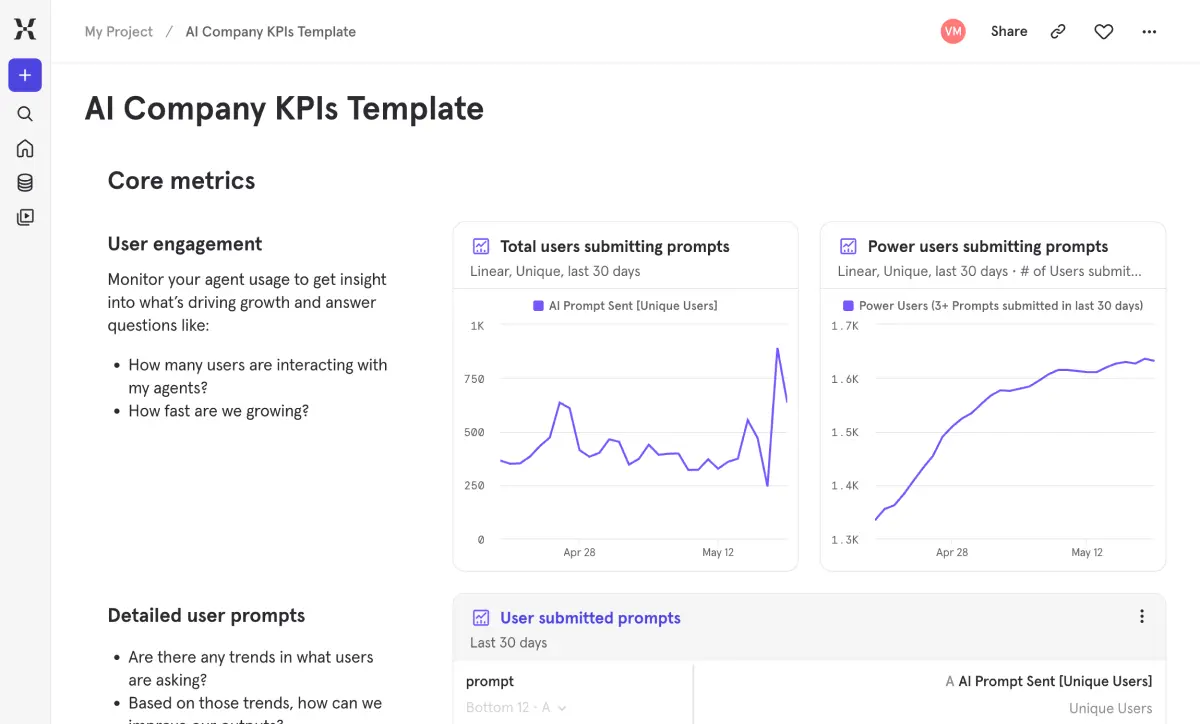
Traditional product analytics frameworks weren't built for AI — they can't tell you what users are asking your agent, whether it's worth the cost, or if responses are fast enough to keep people engaged. This template gives AI teams the operational visibility they're missing: who's using the agent, what they're asking it, how much it costs per user, and whether users find the responses helpful.
Catch cost spikes, latency regressions, and drops in user sentiment before they become real problems. Understand whether your AI feature is building a habit or just attracting one-time curiosity. It's the dashboard every team shipping LLM-powered features needs from day one.
Traditional product analytics frameworks weren't built for AI — they can't tell you what users are asking your agent, whether it's worth the cost, or if responses are fast enough to keep people engaged. This template gives AI teams the operational visibility they're missing: who's using the agent, what they're asking it, how much it costs per user, and whether users find the responses helpful.
Catch cost spikes, latency regressions, and drops in user sentiment before they become real problems. Understand whether your AI feature is building a habit or just attracting one-time curiosity. It's the dashboard every team shipping LLM-powered features needs from day one.
자주 묻는 질문
What metrics should I track for an AI product or agent?
AI products need metrics across five areas: engagement (who’s using it and how often), usage patterns (what are they asking and how frequently), cost (per user, per request, total daily spend), performance (errors, timeouts, response speed), and user satisfaction (feedback sentiment and submission rates). This template covers all five with pre-built reports you can connect to your data right away.
How do I track the cost of running AI agents in production?
This template gives you three cost views: API cost per user (unit economics), total API cost by day (overall spend trends), and cost per request (efficiency tracking). The real value is seeing cost alongside engagement and retention — so you can tell whether increased spending is driving proportional value or whether there’s room to optimize prompts, reduce token usage, or adjust model selection without hurting the experience.
How do I measure whether my AI feature is actually helping users?
Come at it from multiple angles. Retention reports show whether users who interact with your AI come back at higher rates. Funnel reports reveal where people drop off between opening the AI and actually submitting a prompt. Feedback reports capture direct sentiment through thumbs up/down and track how often people bother leaving feedback at all. And a business impact section ties agent usage to your core conversion metrics. No single metric tells the whole story, but together they paint a clear picture.
How do I identify power users of my AI feature?
The template defines power users as those submitting 3+ prompts and tracks them over time. A usage frequency distribution shows how many prompts people submit per session, making it easy to see the split between casual experimenters and heavy adopters. Watch the power user ratio alongside total users — if your user base is growing but the power user share is shrinking, your AI might be attracting curiosity without delivering enough value to keep people coming back.
What prompts are users sending to my AI agent?
The Detailed User Prompts section shows the actual text of what users are submitting, ranked by frequency and unique user count. It’s a direct window into user intent — what questions they’re asking, what tasks they’re trying to accomplish, and where your AI might be falling short. Use it to improve model outputs, refine system prompts, and prioritize what to build next based on what people are actually trying to do.
How should I think about balancing AI agent cost and performance?
Start by looking at cost per request alongside response speed and feedback sentiment. If cost is climbing but satisfaction is flat, there’s probably room to optimize. Shorter prompts, caching frequent responses, or routing simpler queries to a lighter model can all help. This template puts all three metrics side by side so you can find the sweet spot between cost efficiency and the experience users actually care about.
자주 묻는 질문
What metrics should I track for an AI product or agent?
AI products need metrics across five areas: engagement (who’s using it and how often), usage patterns (what are they asking and how frequently), cost (per user, per request, total daily spend), performance (errors, timeouts, response speed), and user satisfaction (feedback sentiment and submission rates). This template covers all five with pre-built reports you can connect to your data right away.
How do I track the cost of running AI agents in production?
This template gives you three cost views: API cost per user (unit economics), total API cost by day (overall spend trends), and cost per request (efficiency tracking). The real value is seeing cost alongside engagement and retention — so you can tell whether increased spending is driving proportional value or whether there’s room to optimize prompts, reduce token usage, or adjust model selection without hurting the experience.
How do I measure whether my AI feature is actually helping users?
Come at it from multiple angles. Retention reports show whether users who interact with your AI come back at higher rates. Funnel reports reveal where people drop off between opening the AI and actually submitting a prompt. Feedback reports capture direct sentiment through thumbs up/down and track how often people bother leaving feedback at all. And a business impact section ties agent usage to your core conversion metrics. No single metric tells the whole story, but together they paint a clear picture.
How do I identify power users of my AI feature?
The template defines power users as those submitting 3+ prompts and tracks them over time. A usage frequency distribution shows how many prompts people submit per session, making it easy to see the split between casual experimenters and heavy adopters. Watch the power user ratio alongside total users — if your user base is growing but the power user share is shrinking, your AI might be attracting curiosity without delivering enough value to keep people coming back.
What prompts are users sending to my AI agent?
The Detailed User Prompts section shows the actual text of what users are submitting, ranked by frequency and unique user count. It’s a direct window into user intent — what questions they’re asking, what tasks they’re trying to accomplish, and where your AI might be falling short. Use it to improve model outputs, refine system prompts, and prioritize what to build next based on what people are actually trying to do.
How should I think about balancing AI agent cost and performance?
Start by looking at cost per request alongside response speed and feedback sentiment. If cost is climbing but satisfaction is flat, there’s probably room to optimize. Shorter prompts, caching frequent responses, or routing simpler queries to a lighter model can all help. This template puts all three metrics side by side so you can find the sweet spot between cost efficiency and the experience users actually care about.
자주 묻는 질문
What metrics should I track for an AI product or agent?
AI products need metrics across five areas: engagement (who’s using it and how often), usage patterns (what are they asking and how frequently), cost (per user, per request, total daily spend), performance (errors, timeouts, response speed), and user satisfaction (feedback sentiment and submission rates). This template covers all five with pre-built reports you can connect to your data right away.
How do I track the cost of running AI agents in production?
This template gives you three cost views: API cost per user (unit economics), total API cost by day (overall spend trends), and cost per request (efficiency tracking). The real value is seeing cost alongside engagement and retention — so you can tell whether increased spending is driving proportional value or whether there’s room to optimize prompts, reduce token usage, or adjust model selection without hurting the experience.
How do I measure whether my AI feature is actually helping users?
Come at it from multiple angles. Retention reports show whether users who interact with your AI come back at higher rates. Funnel reports reveal where people drop off between opening the AI and actually submitting a prompt. Feedback reports capture direct sentiment through thumbs up/down and track how often people bother leaving feedback at all. And a business impact section ties agent usage to your core conversion metrics. No single metric tells the whole story, but together they paint a clear picture.
How do I identify power users of my AI feature?
The template defines power users as those submitting 3+ prompts and tracks them over time. A usage frequency distribution shows how many prompts people submit per session, making it easy to see the split between casual experimenters and heavy adopters. Watch the power user ratio alongside total users — if your user base is growing but the power user share is shrinking, your AI might be attracting curiosity without delivering enough value to keep people coming back.
What prompts are users sending to my AI agent?
The Detailed User Prompts section shows the actual text of what users are submitting, ranked by frequency and unique user count. It’s a direct window into user intent — what questions they’re asking, what tasks they’re trying to accomplish, and where your AI might be falling short. Use it to improve model outputs, refine system prompts, and prioritize what to build next based on what people are actually trying to do.
How should I think about balancing AI agent cost and performance?
Start by looking at cost per request alongside response speed and feedback sentiment. If cost is climbing but satisfaction is flat, there’s probably room to optimize. Shorter prompts, caching frequent responses, or routing simpler queries to a lighter model can all help. This template puts all three metrics side by side so you can find the sweet spot between cost efficiency and the experience users actually care about.
자주 묻는 질문
What metrics should I track for an AI product or agent?
AI products need metrics across five areas: engagement (who’s using it and how often), usage patterns (what are they asking and how frequently), cost (per user, per request, total daily spend), performance (errors, timeouts, response speed), and user satisfaction (feedback sentiment and submission rates). This template covers all five with pre-built reports you can connect to your data right away.
How do I track the cost of running AI agents in production?
This template gives you three cost views: API cost per user (unit economics), total API cost by day (overall spend trends), and cost per request (efficiency tracking). The real value is seeing cost alongside engagement and retention — so you can tell whether increased spending is driving proportional value or whether there’s room to optimize prompts, reduce token usage, or adjust model selection without hurting the experience.
How do I measure whether my AI feature is actually helping users?
Come at it from multiple angles. Retention reports show whether users who interact with your AI come back at higher rates. Funnel reports reveal where people drop off between opening the AI and actually submitting a prompt. Feedback reports capture direct sentiment through thumbs up/down and track how often people bother leaving feedback at all. And a business impact section ties agent usage to your core conversion metrics. No single metric tells the whole story, but together they paint a clear picture.
How do I identify power users of my AI feature?
The template defines power users as those submitting 3+ prompts and tracks them over time. A usage frequency distribution shows how many prompts people submit per session, making it easy to see the split between casual experimenters and heavy adopters. Watch the power user ratio alongside total users — if your user base is growing but the power user share is shrinking, your AI might be attracting curiosity without delivering enough value to keep people coming back.
What prompts are users sending to my AI agent?
The Detailed User Prompts section shows the actual text of what users are submitting, ranked by frequency and unique user count. It’s a direct window into user intent — what questions they’re asking, what tasks they’re trying to accomplish, and where your AI might be falling short. Use it to improve model outputs, refine system prompts, and prioritize what to build next based on what people are actually trying to do.
How should I think about balancing AI agent cost and performance?
Start by looking at cost per request alongside response speed and feedback sentiment. If cost is climbing but satisfaction is flat, there’s probably room to optimize. Shorter prompts, caching frequent responses, or routing simpler queries to a lighter model can all help. This template puts all three metrics side by side so you can find the sweet spot between cost efficiency and the experience users actually care about.