新しい
エクスペリメントとフィーチャーフラグが、FreeプランとGrowthプランでご利用いただけるようになりました!
新しい
エクスペリメントとフィーチャーフラグが、FreeプランとGrowthプランでご利用いただけるようになりました!

コンテキストエンジン
高耐久性コード
テキスト
テキスト
単なるデータとしてではなく、あなたのビジネスを理解した上での回答
単なるデータとしてではなく、あなたのビジネスを理解した上での回答
ほとんどのAIツールは、あなたのビジネスがどのように動いているかを理解していません。Context Engineはそれを解決します。一度設定するだけで、それ以降はすべてのクエリが、あなたの文脈(コンテキスト)がすでに読み込まれた状態で開始されます。


Mixpanel AIにコンテキストを与えましょう。信頼できる回答が得られます。
Mixpanel AIにコンテキストを与えましょう。信頼できる回答が得られます。
チームが検証済みのデータに基づいて精度の高いクエリを実行できるように、通常 Mixpanel AI に提供するコンテキストは以下の通りです。Mixpanel の設定でコンテキストを直接入力するか、MCP を通じて AI アシスタントにプロジェクトを確認してもらい、追加すると最も効果的な内容を提案してもらうことができます。
組織レベル
組織レベル
御社の事業内容と、どのようなお客様を対象としているか
ノーススター・メトリック(北極星指標)と、その測定方法
AIが理解すべき社内用語と略語
顧客をセグメント化する方法
プロジェクトレベル
プロジェクトレベル
イベントのタクソノミーと命名規則
最も重要なイベントが何を表しているのか、そしてそれらがいつ発生するのか
主要なダッシュボードと、よくある質問に対する標準的な回答が見つかる場所
キーボード ショートカット

認証モード
認証モード
テキスト
テキスト
AIが使用できるものと使用できないものは、あなたが決定します。
AIが使用できるものと使用できないものは、あなたが決定します。
AIが使用できるものと使用できないものは、あなたが決定します。
間違ったデータに基づいた回答であれば、いくら早くても意味はありません。「ベリファイドモード(Verified Mode)」は、Mixpanel AIがクエリできるイベントとプロパティを管理者が明示的にコントロールできるようにします。これにより、すべての出力はチームが確認・承認した信頼できるソースから生成されます。その結果、誰が質問しても一貫した回答が得られ、自信を持って次のアクションを起こすことができます。
コンテキストと信頼 — どこで働いていても
コンテキストと信頼 — どこで働いていても
コンテキストと信頼 — どこで働いていても
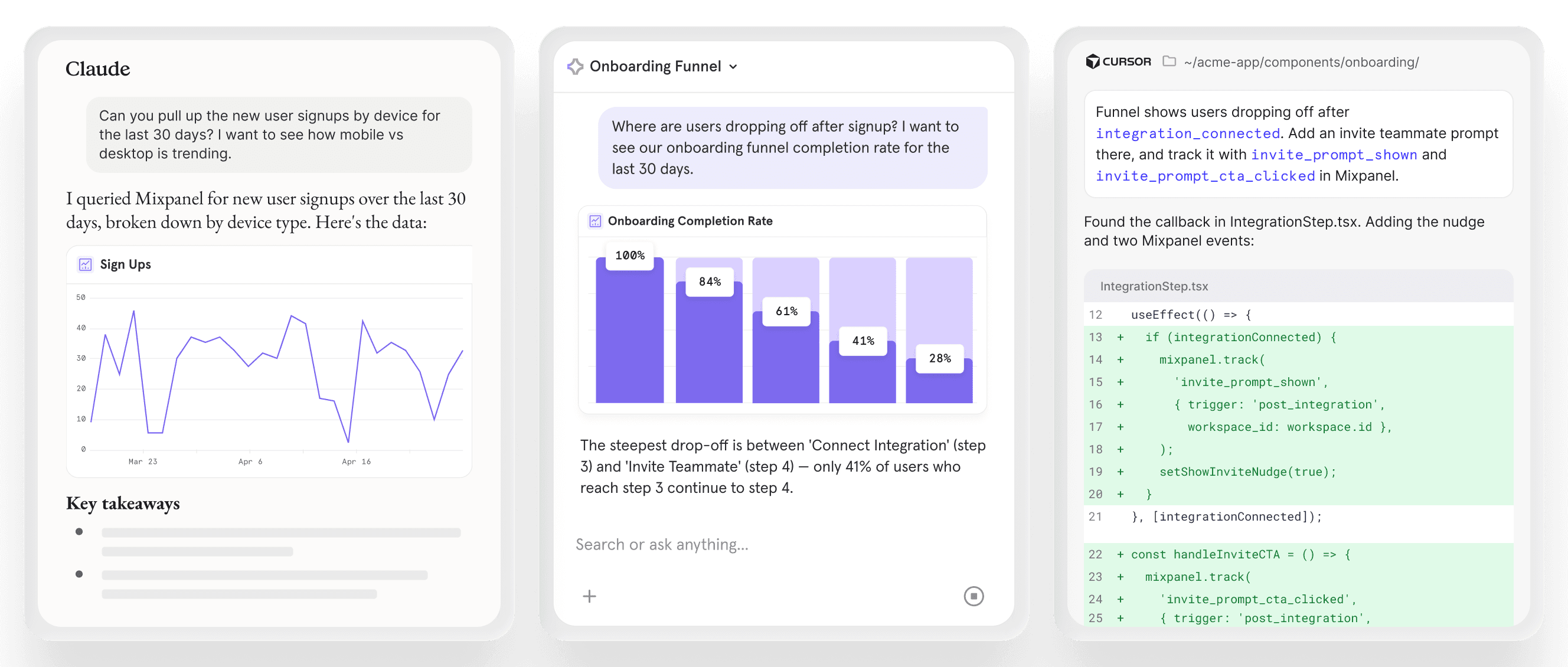
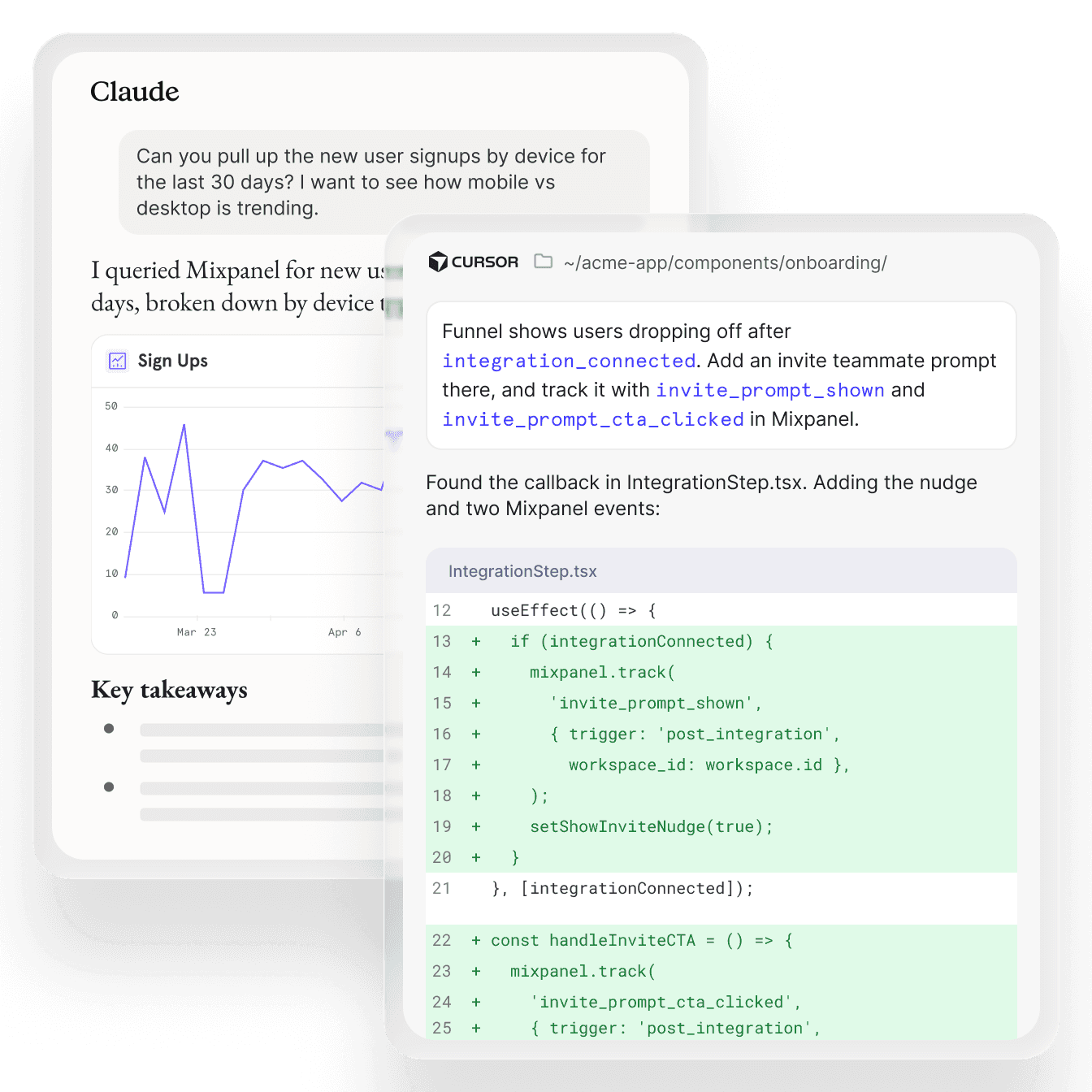
Context EngineとVerified Modeは、Mixpanelのインターフェース内だけに留まりません。Claude、ChatGPT、Cursor、その他の接続されたツールからMCP Server経由でプロダクトインテリジェンスにアクセスする場合でも、同じコンテキスト、ガバナンス、設定が適用されます。
Context EngineとVerified Modeは、Mixpanelのインターフェース内だけに留まりません。Claude、ChatGPT、Cursor、その他の接続されたツールからMCP Server経由でプロダクトインテリジェンスにアクセスする場合でも、同じコンテキスト、ガバナンス、設定が適用されます。
Context EngineとVerified Modeは、Mixpanelのインターフェース内だけに留まりません。Claude、ChatGPT、Cursor、その他の接続されたツールからMCP Server経由でプロダクトインテリジェンスにアクセスする場合でも、同じコンテキスト、ガバナンス、設定が適用されます。
面倒なクリーンアップ作業なしで、クリーンなデータを
面倒なクリーンアップ作業なしで、クリーンなデータを
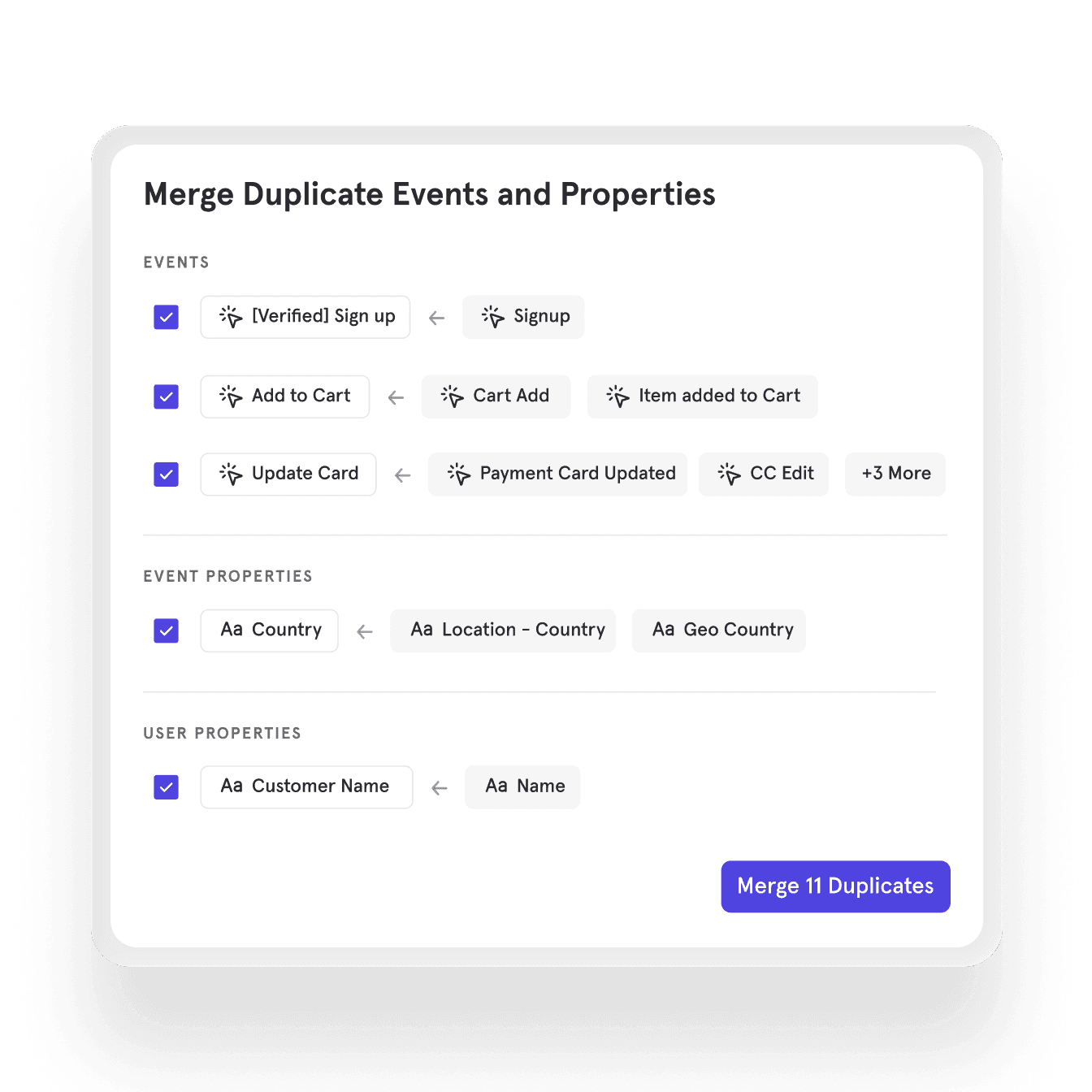
重複するイベント、重複するプロパティ、一貫性のない命名など、整理されていないトラッキングは全員の作業スピードを低下させます。AI搭載のデータガバナンスがチームに代わってクリーンアップを処理します。その結果、チーム全員が信頼できるクリーンなデータが手に入ります。
1
AIを活用したデータガバナンスがレキシコンをスキャンします。
2
重複は自動的にフラグが立てられ、レビューの対象になります。
3
ワンクリックで統合します。
よくある質問
ビジネス コンテキストの表示や編集ができるのは誰ですか?
Anyone with project access can read context. Only org and project admins can edit it, so there's no risk of individual users overwriting the definitions your data team has put in place.
AIはコンテキストを自動的に生成できますか、それとも手動で作成する必要がありますか?
You can write context manually in Settings, or connect through MCP and ask your AI assistant to review your project and suggest what context would help it answer better. Rest assured — we’re working on an automation to generate context within the product UI.
Context Engine のコンテンツは、私の AI プロバイダーに送信されますか?
Yes. When AI reads your business context through MCP, that content is sent to whichever AI provider you're using (Claude, ChatGPT, etc.), as part of the session. We recommend keeping credentials, customer PII, and other sensitive information out of your context fields.
認証モードと既存のMixpanelデータ権限の違いは何ですか?
Your existing permissions control what users can see and do inside Mixpanel. Verified Mode is a separate layer specifically for AI queries. It controls which events and properties AI is allowed to reason from when answering questions. An event might be technically accessible to a user in Mixpanel while still being outside the approved set for AI, giving admins precise control over what AI can and can't use.
MCPサーバーを使用する場合、検証済みモード(Verified Mode)は適用されますか?
Yes. Verified Mode applies regardless of where AI is accessing Mixpanel, whether from inside the product or through an external AI tool via MCP Server. The approved dataset travels with your data.
これはLexiconとどのように関係していますか?
Lexicon is where your team manages event and property definitions for human use, such as display names, descriptions, and tags. Context Engine builds on top of that by giving AI the business-level knowledge it needs: what your goals are, how you define success, and the norms your team operates by. Good Lexicon hygiene helps, but Context Engine is what makes AI answers reflect how your business actually works, not just what your events are named.
よくある質問
ビジネス コンテキストの表示や編集ができるのは誰ですか?
Anyone with project access can read context. Only org and project admins can edit it, so there's no risk of individual users overwriting the definitions your data team has put in place.
AIはコンテキストを自動的に生成できますか、それとも手動で作成する必要がありますか?
You can write context manually in Settings, or connect through MCP and ask your AI assistant to review your project and suggest what context would help it answer better. Rest assured — we’re working on an automation to generate context within the product UI.
Context Engine のコンテンツは、私の AI プロバイダーに送信されますか?
Yes. When AI reads your business context through MCP, that content is sent to whichever AI provider you're using (Claude, ChatGPT, etc.), as part of the session. We recommend keeping credentials, customer PII, and other sensitive information out of your context fields.
認証モードと既存のMixpanelデータ権限の違いは何ですか?
Your existing permissions control what users can see and do inside Mixpanel. Verified Mode is a separate layer specifically for AI queries. It controls which events and properties AI is allowed to reason from when answering questions. An event might be technically accessible to a user in Mixpanel while still being outside the approved set for AI, giving admins precise control over what AI can and can't use.
MCPサーバーを使用する場合、検証済みモード(Verified Mode)は適用されますか?
Yes. Verified Mode applies regardless of where AI is accessing Mixpanel, whether from inside the product or through an external AI tool via MCP Server. The approved dataset travels with your data.
これはLexiconとどのように関係していますか?
Lexicon is where your team manages event and property definitions for human use, such as display names, descriptions, and tags. Context Engine builds on top of that by giving AI the business-level knowledge it needs: what your goals are, how you define success, and the norms your team operates by. Good Lexicon hygiene helps, but Context Engine is what makes AI answers reflect how your business actually works, not just what your events are named.
よくある質問
ビジネス コンテキストの表示や編集ができるのは誰ですか?
Anyone with project access can read context. Only org and project admins can edit it, so there's no risk of individual users overwriting the definitions your data team has put in place.
AIはコンテキストを自動的に生成できますか、それとも手動で作成する必要がありますか?
You can write context manually in Settings, or connect through MCP and ask your AI assistant to review your project and suggest what context would help it answer better. Rest assured — we’re working on an automation to generate context within the product UI.
Context Engine のコンテンツは、私の AI プロバイダーに送信されますか?
Yes. When AI reads your business context through MCP, that content is sent to whichever AI provider you're using (Claude, ChatGPT, etc.), as part of the session. We recommend keeping credentials, customer PII, and other sensitive information out of your context fields.
認証モードと既存のMixpanelデータ権限の違いは何ですか?
Your existing permissions control what users can see and do inside Mixpanel. Verified Mode is a separate layer specifically for AI queries. It controls which events and properties AI is allowed to reason from when answering questions. An event might be technically accessible to a user in Mixpanel while still being outside the approved set for AI, giving admins precise control over what AI can and can't use.
MCPサーバーを使用する場合、検証済みモード(Verified Mode)は適用されますか?
Yes. Verified Mode applies regardless of where AI is accessing Mixpanel, whether from inside the product or through an external AI tool via MCP Server. The approved dataset travels with your data.
これはLexiconとどのように関係していますか?
Lexicon is where your team manages event and property definitions for human use, such as display names, descriptions, and tags. Context Engine builds on top of that by giving AI the business-level knowledge it needs: what your goals are, how you define success, and the norms your team operates by. Good Lexicon hygiene helps, but Context Engine is what makes AI answers reflect how your business actually works, not just what your events are named.
よくある質問
ビジネス コンテキストの表示や編集ができるのは誰ですか?
Anyone with project access can read context. Only org and project admins can edit it, so there's no risk of individual users overwriting the definitions your data team has put in place.
AIはコンテキストを自動的に生成できますか、それとも手動で作成する必要がありますか?
You can write context manually in Settings, or connect through MCP and ask your AI assistant to review your project and suggest what context would help it answer better. Rest assured — we’re working on an automation to generate context within the product UI.
Context Engine のコンテンツは、私の AI プロバイダーに送信されますか?
Yes. When AI reads your business context through MCP, that content is sent to whichever AI provider you're using (Claude, ChatGPT, etc.), as part of the session. We recommend keeping credentials, customer PII, and other sensitive information out of your context fields.
認証モードと既存のMixpanelデータ権限の違いは何ですか?
Your existing permissions control what users can see and do inside Mixpanel. Verified Mode is a separate layer specifically for AI queries. It controls which events and properties AI is allowed to reason from when answering questions. An event might be technically accessible to a user in Mixpanel while still being outside the approved set for AI, giving admins precise control over what AI can and can't use.
MCPサーバーを使用する場合、検証済みモード(Verified Mode)は適用されますか?
Yes. Verified Mode applies regardless of where AI is accessing Mixpanel, whether from inside the product or through an external AI tool via MCP Server. The approved dataset travels with your data.
これはLexiconとどのように関係していますか?
Lexicon is where your team manages event and property definitions for human use, such as display names, descriptions, and tags. Context Engine builds on top of that by giving AI the business-level knowledge it needs: what your goals are, how you define success, and the norms your team operates by. Good Lexicon hygiene helps, but Context Engine is what makes AI answers reflect how your business actually works, not just what your events are named.