テンプレート
テンプレート
ウェブ分析テンプレート
ウェブ分析テンプレート
ウェブ分析テンプレート
ユーザー、セッション、ページレベルの重要な指標により、ウェブサイトのパフォーマンスを包括的に把握できます。
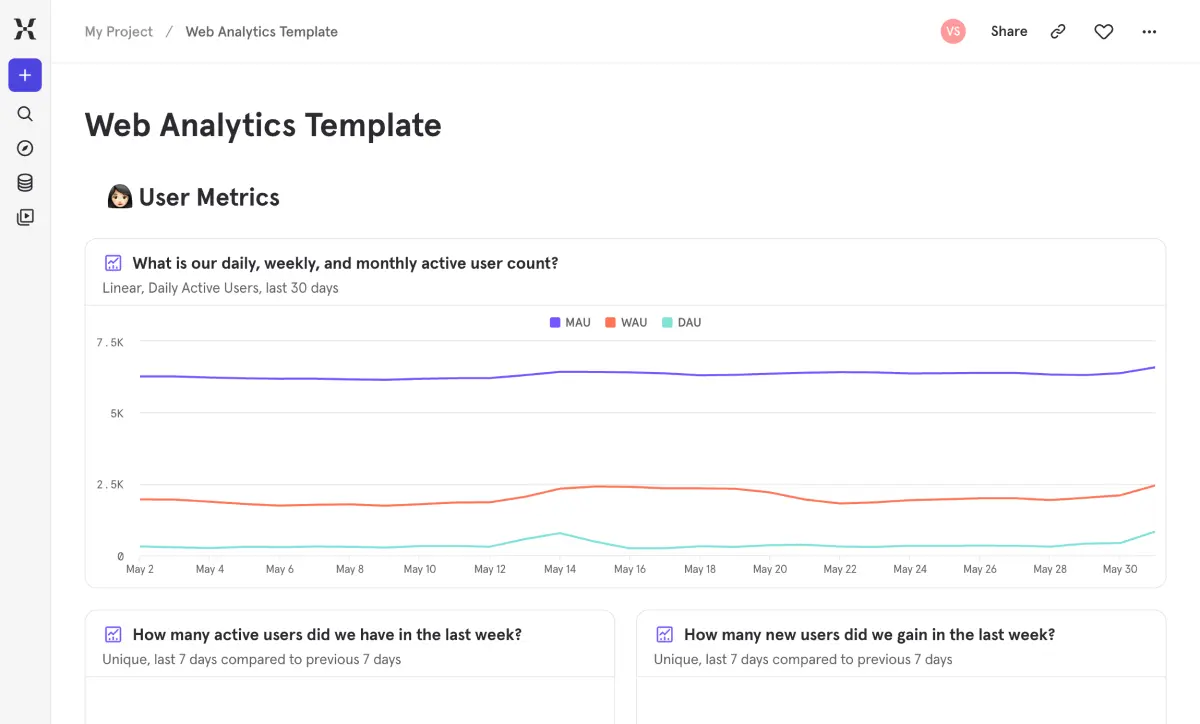
ウェブサイトで何が起きているのかを把握するために、5つの異なるツールを掘り返して情報を繋ぎ合わせる必要はありません。このテンプレートは、訪問者数、セッション中のエンゲージメント、そしてどのページが役割を果たしているかといった、基本的な疑問に即座に答えます。
直帰率の上昇やセッション深度の低下といった問題を、コンバージョンに影響が出る前に発見できます。トラフィックソースを並べて比較し、どのソースがエンゲージメントの高い訪問者をもたらし、どれがただのクリック流入に過ぎないかを確認しましょう。初めて分析を導入する場合でも、レガシーツールを置き換える場合でも、これはすべてのウェブチームが必要とする基盤です。
ウェブサイトで何が起きているのかを把握するために、5つの異なるツールを掘り返して情報を繋ぎ合わせる必要はありません。このテンプレートは、訪問者数、セッション中のエンゲージメント、そしてどのページが役割を果たしているかといった、基本的な疑問に即座に答えます。
直帰率の上昇やセッション深度の低下といった問題を、コンバージョンに影響が出る前に発見できます。トラフィックソースを並べて比較し、どのソースがエンゲージメントの高い訪問者をもたらし、どれがただのクリック流入に過ぎないかを確認しましょう。初めて分析を導入する場合でも、レガシーツールを置き換える場合でも、これはすべてのウェブチームが必要とする基盤です。
よくあるご質問
追跡すべき最も重要なウェブ解析指標は何ですか?
They fall into three buckets. User metrics: DAU, WAU, MAU, new user acquisition, and audience breakdown by geography and platform. Session metrics: total sessions, bounce rate, session duration, pages per session, and performance by traffic source. Page metrics: total views, pages per user, and individual page performance including landing page, exit page, and bounce rate. This template has reports for all of them, so you’re covered from day one.
Mixpanelをウェブアナリティクスにどのように使用すればよいですか?
Mixpanel goes beyond traditional pageview counting. Install the JavaScript SDK or connect via a CDP, and Mixpanel automatically tracks page views, sessions, and user properties like geography and platform. This template gives you an instant dashboard with pre-built reports for user, session, and page metrics — the same foundation you’d build in any web analytics tool, plus Mixpanel’s segmentation and cohort analysis when you’re ready to go deeper.
ウェブサイトの直帰率を下げるにはどうすればよいですか?
Start by figuring out where it’s happening and why. This template shows your overall bounce rate alongside a page-level table that breaks it down for every individual page. You can also view session performance by traffic source to spot whether certain channels consistently produce higher bounce rates. Once you’ve identified the worst offenders, you can dig into content relevance, load speed, and whether the landing experience matches what visitors expected when they clicked.
Mixpanelはウェブ分析のセッションをどのように追跡しますか?
Mixpanel groups user activity into sessions based on a configurable timeout window — 30 minutes of inactivity by default. Each session captures page views, events, duration, and entry/exit pages. This template uses that as the foundation for bounce rate, session duration, pages per session, and performance by source. It works out of the box with no manual session configuration needed.
どの流入元が最も高いエンゲージメントを獲得しているかを確認できますか?
Yes — the Session Metrics section includes a performance-by-source breakdown that shows how session behavior varies across your traffic channels. Compare bounce rates, session depth, and duration side by side to see which sources bring engaged visitors and which ones produce drive-by clicks. It’s one of the fastest ways to figure out where your marketing is actually working.
よくあるご質問
追跡すべき最も重要なウェブ解析指標は何ですか?
They fall into three buckets. User metrics: DAU, WAU, MAU, new user acquisition, and audience breakdown by geography and platform. Session metrics: total sessions, bounce rate, session duration, pages per session, and performance by traffic source. Page metrics: total views, pages per user, and individual page performance including landing page, exit page, and bounce rate. This template has reports for all of them, so you’re covered from day one.
Mixpanelをウェブアナリティクスにどのように使用すればよいですか?
Mixpanel goes beyond traditional pageview counting. Install the JavaScript SDK or connect via a CDP, and Mixpanel automatically tracks page views, sessions, and user properties like geography and platform. This template gives you an instant dashboard with pre-built reports for user, session, and page metrics — the same foundation you’d build in any web analytics tool, plus Mixpanel’s segmentation and cohort analysis when you’re ready to go deeper.
ウェブサイトの直帰率を下げるにはどうすればよいですか?
Start by figuring out where it’s happening and why. This template shows your overall bounce rate alongside a page-level table that breaks it down for every individual page. You can also view session performance by traffic source to spot whether certain channels consistently produce higher bounce rates. Once you’ve identified the worst offenders, you can dig into content relevance, load speed, and whether the landing experience matches what visitors expected when they clicked.
Mixpanelはウェブ分析のセッションをどのように追跡しますか?
Mixpanel groups user activity into sessions based on a configurable timeout window — 30 minutes of inactivity by default. Each session captures page views, events, duration, and entry/exit pages. This template uses that as the foundation for bounce rate, session duration, pages per session, and performance by source. It works out of the box with no manual session configuration needed.
どの流入元が最も高いエンゲージメントを獲得しているかを確認できますか?
Yes — the Session Metrics section includes a performance-by-source breakdown that shows how session behavior varies across your traffic channels. Compare bounce rates, session depth, and duration side by side to see which sources bring engaged visitors and which ones produce drive-by clicks. It’s one of the fastest ways to figure out where your marketing is actually working.
よくあるご質問
追跡すべき最も重要なウェブ解析指標は何ですか?
They fall into three buckets. User metrics: DAU, WAU, MAU, new user acquisition, and audience breakdown by geography and platform. Session metrics: total sessions, bounce rate, session duration, pages per session, and performance by traffic source. Page metrics: total views, pages per user, and individual page performance including landing page, exit page, and bounce rate. This template has reports for all of them, so you’re covered from day one.
Mixpanelをウェブアナリティクスにどのように使用すればよいですか?
Mixpanel goes beyond traditional pageview counting. Install the JavaScript SDK or connect via a CDP, and Mixpanel automatically tracks page views, sessions, and user properties like geography and platform. This template gives you an instant dashboard with pre-built reports for user, session, and page metrics — the same foundation you’d build in any web analytics tool, plus Mixpanel’s segmentation and cohort analysis when you’re ready to go deeper.
ウェブサイトの直帰率を下げるにはどうすればよいですか?
Start by figuring out where it’s happening and why. This template shows your overall bounce rate alongside a page-level table that breaks it down for every individual page. You can also view session performance by traffic source to spot whether certain channels consistently produce higher bounce rates. Once you’ve identified the worst offenders, you can dig into content relevance, load speed, and whether the landing experience matches what visitors expected when they clicked.
Mixpanelはウェブ分析のセッションをどのように追跡しますか?
Mixpanel groups user activity into sessions based on a configurable timeout window — 30 minutes of inactivity by default. Each session captures page views, events, duration, and entry/exit pages. This template uses that as the foundation for bounce rate, session duration, pages per session, and performance by source. It works out of the box with no manual session configuration needed.
どの流入元が最も高いエンゲージメントを獲得しているかを確認できますか?
Yes — the Session Metrics section includes a performance-by-source breakdown that shows how session behavior varies across your traffic channels. Compare bounce rates, session depth, and duration side by side to see which sources bring engaged visitors and which ones produce drive-by clicks. It’s one of the fastest ways to figure out where your marketing is actually working.
よくあるご質問
追跡すべき最も重要なウェブ解析指標は何ですか?
They fall into three buckets. User metrics: DAU, WAU, MAU, new user acquisition, and audience breakdown by geography and platform. Session metrics: total sessions, bounce rate, session duration, pages per session, and performance by traffic source. Page metrics: total views, pages per user, and individual page performance including landing page, exit page, and bounce rate. This template has reports for all of them, so you’re covered from day one.
Mixpanelをウェブアナリティクスにどのように使用すればよいですか?
Mixpanel goes beyond traditional pageview counting. Install the JavaScript SDK or connect via a CDP, and Mixpanel automatically tracks page views, sessions, and user properties like geography and platform. This template gives you an instant dashboard with pre-built reports for user, session, and page metrics — the same foundation you’d build in any web analytics tool, plus Mixpanel’s segmentation and cohort analysis when you’re ready to go deeper.
ウェブサイトの直帰率を下げるにはどうすればよいですか?
Start by figuring out where it’s happening and why. This template shows your overall bounce rate alongside a page-level table that breaks it down for every individual page. You can also view session performance by traffic source to spot whether certain channels consistently produce higher bounce rates. Once you’ve identified the worst offenders, you can dig into content relevance, load speed, and whether the landing experience matches what visitors expected when they clicked.
Mixpanelはウェブ分析のセッションをどのように追跡しますか?
Mixpanel groups user activity into sessions based on a configurable timeout window — 30 minutes of inactivity by default. Each session captures page views, events, duration, and entry/exit pages. This template uses that as the foundation for bounce rate, session duration, pages per session, and performance by source. It works out of the box with no manual session configuration needed.
どの流入元が最も高いエンゲージメントを獲得しているかを確認できますか?
Yes — the Session Metrics section includes a performance-by-source breakdown that shows how session behavior varies across your traffic channels. Compare bounce rates, session depth, and duration side by side to see which sources bring engaged visitors and which ones produce drive-by clicks. It’s one of the fastest ways to figure out where your marketing is actually working.