🎉 새로운 보고서 - 귀사의 성과를 확인하세요.

메트릭 트리

성장 전략을 지속적으로 갱신되는 인터랙티브 프레임워크로 관리하며, 팀이 비즈니스 목표에 대한 책임을 놓치지 않게 하세요.

성장 전략을 지속적으로 갱신되는 인터랙티브 프레임워크로 관리하며, 팀이 비즈니스 목표에 대한 책임을 놓치지 않게 하세요.

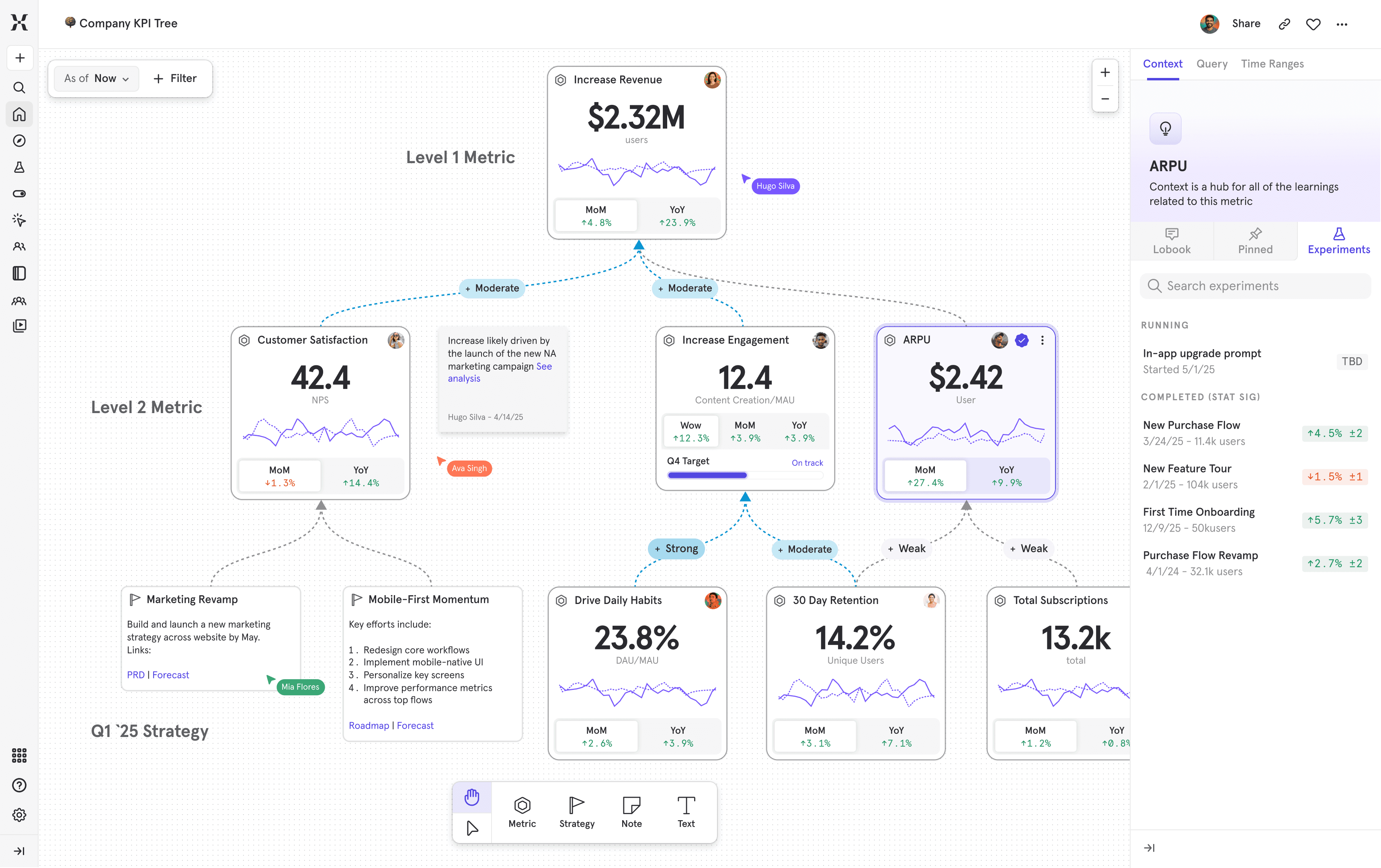
Image showing a Company KPI tree built in Mixpanel, with a panel that lists Experiments for the ARPU metric, floating on a colorful gradient background.
진행 방식을 확인하세요

메트릭 트리를 둘러보며, 전략적 의사 결정을 위한 메트릭 인터랙티브 프레임워크를 만드는 방법을 알아보세요.

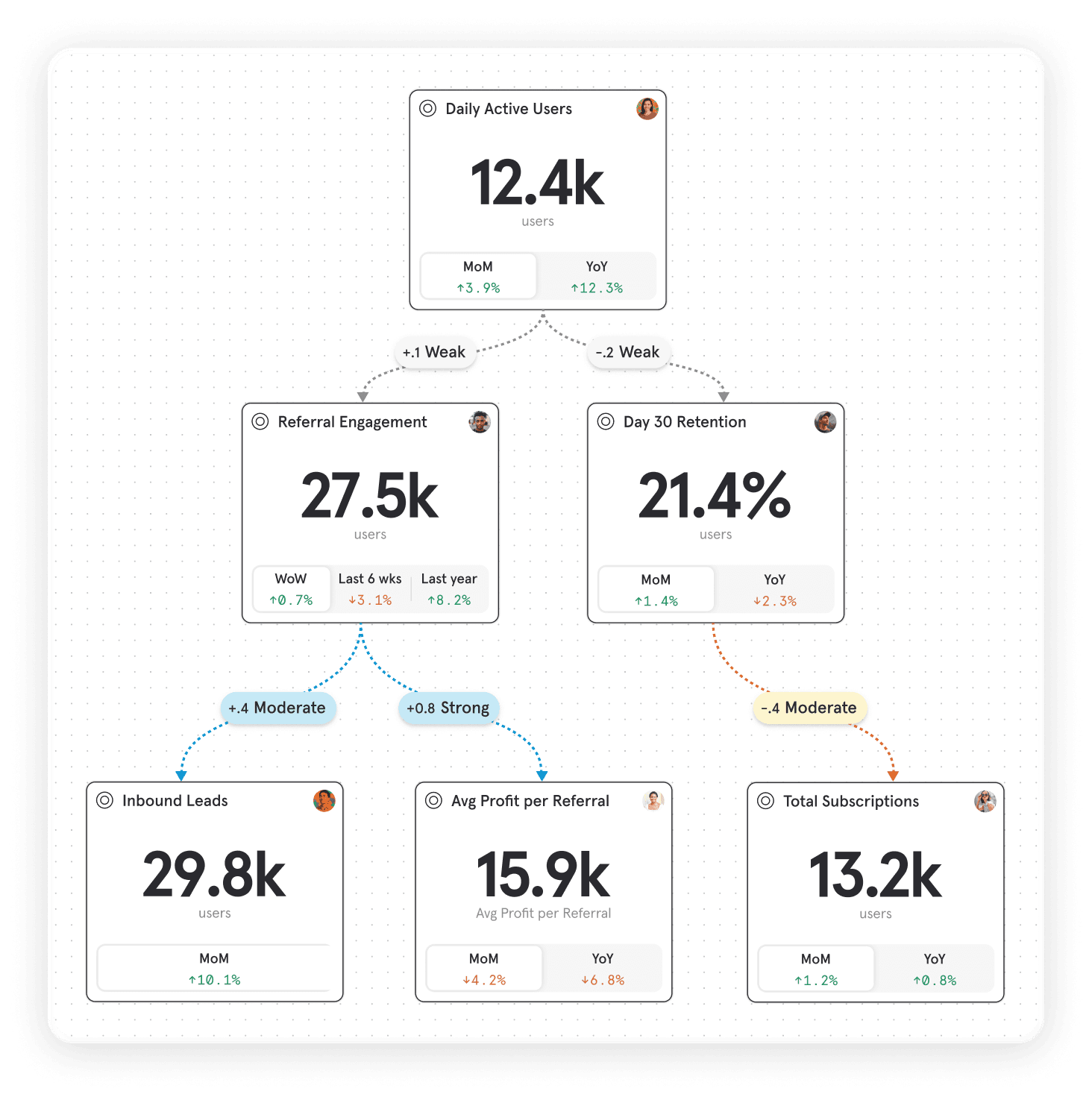
Image of a 3-tier Metric Tree showing correlation ranging from weak to strong between each metric card, floating on a colorful gradient background.

전략을 모두가 공통적인 시각으로 파악할 수 있도록 하고, 모든 메트릭 사이의 관계를 시각화하세요. 입력부터 출력까지, 효과적인 지점과 그렇지 않은 지점에 대한 인사이트를 얻을 수 있습니다.

각 메트릭을 깊게 파고들어 성과에 어떤 영향을 주는지 파악하세요. 기간 대비 및 트렌드 분석, 목표 트래킹, 실험 영향까지 한곳에서 확인할 수 있습니다.

Image that shows a zoomed in Metric Tree, displaying a multiplayer cursor and a hover effect that appears on a line chart for the Day 30 Retention card that allows you to see the specific number of users for a moment in time.
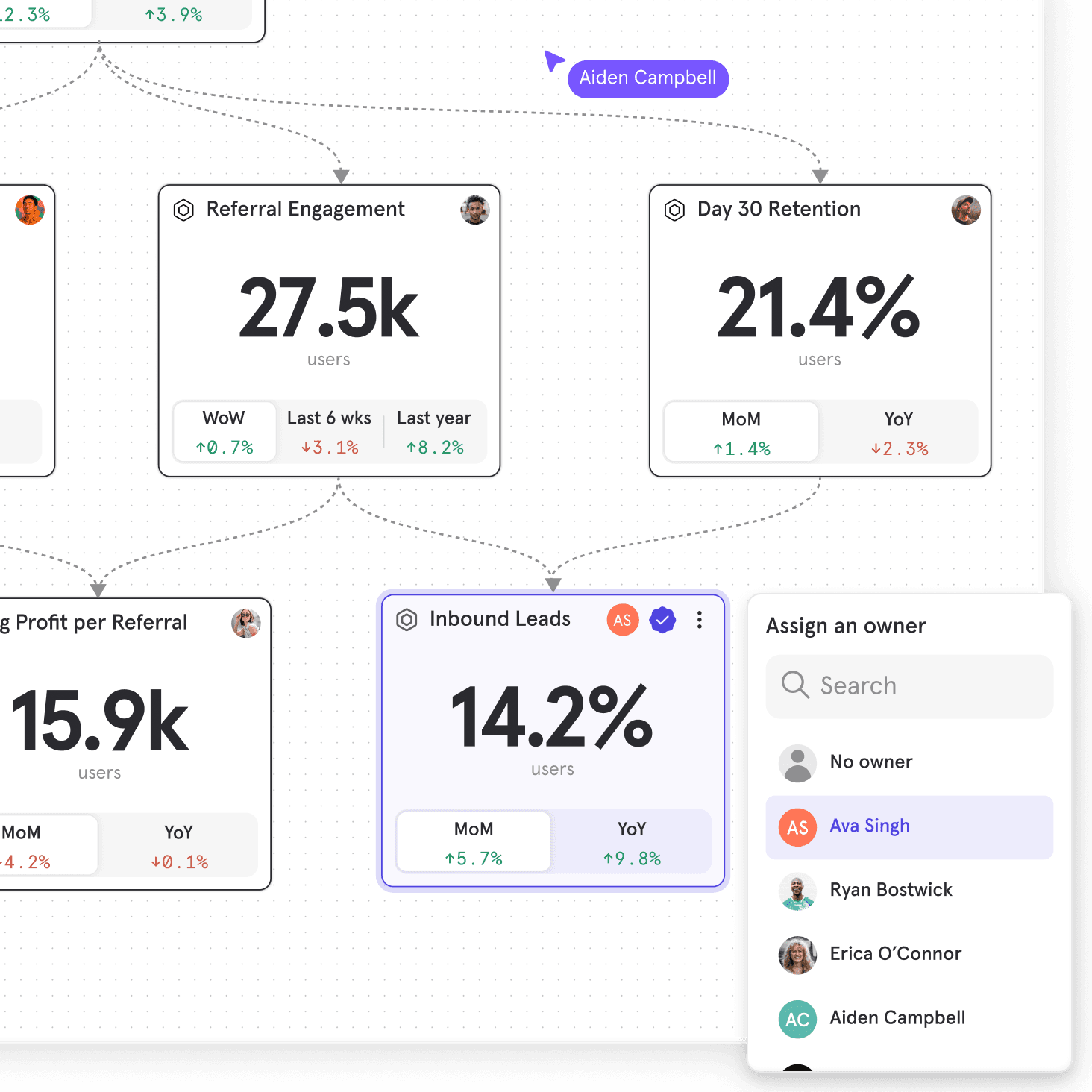
Image showing a zoomed in Metric Tree, with a metric card for Inbound Leads highlighted and an ownership panel to the side, allowing the user to assign an owner to the metric.

KPI

KPI

잦은 콘텍스트 전환 없이, 검증 및 정의된 메트릭, 지정 담당자, 변경 및 아이디어 추적 로그까지 한곳에서 관리하세요.

Get started in seconds

Get started in seconds

Jumpstart your Metric Trees with AI by describing your product or strategy in plain language to generate a first-draft Metric Tree, helping you ideate the metrics that matter for your business using industry best practices.
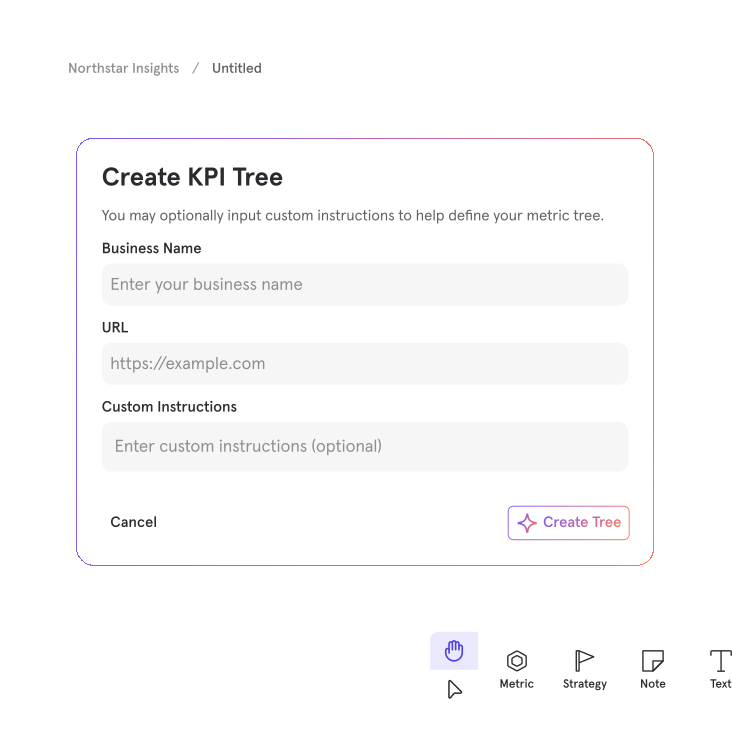
Create KPI Tree dialog in an analytics tool showing fields for Business Name, URL, and optional Custom Instructions over a dotted canvas background labeled ‘Northstar Insights / Untitled,’ with a ‘Create Tree’ button in the bottom right.

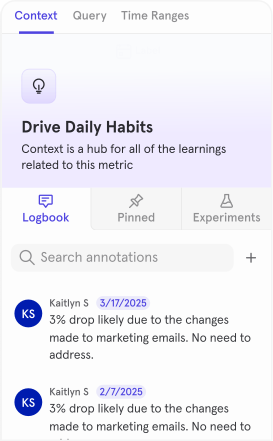
Image showing the logbook panel in the Metric Trees dashboard, listing all the annotations recorded for a selected metric.
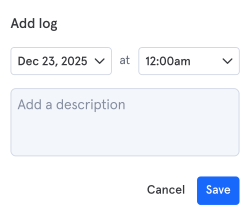
Image showing the product user interface displayed when a user leaves an annotation for a metric, where the date, time, and a description can be set.

실험

실험이 모든 메트릭에 미치는 영향을 확인하세요.

Image showing the logbook panel in the Metric Trees dashboard, listing all the annotations recorded for a selected metric.
Image showing the product user interface displayed when a user leaves an annotation for a metric, where the date, time, and a description can be set.

실험

실험이 모든 메트릭에 미치는 영향을 확인하세요.
Image of logo for the company Zola, showing a sans-serif wordmark and a pair of overlapping hearts all in black.

“메트릭 트리는 제품을 지속적으로, 경영진 관점에서 바라볼 수 있게 해주는 툴입니다. 더블 클릭으로 인사이트를 더 깊게 파고들 수 있다는 점이 제품을 제대로 관리하는 핵심이 됐습니다.”

“메트릭 트리는 제품을 지속적으로, 경영진 관점에서 바라볼 수 있게 해주는 툴입니다. 더블 클릭으로 인사이트를 더 깊게 파고들 수 있다는 점이 제품을 제대로 관리하는 핵심이 됐습니다.”

Karl Thumm

데이터 및 분석 디렉터

Large icon of an open hand, with a heart floating above it, monochromatic in shades of purple.

혼자가 아닌, 모두가 함께

Mixpanel 전문가와 긴밀히 협업해 전략을 정의하고 트리를 구축한 뒤, 데이터 기반 의사 결정에 반영하세요.

혼자가 아닌, 모두가 함께

Mixpanel 전문가와 긴밀히 협업해 전략을 정의하고 트리를 구축한 뒤, 데이터 기반 의사 결정에 반영하세요.

경영진 합의

전략 우선순위를 합의하고 메트릭 프레임워크를 확정합니다.

메트릭 트리 생성

Mixpanel에서 데이터 연결, 계산, 지정 담당자를 포함하는 메트릭 트리를 구축하세요.

실행 정착

운영 프로세스와 정기적 루틴에 메트릭 트리를 반영하세요.

지금 성장에 시동을 거세요

지금 성장에 시동을 거세요

Image of the Zola logo floating in a speech bubble on a sky blue background

웨비나

데이터를 영향력으로 전환하기

이 웨비나를 시청해 Zola와 같은 선도 기업이 데이터 수집과 비즈니스 혁신 사이의 간극을 메우는 데 사용하는 전략 프레임워크를 알아보세요.

동영상

메트릭 트리가 데이터를 콘텍스트와 실행으로 전환하는 방식

Mixpanel 메트릭 트리가 데이터에 콘텍스트를 더해, 모든 이니셔티브, 목표, 메트릭을 성장 방향이 명확하게 드러나는 하나의 큰 그림으로 묶어내는 방식을 확인하세요.

Image of the cover of the Beyond the North Star ebook, with a pink and purple glow behind it, floating on a light purple background.

eBook

북극성 지표를 넘어

메트릭 트리로 성장 전략을 운영에 적용하고, 지속적이고 측정 가능한 성장을 만드는 프레임워크를 구축하는 방법을 확인해 보세요.

Image showing the pinned panel in the Metric Trees dashboard, listing all dashboards and reports that have been pinned to the metric card.
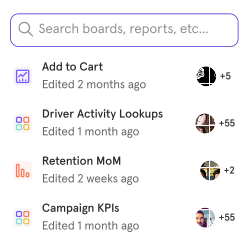
Image showing the product user interface displayed when a user pins a dashboard or report to a metric card, displaying a search field as well as a list of strategic metrics dashboards and reports.
Image showing the pinned panel in the Metric Trees dashboard, listing all dashboards and reports that have been pinned to the metric card.
Image showing the product user interface displayed when a user pins a dashboard or report to a metric card, displaying a search field as well as a list of strategic metrics dashboards and reports.

고정

각 메트릭을 사용하는 고정 리포트로 더욱 심층적으로 파고드세요.

고정

각 메트릭을 사용하는 고정 리포트로 더욱 심층적으로 파고드세요.
Image showing the experiments panel in the Metric Trees dashboard, listing all the experiments that have been completed or are currently running for a selected metric card.
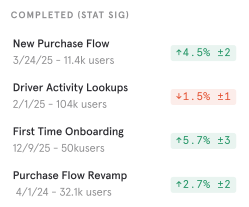
Image showing the product user interface listing completed statistically significant experiments, with dates, number of users, and results for each.
Image showing the experiments panel in the Metric Trees dashboard, listing all the experiments that have been completed or are currently running for a selected metric card.
Image showing the product user interface listing completed statistically significant experiments, with dates, number of users, and results for each.

실험

실험이 모든 메트릭에 미치는 영향을 확인하세요.

실험

실험이 모든 메트릭에 미치는 영향을 확인하세요.

전략적 콘텍스트를 기반으로 의사 결정을 내리세요

Image showing the logbook panel in the Metric Trees dashboard, listing all the annotations recorded for a selected metric.
Image showing the product user interface displayed when a user leaves an annotation for a metric, where the date, time, and a description can be set.
Image showing the logbook panel in the Metric Trees dashboard, listing all the annotations recorded for a selected metric.
Image showing the product user interface displayed when a user leaves an annotation for a metric, where the date, time, and a description can be set.

로그북

실행하고, 추적할 수 있도록 변경 사항을 기록하세요.

로그북

실행하고, 추적할 수 있도록 변경 사항을 기록하세요.