


What is product experimentation? A complete guide for 2026

Product teams have always run experiments. But recently, the questions those experiments aim to answer have gotten harder.
Testing a button color is straightforward: Run an A/B test, measure clicks, ship the winner. Testing whether your new AI writing assistant produces better outcomes when the system prompt instructs the model to be concise versus thorough is a different problem. The input isn't fixed, and every user gets a different output.
According to Mixpanel's 2026 State of Digital Analytics report, AI products are growing faster than any other vertical: +27% year-over-year in acquisition volume and +26% in total devices used. As AI features become a standard layer in digital products, the experimentation frameworks built for deterministic features need to evolve alongside them.
This guide covers the full picture for 2026: what product experimentation is, how to run it well, and how to think about it when the features you're testing produce different outputs for every user.
What is product experimentation?
Product experimentation is the structured process of testing changes to your product in controlled environments to understand their impact on user behavior and business metrics. It's hypothesis-driven, data-informed, and iterative.
The core idea is simple: Instead of shipping a change and hoping it works, you test it against a control group. You measure what actually changes in user behavior, then decide whether to scale the change, iterate on it, or scrap it.
Done well, product experimentation replaces internal debate with evidence. It answers the questions that matter: Does this change improve retention? Does this feature drive activation? Does this redesign reduce drop-off?
Product experimentation encompasses A/B tests, multivariate tests, feature flag rollouts, and phased releases. What unifies them is the intent: structured learning about what moves the metrics you care about.
The benefits of product experimentation
Product teams adopt structured experimentation for a few specific reasons, each of which compounds over time.
Faster, more confident decisions
Experimentation replaces opinion with evidence. When two stakeholders disagree on whether a feature change will help retention, an experiment settles it. According to Mixpanel's 2026 State of Digital Analytics, product is now the primary growth channel; companies anchor their acquisition, engagement, and retention strategies on in-product behavior like feature adoption and time to value.
Structured experimentation is the mechanism that lets teams act on that behavioral data quickly and accurately, rather than waiting for quarterly reviews to surface what's working.
Reduced risk at launch
Shipping to 100% of users at once is a bet. Shipping to 5% first is a test. Feature flags and phased rollouts let teams catch problems early, before they affect most users, and roll back instantly if a variant underperforms on guardrail metrics.
Better product-market fit over time
Teams that run experiments consistently build compounding knowledge about their users. Each result, whether a win or a loss, tells you something about what your users respond to. That institutional knowledge is difficult to replicate.
Clearer accountability for outcomes
When experimentation is tied to real business metrics—retention, conversion, revenue—teams stop optimizing for activity and start optimizing for outcomes. That shift changes how roadmaps get prioritized and how success gets defined.
When (and when not) to do product experimentation
Not every change needs an experiment. Knowing when to test and when to just ship is as important as knowing how to run a good test.
Experiment when…
- You have enough traffic to detect a meaningful effect. Low-traffic surfaces produce underpowered experiments that can't distinguish signal from noise.
- The decision is reversible, and the cost of being wrong is worth measuring. High-stakes, hard-to-reverse changes are often better approached with staged rollouts and monitoring.
- You have a clear hypothesis and a defined success metric before you start. An experiment without a pre-specified metric is an exercise in post-hoc rationalization.
- The change is isolated enough to be attributable. Shipping multiple changes simultaneously makes it impossible to know which one drove the outcome.
When not to experiment
- When you're fixing a bug or addressing a clear usability failure. You don't need an experiment to confirm that a broken flow should be fixed.
- When you don't have enough sample size to reach statistical significance in a reasonable timeframe. A test that runs for six months to reach significance isn't a useful feedback loop.
- When the change is so foundational that testing a partial rollout would distort the signal, such as a wholesale navigation redesign that depends on users adjusting to a new mental model.
- When ethical or compliance requirements prohibit it, some changes—particularly in regulated industries—can't be tested in ways that expose different user groups to different experiences.
Product experimentation vs. A/B testing vs. user research
These three terms are often used interchangeably, but they answer different questions.
Product experimentation is the overarching practice. It includes any structured method for learning what works in your product. A/B testing and user research are both inputs to that practice.
A/B testing is a specific experiment type: you show two versions of something to separate user groups and measure which performs better. It's quantitative, statistically rigorous, and answers "which version produces better outcomes?"
User research (surveys, interviews, session replay) tells you why users behave the way they do. It generates hypotheses and explains results, but it can't tell you which variant wins at scale.
The most effective teams combine all three. Qualitative research generates hypotheses worth testing. A/B tests validate whether those hypotheses hold at scale. Product experimentation ties the findings back to the metrics that matter.
Product experimentation frameworks: The basics
A framework gives your experimentation program structure. Without one, teams run tests inconsistently, interpret results differently, and struggle to build on previous learnings.
The most widely used framework for measuring user experience quality is HEART (Happiness, Engagement, Adoption, Retention, Task Success), developed at Google. HEART gives teams a taxonomy for what to measure, mapped to user experience dimensions rather than vanity metrics.
The practical application is pairing HEART dimensions with specific metrics for your product context:
- Happiness: NPS, satisfaction scores, qualitative feedback
- Engagement: session frequency, feature usage depth, actions per session
- Adoption: new feature activation rate, time to first use
- Retention: D7/D30 retention, DAU/MAU ratio, churn rate
- Task Success: completion rate, error rate, time to complete
Beyond HEART, effective experimentation programs share a few structural habits: pre-registering hypotheses before running tests, defining success metrics and guardrail metrics upfront, and building a shared repository of results that teams can reference when forming new hypotheses.
Experimentation framework
The HEART framework: What to measure and how
Map each HEART dimension to metrics that reflect real user experience, not vanity numbers.
| Dimension | What it measures | Example metrics |
|---|---|---|
|
Happiness
|
User satisfaction and sentiment. How users feel about their experience. | NPS Satisfaction scores Qualitative feedback |
|
Engagement
|
Depth and frequency of use. How actively users interact with your product. | Session frequency Feature usage depth Actions per session |
|
Adoption
|
Feature uptake. How many users discover and start using new functionality. | Feature activation rate Time to first use |
|
Retention
|
Long-term loyalty. Whether users come back after initial exposure. | D7 / D30 retention DAU/MAU ratio Churn rate |
|
Task success
|
Ability to complete intended tasks. Where friction turns into failure. | Completion rate Error rate Time to complete |
Step-by-step guide to running an experiment
Running a rigorous experiment isn't complicated, but it requires discipline. Here's the process.
1. Define goals and success metrics
Before you run anything, define what you're trying to learn and what metric will tell you whether you succeeded. A good success metric is specific, measurable, and tied to a business outcome you care about. "More engagement" is not a metric. "Improve 7-day retention among new users" is.
Also define your guardrail metrics, the indicators you're not trying to move but that shouldn't degrade. For example, if you're running an experiment to improve activation, your guardrail might be D30 retention. A change that improves activation at the cost of long-term retention isn't a win.
2. Craft a strong hypothesis
A hypothesis states what you expect to happen and why. The format is simple: "We believe that [change] will cause [outcome] because [reason]."
The "because" is the important part. It forces you to articulate the mechanism. If you can't explain why you expect the change to work, you're not ready to test it, and you won't learn much from the result regardless of which way it goes.
3. Estimate sample size and minimum detectable effect (MDE)
Statistical power determines whether your experiment can detect the effect you're looking for. Before you launch, calculate the minimum sample size needed to detect your MDE at your target confidence level (typically 95%) and power (typically 80%).
A common mistake is under-sizing experiments. An underpowered test that shows "no significant effect" proves nothing—the change might have worked; you just didn't have enough data to see it.
4. Implement your experiment (feature flags + tracking)
Feature flags let you control which users see which variant without a code deploy for each change. The flag handles the routing; your analytics platform handles the measurement.
For each variant, you need at least three event types tracked: exposure (user was assigned to the experiment), the primary action you're measuring, and any guardrail metric events.
| For AI-powered features, the equivalent of a feature flag is a prompt flag, a configuration that controls which prompt template, model version, or output format a given user receives. The flag controls the stimulus; the AI generates the response. You're testing the configuration, not the output. See the next section for a full breakdown of how to A/B test AI features. |
5. Analyze your results
Wait until you've reached your target sample size before analyzing results. Peeking at results early and stopping when you see significance inflates your false positive rate.
When the experiment ends, check statistical significance on your primary metric, review your guardrail metrics, and segment the results. Global results often mask important variation by user type, platform, or acquisition channel.
6. Iterate and scale what works
Shipping the winner is not the end of the process. Document the result, update your hypothesis log, and use the insight to inform the next test. The value of experimentation compounds when each test builds on previous learnings rather than starting from scratch.
How to A/B test AI-powered features
AI feature testing differs from traditional feature testing in one fundamental way: the stimulus isn't fixed.
When you A/B test a button color, Variant A always shows the same button. When you run AI A/B testing on a system prompt, Variant A produces a different output for every user. The content varies even though the configuration is constant.
This means you can't test the output, so you test the configuration that produced it instead. The experiment variable is upstream of the AI: the prompt template, the model version, the output format, or the UX wrapper. A product analytics platform measures what users do after they receive the AI output. That's a distinct and complementary layer to LLM evals, which assess output quality in isolation.
Think of it this way: when you test a CTA button, you test the button design, not the text a copywriter wrote. When you test AI, you test the configuration that produced the output, not the output itself.
For real-world examples of how teams track AI feature adoption, see Mixpanel's product analytics examples, including copilot usage tracking and AI engagement cohorts
What makes AI experimentation different from traditional A/B testing
Traditional A/B tests hold the stimulus constant across users. AI experiments hold the configuration constant and let the output vary. The experiment controls what goes in; user behavior tells you whether what came out was better.
This has a practical implication for AI feature tracking: because output variance is inherent, you need to track user response to the AI output, not the output content itself. The events that matter are downstream of the AI: task completed, session continued, output accepted or ignored, return visit within seven days.
AI experimentation
Traditional A/B testing vs. AI feature experimentation
The same rigor applies—but the variable you are testing, and how you measure it, is fundamentally different.
| Traditional A/B testing | AI feature experimentation | |
|---|---|---|
| What you’re testing |
Fixed stimulus A defined UI change—button copy, layout, color, flow step. The same for every user in the variant. |
Configuration A prompt template, model version, or output format. The configuration is constant; the AI output varies per user. |
| What varies | Which version of the UI each user sees. Nothing else. |
The AI output itself, even within the same variant. Every user receives a different response.
This is expected and inherent—it is not noise to eliminate, it is the nature of generative AI. |
| How to measure | Direct interaction with the variant: click-through rate, conversion, form completion. |
User behavior downstream of the AI output: task completion, session depth, D7 retention, return visits.
Measuring only clicks on the AI output misses the real signal. |
| LLM evals | Not applicable. | Complementary but separate. LLM evals assess output quality. Product analytics measures whether users behaved better. They answer different questions. |
| Sample size | Standard MDE calculation at your target confidence level and power. | Standard calculation plus a 20–30% buffer to account for output variance within each variant. |
| Primary metric | Whichever conversion or engagement metric your hypothesis targets. | Retention by cohort. It tells you whether the change had a lasting effect, not just an immediate one. |
Testing prompt variations
A product team ships an AI writing assistant with two system prompt variants. Variant A instructs the model to be concise; Variant B instructs it to be thorough. The experiment controls which prompt each user cohort receives. An analytics platform like Mixpanel tracks what users do after receiving the output.
Events to track: prompt version fired, output viewed, action taken on output (accepted, edited, ignored), session continued or ended, and any conversion event downstream.
- Success metric: Not "which prompt produces better-quality output", that's more of an LLM eval question. The AI analytics question is: which prompt led to higher task completion, longer session depth, or better D7 retention?
- Common mistake to avoid: Measuring only click-through on the AI output misses the downstream signal. A user who ignores an AI suggestion and completes the task manually is a very different outcome than a user who follows the suggestion and then churns next week. You need both events.
Testing model versions
Testing a model version follows the same pattern as any AI experiment: hold the configuration constant, vary one input, measure downstream behavior. Here, the variable is the model itself. Everything around it (the prompt, the UX, the task) stays the same, so any difference in user behavior can be attributed to the model change rather than something else in the stack.
To measure for AI feature performance, retention by model cohort is the metric that matters most; it tells you whether the change had a durable effect on user behavior, not just an immediate one. Also track task completion rate and error/retry rate, which surfaces cases where users are re-prompting because the output fell short.
Measuring AI features: Output formats and UX wrappers
Output format tests ask whether users engage differently with the same content presented in different ways: bullets vs. prose, with citations vs. without, short vs. long. UX wrapper tests ask whether users respond better to the same AI output delivered via different interface patterns: inline suggestion vs. side panel, modal vs. tooltip.
These are standard feature experiments with one added variable: the AI output content varies between sessions even within the same variant. Because of this, output format and UX wrapper tests require larger sample sizes than button tests. The minimum detectable effect (MDE) calculation from the step-by-step guide above applies, with an additional buffer for output variance—plan for at least 20–30% more sessions than a comparable static feature test.
| For AI experiments, "measuring AI features" means measuring user response to the configuration, not the content. You're not evaluating output quality, because your LLM eval pipeline does that. You're evaluating whether users who received configuration A behaved better (completed more tasks, returned more often, retained longer) than users who received configuration B. |
Tools and tech stack for feature experimentation
The modern experimentation stack is a layered system. You need three things: a way to control who sees what (feature flags), a way to measure what they do (analytics), and a way to understand why they behave that way (qualitative). Some tools cover one layer well. Some cover two. The clearest signal that an experimentation program is maturing is when those layers are connected.
Feature flag and rollout layer
Feature flags let you control which users see which variant without deploying new code for each change. The right tool depends on your team's setup: some platforms specialize in feature flags as a standalone capability, others bundle flags with broader experimentation and statistical analysis, and some analytics platforms now include native flagging (like Mixpanel). The trade-offs come down to statistical methodology, SDK breadth across your stack, and how tightly the flag layer needs to integrate with your CI/CD pipeline.
What matters more than the specific tool is the discipline around it: clean variant definitions, consistent exposure tracking, and a clear handoff from the flag layer to whatever platform measures user behavior afterward. A feature flag tool tells you who saw what. It doesn't tell you what they did next: that signal lives in your analytics layer.
Analytics layer
This is where Mixpanel sits. Mixpanel is downstream of your feature flag tool, capturing what users do after a variant is served, across your entire product, not just the experiment surface.
If a feature flag tool tells you "User 123 was in the treatment group," Mixpanel tells you what User 123 did next: did they complete the task, return the following week, upgrade their plan, or churn three days later? That connection, from variant assignment to business outcome, is what turns an experiment result into a decision.
AI experimentation stack
When you're testing AI features, one additional layer sits upstream of the feature flag: prompt management. Tools like LangSmith, PromptLayer, and Helicone capture prompt versions and LLM call logs. They're the control plane for AI, defining which prompt template or model version gets tested before the feature flag routes traffic.
The full AI experimentation stack looks like this:
- Prompt management tool that captures prompt versions and controls which configuration gets deployed. This is the upstream variable in your AI experiment.
- Feature flag tool that controls rollout: which user cohort gets the new prompt or model version, at what percentage of traffic.
- Analytics platform to measure downstream user behavior: did users who received the new prompt complete more tasks, return more often, retain better? This is the signal that determines whether the AI change was worth shipping.
Each layer answers a different question. Together, they close the loop from AI experiment to business outcome.
Qualitative layer
Session replay tools and survey platforms give you the "why" behind quantitative results. If an A/B test shows that one variant has lower conversion, session replay can show you where users got stuck. Surveys can surface confusion that event data can't detect. Qualitative tools make your hypotheses sharper and your interpretations more accurate.
Measuring experiment ROI
Measuring the return on your experimentation program requires tracking more than individual test results. The compounding value comes from velocity (how many experiments you run), accuracy (how often your experiments inform real decisions), and impact (how much those decisions moved the metrics that matter).
What to measure at the program level
- Experiment velocity: number of experiments shipped per quarter, across teams
- Win rate: percentage of tests that produce a significant positive result on the primary metric (a healthy program typically sees 20–33% win rates; higher often signals tests are too conservative)
- Time to decision: average days from experiment launch to a go/no-go decision
- Metric impact: aggregate effect of experiments on your primary business metrics over a defined period
What good looks like: Bolt
Bolt, the European mobility platform, used Mixpanel to connect experiment results to product decisions at scale. By building an experimentation culture supported by self-serve analytics, Bolt's teams reduced ride cancellations by 3%, freed up 15% of Android developer capacity previously spent on manual reporting, and doubled the number of internal users with direct access to product data.
On the consumer side, our teams used Mixpanel to determine if removing surge pricing for ride-hailing would result in higher conversion rates.”
That 15% figure points to one of the clearest ROI signals from a mature experimentation program: the time teams stop spending on inconclusive debates. When experiments make decisions, teams spend fewer cycles relitigating the same questions.
AI experimentation ROI
For teams building AI-powered products, Mixpanel's 2026 State of Digital Analytics found that AI product companies are growing acquisition volume at +27% YoY, the fastest-growing vertical in the dataset. That growth puts pressure on retention: acquiring users quickly doesn't matter if the product doesn't keep them.
The teams with the clearest AI experimentation ROI are the ones connecting prompt and model version changes to retention metrics, not just activation. An AI feature that improves first-session engagement but degrades week-two retention is a net negative. Only downstream measurement, not LLM evals alone, catches that.
AI and the next era of experimentation
What was "the future of product experimentation" a year ago is happening now. Three shifts in particular are reshaping how product teams think about testing.
AI features are first-class experiment subjects
Product teams are A/B testing prompt templates, model versions, and output formats with the same rigor they apply to any other feature change. The tooling and measurement approaches already exist, and are becoming standard practice at teams shipping AI products today.
The practical implication is that if your team is building AI features and not running structured experiments on prompt configurations and model version upgrades, you're making those decisions based on intuition or offline evals alone.
Autonomous analytics is becoming a reality
According to Mixpanel's 2026 State of Digital Analytics, "rise of autonomous analytics" is one of eight macro trends reshaping digital performance. Static dashboards are giving way to AI co-pilots that can identify which metrics are moving, and surface hypotheses to test. AI agents are already being used to plan experiments, reallocate budgets based on results, and automate analysis workflows.
This doesn't eliminate the need for human judgment on what to test and how to interpret results in context. It accelerates the parts of the process that don't require judgment: data aggregation, significance calculation, and result surfacing.
Sequential and Bayesian methods are gaining ground
As teams run more experiments simultaneously, fixed-horizon tests become limiting. You have to choose your sample size upfront, run to completion, and resist the urge to stop early, even when the result is clear.
Sequential testing methods let teams call a result early when the evidence is sufficiently strong, without inflating false positive rates. Bayesian methods offer similar benefits and produce results in probability terms ("there's a 94% chance Variant B is better") that are often more intuitive for non-statisticians to act on. Both approaches are increasingly available in commercial experimentation platforms.
Run smarter experiments with Mixpanel
Product experimentation is most valuable when experiment results connect directly to the metrics that drive your business. A feature flag tells you who received which variant. What it doesn't tell you is whether that variant led to better retention, higher conversion, or longer sessions three weeks later.
Mixpanel sits downstream of your feature flag tool. It captures what users do after a variant is served, across your entire product, not just the experiment surface. That connection, from variant assignment to business outcome, is what turns a statistically significant result into a decision you can act on.
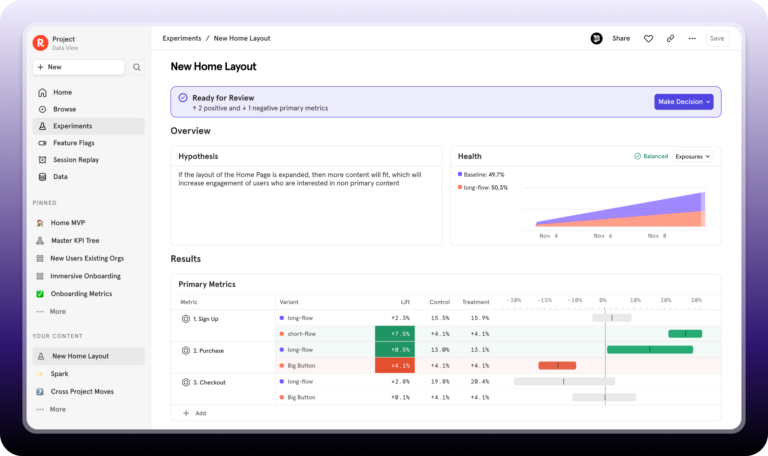
That includes AI experiments. When you're testing prompt variations or rolling out a new model version, Mixpanel captures how users behave after receiving the AI output: whether they completed the task, returned the following week, or churned. User behavior is the signal that determines whether an AI change was worth shipping, and LLM evals alone can't give you that.