Agent Intelligence
Build agents your customers love — and measure their impact.
Agent Intelligence
Build agents your customers love — and measure their impact.

AI Data Governance
AI that understands your business and delivers answers you trust
AI that understands your business and delivers answers you trust
AI that understands your business and delivers answers you trust
Get AI answers from a source you can trust: your business data. Every response reflects how you actually run your business. No guessing. No generic model.
Context Engine
Context Engine
Text
Text
Answers that know your business, not just your data
Answers that know your business, not just your data
Most AI tools have no idea how your business works. Context Engine fixes that. Configure it once, and from then on, every query starts with your context already loaded.


Give Mixpanel AI context. Get answers you can trust.
Give Mixpanel AI context. Get answers you can trust.
Here's the context teams typically give Mixpanel AI to make sure every query is grounded in your verified data. You can write context directly in Mixpanel Settings, or ask your AI assistant through MCP to review your project and suggest what would be most useful to add.
Org level
Org level
What your company does and who your customers are
Your north star metric and how you measure it
Internal terminology and acronyms AI should understand
How you segment customers
Project level
Project level
Your event taxonomy and naming conventions
What your most important events represent and when they fire
Key dashboards and where to find canonical answers for common questions
Operating shortcuts

Verified Mode
Verified Mode
Text
Text
You decide what AI can use and what it can’t
You decide what AI can use and what it can’t
You decide what AI can use and what it can’t
Fast answers don't matter if they're built on the wrong data. Verified Mode gives admins explicit control over which events and properties Mixpanel AI can query — so every output comes from a source your team has reviewed and approved. The result: consistent answers regardless of who's asking, and the confidence to act on them.
Context and trust — wherever you work
Context and trust — wherever you work
Context and trust — wherever you work
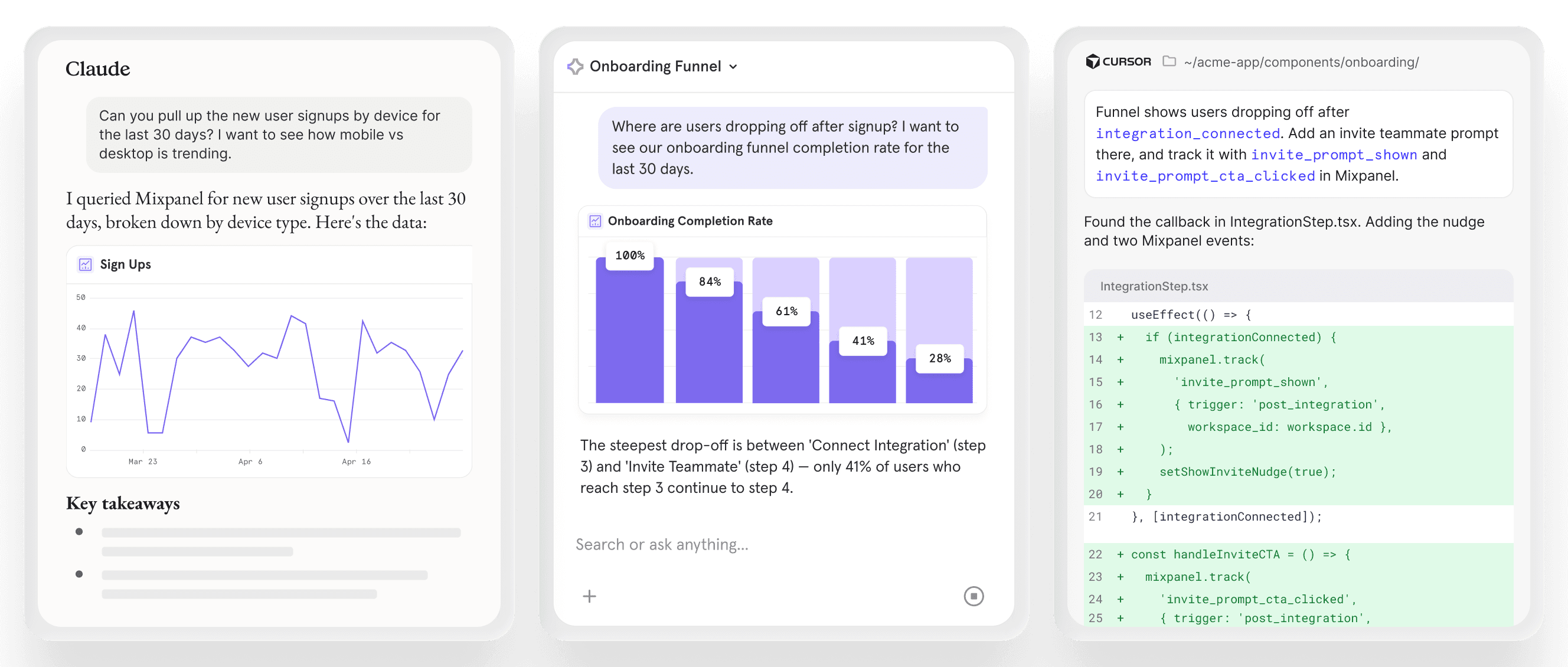
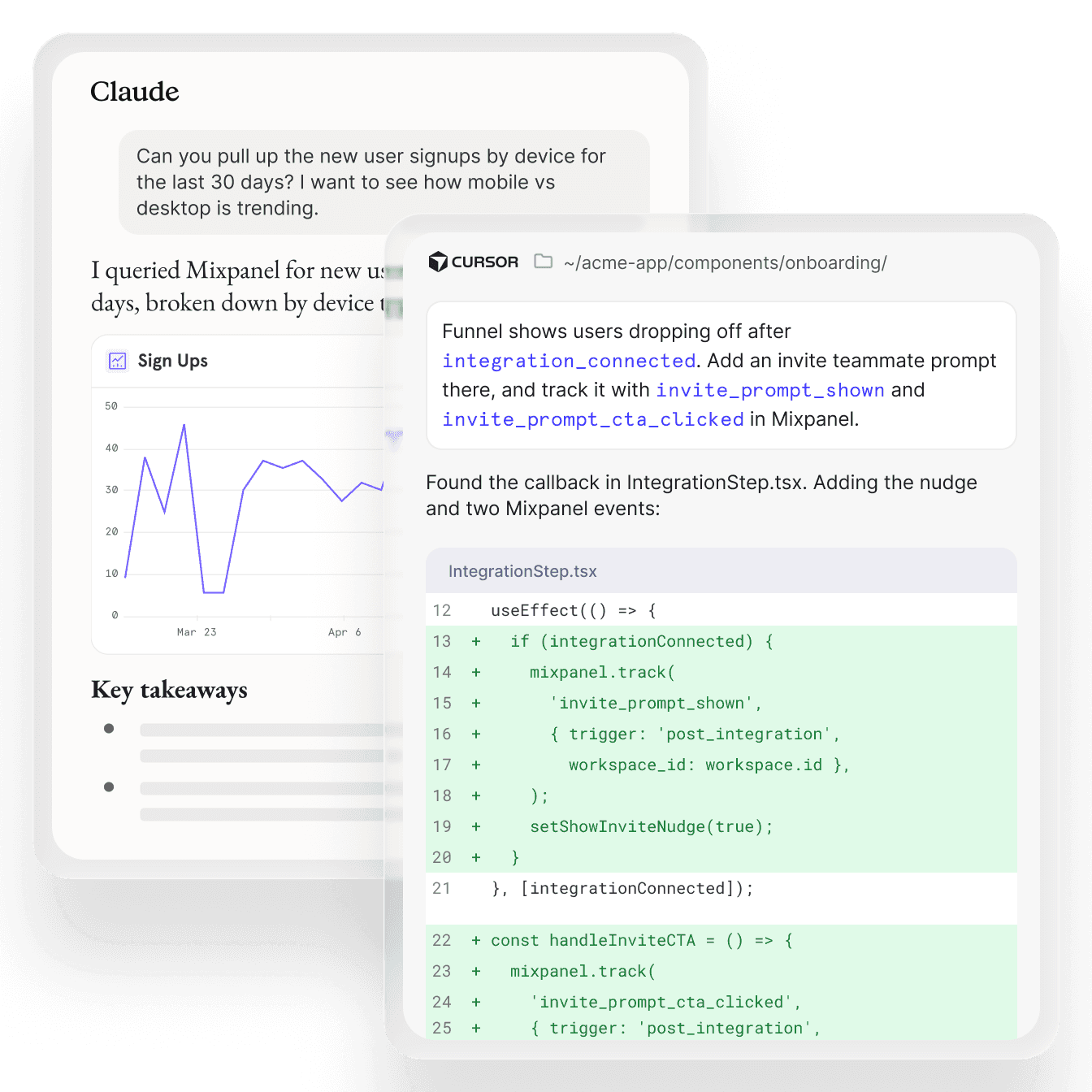
Context Engine and Verified Mode don't stop at the Mixpanel interface. When you access product intelligence through MCP Server, from Claude, ChatGPT, Cursor, or any connected tool, the same context, governance, and configuration settings apply.
Context Engine and Verified Mode don't stop at the Mixpanel interface. When you access product intelligence through MCP Server, from Claude, ChatGPT, Cursor, or any connected tool, the same context, governance, and configuration settings apply.
Context Engine and Verified Mode don't stop at the Mixpanel interface. When you access product intelligence through MCP Server, from Claude, ChatGPT, Cursor, or any connected tool, the same context, governance, and configuration settings apply.
Clean data, without the cleanup
Clean data, without the cleanup
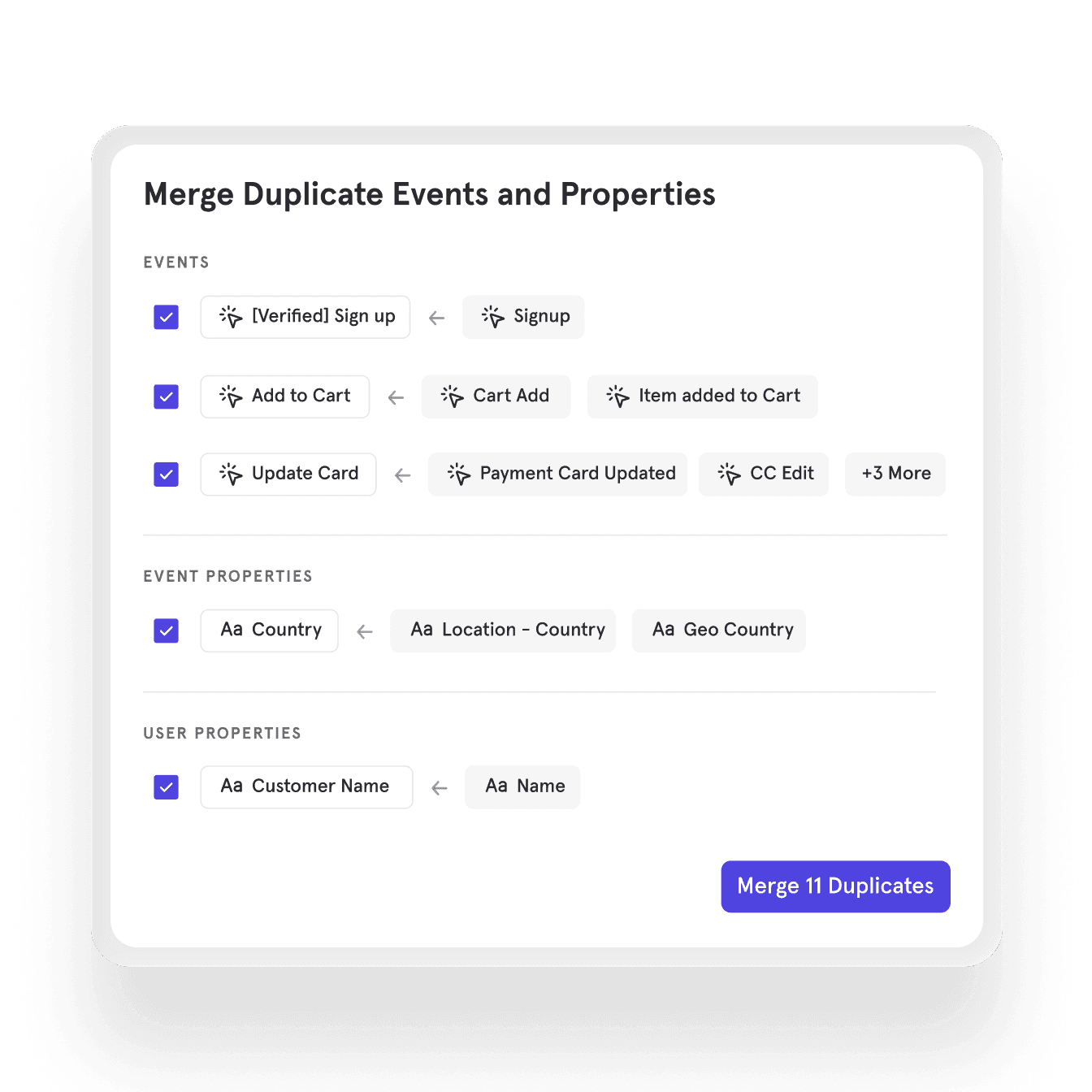
Messy tracking slows everyone down, whether it’s duplicate events, overlapping properties, or inconsistent naming. AI-powered data governance handles the cleanup for you. The results: clean data your whole team can rely on.
1
AI-powered Data Governance scans your Lexicon.
2
Duplicates are automatically flagged for review.
3
Consolidate with a single click.
FAQ
Who can see and edit business context?
Anyone with project access can read context. Only org and project admins can edit it, so there's no risk of individual users overwriting the definitions your data team has put in place.
Can the AI generate context automatically, or do I need to write it manually?
You can write context manually in Settings, or connect through MCP and ask your AI assistant to review your project and suggest what context would help it answer better. Rest assured — we’re working on an automation to generate context within the product UI.
Does Context Engine content get sent to my AI provider?
Yes. When AI reads your business context through MCP, that content is sent to whichever AI provider you're using (Claude, ChatGPT, etc.), as part of the session. We recommend keeping credentials, customer PII, and other sensitive information out of your context fields.
What's the difference between Verified Mode and my existing Mixpanel data permissions?
Your existing permissions control what users can see and do inside Mixpanel. Verified Mode is a separate layer specifically for AI queries. It controls which events and properties AI is allowed to reason from when answering questions. An event might be technically accessible to a user in Mixpanel while still being outside the approved set for AI, giving admins precise control over what AI can and can't use.
Does Verified Mode apply when using MCP Server?
Yes. Verified Mode applies regardless of where AI is accessing Mixpanel, whether from inside the product or through an external AI tool via MCP Server. The approved dataset travels with your data.
How does this relate to Lexicon?
Lexicon is where your team manages event and property definitions for human use, such as display names, descriptions, and tags. Context Engine builds on top of that by giving AI the business-level knowledge it needs: what your goals are, how you define success, and the norms your team operates by. Good Lexicon hygiene helps, but Context Engine is what makes AI answers reflect how your business actually works, not just what your events are named.
FAQ
Who can see and edit business context?
Anyone with project access can read context. Only org and project admins can edit it, so there's no risk of individual users overwriting the definitions your data team has put in place.
Can the AI generate context automatically, or do I need to write it manually?
You can write context manually in Settings, or connect through MCP and ask your AI assistant to review your project and suggest what context would help it answer better. Rest assured — we’re working on an automation to generate context within the product UI.
Does Context Engine content get sent to my AI provider?
Yes. When AI reads your business context through MCP, that content is sent to whichever AI provider you're using (Claude, ChatGPT, etc.), as part of the session. We recommend keeping credentials, customer PII, and other sensitive information out of your context fields.
What's the difference between Verified Mode and my existing Mixpanel data permissions?
Your existing permissions control what users can see and do inside Mixpanel. Verified Mode is a separate layer specifically for AI queries. It controls which events and properties AI is allowed to reason from when answering questions. An event might be technically accessible to a user in Mixpanel while still being outside the approved set for AI, giving admins precise control over what AI can and can't use.
Does Verified Mode apply when using MCP Server?
Yes. Verified Mode applies regardless of where AI is accessing Mixpanel, whether from inside the product or through an external AI tool via MCP Server. The approved dataset travels with your data.
How does this relate to Lexicon?
Lexicon is where your team manages event and property definitions for human use, such as display names, descriptions, and tags. Context Engine builds on top of that by giving AI the business-level knowledge it needs: what your goals are, how you define success, and the norms your team operates by. Good Lexicon hygiene helps, but Context Engine is what makes AI answers reflect how your business actually works, not just what your events are named.
FAQ
Who can see and edit business context?
Anyone with project access can read context. Only org and project admins can edit it, so there's no risk of individual users overwriting the definitions your data team has put in place.
Can the AI generate context automatically, or do I need to write it manually?
You can write context manually in Settings, or connect through MCP and ask your AI assistant to review your project and suggest what context would help it answer better. Rest assured — we’re working on an automation to generate context within the product UI.
Does Context Engine content get sent to my AI provider?
Yes. When AI reads your business context through MCP, that content is sent to whichever AI provider you're using (Claude, ChatGPT, etc.), as part of the session. We recommend keeping credentials, customer PII, and other sensitive information out of your context fields.
What's the difference between Verified Mode and my existing Mixpanel data permissions?
Your existing permissions control what users can see and do inside Mixpanel. Verified Mode is a separate layer specifically for AI queries. It controls which events and properties AI is allowed to reason from when answering questions. An event might be technically accessible to a user in Mixpanel while still being outside the approved set for AI, giving admins precise control over what AI can and can't use.
Does Verified Mode apply when using MCP Server?
Yes. Verified Mode applies regardless of where AI is accessing Mixpanel, whether from inside the product or through an external AI tool via MCP Server. The approved dataset travels with your data.
How does this relate to Lexicon?
Lexicon is where your team manages event and property definitions for human use, such as display names, descriptions, and tags. Context Engine builds on top of that by giving AI the business-level knowledge it needs: what your goals are, how you define success, and the norms your team operates by. Good Lexicon hygiene helps, but Context Engine is what makes AI answers reflect how your business actually works, not just what your events are named.
FAQ
Who can see and edit business context?
Anyone with project access can read context. Only org and project admins can edit it, so there's no risk of individual users overwriting the definitions your data team has put in place.
Can the AI generate context automatically, or do I need to write it manually?
You can write context manually in Settings, or connect through MCP and ask your AI assistant to review your project and suggest what context would help it answer better. Rest assured — we’re working on an automation to generate context within the product UI.
Does Context Engine content get sent to my AI provider?
Yes. When AI reads your business context through MCP, that content is sent to whichever AI provider you're using (Claude, ChatGPT, etc.), as part of the session. We recommend keeping credentials, customer PII, and other sensitive information out of your context fields.
What's the difference between Verified Mode and my existing Mixpanel data permissions?
Your existing permissions control what users can see and do inside Mixpanel. Verified Mode is a separate layer specifically for AI queries. It controls which events and properties AI is allowed to reason from when answering questions. An event might be technically accessible to a user in Mixpanel while still being outside the approved set for AI, giving admins precise control over what AI can and can't use.
Does Verified Mode apply when using MCP Server?
Yes. Verified Mode applies regardless of where AI is accessing Mixpanel, whether from inside the product or through an external AI tool via MCP Server. The approved dataset travels with your data.
How does this relate to Lexicon?
Lexicon is where your team manages event and property definitions for human use, such as display names, descriptions, and tags. Context Engine builds on top of that by giving AI the business-level knowledge it needs: what your goals are, how you define success, and the norms your team operates by. Good Lexicon hygiene helps, but Context Engine is what makes AI answers reflect how your business actually works, not just what your events are named.
Build fast with always-on product intelligence
Start for free and see why thousands of product teams trust Mixpanel to help them make better decisions with their data.
Build fast with always-on product intelligence
Start for free and see why thousands of product teams trust Mixpanel to help them make better decisions with their data.
Build fast with always-on product intelligence
Start for free and see why thousands of product teams trust Mixpanel to help them make better decisions with their data.
Build fast with always-on product intelligence
Start for free and see why thousands of product teams trust Mixpanel to help them make better decisions with their data.