Agent Intelligence
Build agents your customers love — and measure their impact.
Agent Intelligence
Build agents your customers love — and measure their impact.

Mixpanel MCP
Product intelligence, wherever you work
Product intelligence, wherever you work
Product intelligence, wherever you work
Your team doesn't work inside a single product — and they don’t have to. With Mixpanel MCP Server, access the power of Mixpanel in Claude, ChatGPT, Cursor, and Slack.
Understand your data
Query and analyze
Build and create
Automate data governance
Test and ship
Investigate user behavior

" width="32px"><path d="M 0 0 L 32 0 L 32 32 L 0 32 Z" fill="transparent" height="32px" id="JUbqpli2l" width="32px"/><path d="M 6.272 21.28 L 12.576 17.76 L 12.672 17.44 L 12.576 17.28 L 12.256 17.28 L 11.2 17.216 L 7.616 17.12 L 4.48 16.96 L 1.44 16.8 L 0.672 16.64 L 0 15.68 L 0.064 15.2 L 0.704 14.784 L 1.632 14.848 L 3.648 15.008 L 6.688 15.2 L 8.896 15.328 L 12.16 15.712 L 12.672 15.712 L 12.736 15.488 L 12.576 15.36 L 12.448 15.232 L 9.28 13.12 L 5.888 10.88 L 4.096 9.568 L 3.136 8.928 L 2.656 8.288 L 2.464 6.944 L 3.328 5.984 L 4.512 6.08 L 4.8 6.144 L 5.984 7.072 L 8.544 9.024 L 11.84 11.52 L 12.32 11.904 L 12.512 11.776 L 12.544 11.68 L 12.32 11.328 L 10.56 8 L 8.64 4.672 L 7.776 3.296 L 7.552 2.464 C 7.462 2.152 7.419 1.829 7.424 1.504 L 8.384 0.16 L 8.96 0 L 10.304 0.192 L 10.816 0.64 L 11.648 2.56 L 12.96 5.536 L 15.04 9.568 L 15.68 10.784 L 16 11.872 L 16.096 12.192 L 16.32 12.192 L 16.32 12.032 L 16.48 9.728 L 16.8 6.944 L 17.12 3.36 L 17.216 2.336 L 17.728 1.12 L 18.688 0.48 L 19.52 0.832 L 20.16 1.76 L 20.064 2.336 L 19.712 4.8 L 18.88 8.672 L 18.4 11.296 L 18.688 11.296 L 19.008 10.944 L 20.32 9.216 L 22.528 6.464 L 23.488 5.344 L 24.64 4.16 L 25.376 3.584 L 26.752 3.584 L 27.744 5.088 L 27.296 6.656 L 25.888 8.448 L 24.704 9.952 L 23.008 12.224 L 21.984 14.048 L 22.08 14.176 L 22.304 14.176 L 26.144 13.344 L 28.192 12.992 L 30.624 12.576 L 31.744 13.088 L 31.872 13.6 L 31.424 14.688 L 28.8 15.328 L 25.728 15.968 L 21.152 17.024 L 21.088 17.056 L 21.152 17.152 L 23.2 17.344 L 24.096 17.408 L 26.272 17.408 L 30.304 17.728 L 31.36 18.368 L 31.968 19.232 L 31.872 19.872 L 30.24 20.704 L 28.064 20.192 L 22.944 18.976 L 21.216 18.56 L 20.96 18.56 L 20.96 18.688 L 22.432 20.128 L 25.088 22.528 L 28.48 25.632 L 28.64 26.4 L 28.224 27.04 L 27.776 26.976 L 24.832 24.736 L 23.68 23.776 L 21.12 21.6 L 20.96 21.6 L 20.96 21.824 L 21.536 22.688 L 24.672 27.392 L 24.832 28.832 L 24.608 29.28 L 23.776 29.6 L 22.912 29.408 L 21.056 26.848 L 19.136 23.968 L 17.632 21.344 L 17.472 21.472 L 16.544 31.136 L 16.128 31.616 L 15.168 32 L 14.368 31.36 L 13.92 30.4 L 14.368 28.416 L 14.88 25.856 L 15.296 23.808 L 15.68 21.28 L 15.904 20.448 L 15.904 20.384 L 15.68 20.384 L 13.76 23.04 L 10.88 26.976 L 8.576 29.408 L 8.032 29.632 L 7.072 29.152 L 7.168 28.256 L 7.68 27.52 L 10.88 23.424 L 12.8 20.896 L 14.08 19.424 L 14.048 19.264 L 13.952 19.264 L 5.504 24.768 L 4 24.96 L 3.36 24.32 L 3.424 23.36 L 3.744 23.04 L 6.304 21.28 Z" fill="rgb(217, 119, 87)" height="32px" id="Szi79v0x4" width="31.968000000000007px"/></g></svg>)
" width="31.74800002721427px"><g d="M 11.555 19.747 L 8.539 19.747 C 8.285 19.747 8.095 19.652 7.968 19.43 L 4.476 13.366 C 3.999 12.54 3.777 11.556 3.777 10.54 C 3.777 6.73 6.73 4.318 9.873 4.318 C 10.095 4.318 10.349 4.318 10.603 4.35 L 6.92 10.636 C 6.698 11.016 6.698 11.398 6.92 11.779 Z M 23.302 5.587 L 16.095 5.587 C 15.65 5.587 15.333 5.778 15.111 6.159 L 10.476 14.128 L 8.982 11.525 C 8.855 11.332 8.855 11.083 8.982 10.89 L 12.475 4.826 C 13.491 3.08 15.65 1.906 17.745 1.906 C 20.157 1.906 22.38 3.334 23.301 5.588 Z M 16.952 21.62 L 15.429 24.224 C 15.302 24.446 15.111 24.541 14.857 24.541 L 7.873 24.541 C 4.476 24.541 1.904 21.938 1.904 18.414 C 1.904 17.08 2.349 15.842 3.142 14.794 L 6.762 21.049 C 6.984 21.429 7.302 21.62 7.746 21.62 L 16.953 21.62 Z M 20.192 16.017 L 18.096 19.747 L 13.652 19.747 L 11.556 16.017 L 13.651 12.287 L 18.095 12.287 Z M 29.842 13.62 C 29.842 14.953 29.398 16.191 28.605 17.24 L 24.985 10.985 C 24.763 10.605 24.445 10.414 24.001 10.414 L 14.794 10.414 L 16.318 7.778 C 16.445 7.556 16.636 7.461 16.89 7.461 L 23.874 7.461 C 27.271 7.461 29.843 10.096 29.843 13.62 Z M 22.763 21.144 L 19.271 27.208 C 18.255 28.954 16.096 30.128 14.001 30.128 C 11.566 30.137 9.369 28.668 8.445 26.415 L 15.684 26.415 C 16.128 26.415 16.446 26.224 16.668 25.843 L 21.271 17.906 L 22.763 20.509 C 22.89 20.702 22.89 20.951 22.763 21.144 Z M 27.97 21.494 C 27.97 25.081 25.271 27.716 21.938 27.716 C 21.684 27.716 21.43 27.684 21.176 27.652 L 24.796 21.398 C 25.017 21.018 25.017 20.636 24.796 20.255 L 20.192 12.287 L 23.208 12.287 C 23.462 12.287 23.653 12.382 23.779 12.604 L 27.271 18.668 C 27.748 19.494 27.97 20.478 27.97 21.494 Z M 31.748 13.62 C 31.748 9.848 29.094 6.597 25.398 5.842 C 24.478 2.286 21.144 0 17.747 0 C 15.525 0 13.366 0.952 11.81 2.667 C 11.156 2.505 10.484 2.419 9.81 2.413 C 5.27 2.413 1.873 6.096 1.873 10.35 C 1.873 11.207 2 12.032 2.286 12.858 C 0.827 14.34 0.007 16.334 0 18.414 C 0 22.186 2.654 25.437 6.35 26.192 C 7.27 29.748 10.604 32.033 14 32.033 C 16.223 32.033 18.382 31.081 19.938 29.367 C 20.592 29.53 21.264 29.615 21.938 29.621 C 26.478 29.621 29.874 25.938 29.874 21.684 C 29.879 20.831 29.74 19.983 29.462 19.176 C 30.921 17.694 31.741 15.7 31.748 13.62 Z" fill="transparent" height="32.032999999999994px" id="Y9UH8isXi" width="31.74800002721427px"><path d="M 11.555 19.747 L 8.539 19.747 C 8.285 19.747 8.095 19.652 7.968 19.43 L 4.476 13.366 C 3.999 12.54 3.777 11.556 3.777 10.54 C 3.777 6.73 6.73 4.318 9.873 4.318 C 10.095 4.318 10.349 4.318 10.603 4.35 L 6.92 10.636 C 6.698 11.016 6.698 11.398 6.92 11.779 Z M 23.302 5.587 L 16.095 5.587 C 15.65 5.587 15.333 5.778 15.111 6.159 L 10.476 14.128 L 8.982 11.525 C 8.855 11.332 8.855 11.083 8.982 10.89 L 12.475 4.826 C 13.491 3.08 15.65 1.906 17.745 1.906 C 20.157 1.906 22.38 3.334 23.301 5.588 Z M 16.952 21.62 L 15.429 24.224 C 15.302 24.446 15.111 24.541 14.857 24.541 L 7.873 24.541 C 4.476 24.541 1.904 21.938 1.904 18.414 C 1.904 17.08 2.349 15.842 3.142 14.794 L 6.762 21.049 C 6.984 21.429 7.302 21.62 7.746 21.62 L 16.953 21.62 Z M 20.192 16.017 L 18.096 19.747 L 13.652 19.747 L 11.556 16.017 L 13.651 12.287 L 18.095 12.287 Z M 29.842 13.62 C 29.842 14.953 29.398 16.191 28.605 17.24 L 24.985 10.985 C 24.763 10.605 24.445 10.414 24.001 10.414 L 14.794 10.414 L 16.318 7.778 C 16.445 7.556 16.636 7.461 16.89 7.461 L 23.874 7.461 C 27.271 7.461 29.843 10.096 29.843 13.62 Z M 22.763 21.144 L 19.271 27.208 C 18.255 28.954 16.096 30.128 14.001 30.128 C 11.566 30.137 9.369 28.668 8.445 26.415 L 15.684 26.415 C 16.128 26.415 16.446 26.224 16.668 25.843 L 21.271 17.906 L 22.763 20.509 C 22.89 20.702 22.89 20.951 22.763 21.144 Z M 27.97 21.494 C 27.97 25.081 25.271 27.716 21.938 27.716 C 21.684 27.716 21.43 27.684 21.176 27.652 L 24.796 21.398 C 25.017 21.018 25.017 20.636 24.796 20.255 L 20.192 12.287 L 23.208 12.287 C 23.462 12.287 23.653 12.382 23.779 12.604 L 27.271 18.668 C 27.748 19.494 27.97 20.478 27.97 21.494 Z M 31.748 13.62 C 31.748 9.848 29.094 6.597 25.398 5.842 C 24.478 2.286 21.144 0 17.747 0 C 15.525 0 13.366 0.952 11.81 2.667 C 11.156 2.505 10.484 2.419 9.81 2.413 C 5.27 2.413 1.873 6.096 1.873 10.35 C 1.873 11.207 2 12.032 2.286 12.858 C 0.827 14.34 0.007 16.334 0 18.414 C 0 22.186 2.654 25.437 6.35 26.192 C 7.27 29.748 10.604 32.033 14 32.033 C 16.223 32.033 18.382 31.081 19.938 29.367 C 20.592 29.53 21.264 29.615 21.938 29.621 C 26.478 29.621 29.874 25.938 29.874 21.684 C 29.879 20.831 29.74 19.983 29.462 19.176 C 30.921 17.694 31.741 15.7 31.748 13.62 Z" fill="rgb(31, 32, 35)" height="32.032999999999994px" id="xJupF662_" width="31.74800002721427px"/></g></g></svg>)
" height="32.000187008441806px" id="HoIgsiQEH" transform="translate(6 4)" width="28.070000000000004px"/></svg>)
" width="32px"><path d="M 16 32 C 7.163 32 0 24.837 0 16 L 0 16 C 0 7.163 7.163 0 16 0 L 16 0 C 24.837 0 32 7.163 32 16 L 32 16 C 32 24.837 24.837 32 16 32 Z" fill="rgb(255, 255, 255)" height="32px" id="CG2OFjuI9" width="32px"/><path d="M 15.438 30.875 C 6.912 30.875 0 23.963 0 15.438 L 0 15.438 C 0 6.912 6.912 0 15.438 0 L 15.438 0 C 23.963 0 30.875 6.912 30.875 15.438 L 30.875 15.438 C 30.875 23.963 23.963 30.875 15.438 30.875 Z" fill="transparent" height="30.875000000000004px" id="O1KI0BwRD" stroke-dasharray="" stroke-linecap="butt" stroke-linejoin="miter" stroke-miterlimit="10" stroke-width="1.125" stroke="rgba(0, 0, 0, 0.07)" transform="translate(0.563 0.563)" width="30.875000000000004px"/><path d="M 8.314 3.888 C 8.803 3.978 9.303 3.796 9.62 3.413 C 9.937 3.03 10.022 2.506 9.842 2.042 C 9.662 1.578 9.246 1.248 8.753 1.18 C 8.014 1.076 7.328 1.582 7.209 2.319 C 7.089 3.055 7.58 3.752 8.314 3.888 Z M 1.086 2.717 C 1.58 2.819 2.091 2.642 2.416 2.256 C 2.741 1.869 2.827 1.335 2.641 0.866 C 2.455 0.397 2.027 0.067 1.525 0.009 C 0.798 -0.072 0.135 0.431 0.018 1.153 C -0.099 1.875 0.37 2.562 1.085 2.716" fill="rgb(31, 32, 35)" height="3.9103296329725765px" id="gdB3QU10J" transform="translate(10.351 12.288)" width="9.934960921259616px"/><path d="M 7.508 3.529 C 8.336 2.147 9.832 1.304 11.443 1.312 C 13.054 1.32 14.542 2.178 15.355 3.569 C 15.557 3.916 15.44 4.361 15.094 4.564 C 14.747 4.766 14.301 4.649 14.099 4.302 C 13.545 3.355 12.532 2.771 11.435 2.766 C 10.338 2.76 9.319 3.335 8.756 4.276 L 2.473 14.767 L 7.352 15.558 C 7.73 15.641 7.977 16.004 7.915 16.386 C 7.853 16.767 7.503 17.034 7.119 16.993 L 1.182 16.031 C 0.944 15.993 0.74 15.839 0.638 15.62 C 0.536 15.401 0.55 15.146 0.674 14.939 Z M 0.278 1.158 C 1.189 0.345 2.388 -0.069 3.607 0.009 C 4.825 0.087 5.962 0.65 6.762 1.572 C 6.945 1.767 7.007 2.046 6.923 2.3 C 6.839 2.554 6.622 2.741 6.359 2.788 C 6.096 2.835 5.828 2.733 5.662 2.524 C 5.117 1.896 4.343 1.512 3.513 1.459 C 2.683 1.406 1.867 1.688 1.246 2.241 C 1.056 2.434 0.774 2.505 0.515 2.426 C 0.256 2.347 0.063 2.13 0.013 1.864 C -0.037 1.598 0.064 1.326 0.277 1.158 Z" fill="rgb(31, 32, 35)" height="16.997346839725036px" id="gkr4_8Fg9" transform="translate(8.615 7.501)" width="15.454267375733517px"/></g></svg>)
 scale(1 1) translate(-1.9644365926722485, -1.2928994061736372)" id="hwp1np3Kk-2404833778-radial-gradient" r="0.9935582955660959"><stop offset="0" stop-color="rgb(0, 174, 255)"/><stop offset="1" stop-color="rgb(7, 54, 196)"/></radialGradient><radialGradient cx="0.5671488419887756" cy="2.087502377696686" gradient-transform="translate(0.5671488419887756, 2.087502377696686) scale(1 1) translate(-0.5671488419887756, -2.087502377696686)" id="yjjo_X4CX-2404833778-radial-gradient" r="0.9176744327777367"><stop offset="0" stop-color="rgb(255, 182, 87)"/><stop offset="1" stop-color="rgb(192, 43, 60)"/></radialGradient><radialGradient cx="0.4555259420810899" cy="1.1534584974104996" gradient-transform="translate(0.4555259420810899, 1.1534584974104996) scale(1 1) translate(-0.4555259420810899, -1.1534584974104996)" id="NqHJfvoOd-2404833778-radial-gradient" r="0.8876222222875396"><stop offset="0" stop-color="rgb(255, 200, 0)"/><stop offset="1" stop-color="rgb(13, 145, 225)"/></radialGradient><linearGradient id="tipg4QI2j-2404833778-linear-gradient" x1="0.4762098066646245" x2="0.5237901933353755" y1="0" y2="1"><stop offset="0" stop-color="rgb(61, 203, 255)"/><stop offset="1" stop-color="rgba(5, 136, 247, 0)"/></linearGradient><radialGradient cx="1.483085253955906" cy="0.38892173652830103" gradient-transform="translate(1.483085253955906, 0.38892173652830103) scale(1 1) translate(-1.483085253955906, -0.38892173652830103)" id="hbXrHPEmi-2404833778-radial-gradient" r="1.3361795215040524"><stop offset="0" stop-color="rgb(140, 72, 255)"/><stop offset="1" stop-color="rgb(255, 177, 82)"/></radialGradient><linearGradient id="m0Tr1cah6-2404833778-linear-gradient" x1="0.49844901556625526" x2="0.5015509844337448" y1="0" y2="1"><stop offset="0" stop-color="rgb(248, 173, 250)"/><stop offset="1" stop-color="rgba(168, 110, 221, 0)"/></linearGradient></defs><g d="M 21.974 1.972 C 21.57 0.792 20.461 0 19.214 0 L 17.823 0 C 16.412 0 15.203 1.011 14.953 2.4 L 13.5 10.478 L 14.065 8.583 C 14.434 7.347 15.57 6.5 16.86 6.5 L 22.108 6.5 L 24.354 7.809 L 26.519 6.5 L 25.609 6.5 C 24.362 6.5 23.253 5.708 22.849 4.528 Z M 8.516 24.029 C 8.916 25.215 10.028 26.014 11.28 26.014 L 13.692 26.014 C 15.296 26.014 16.6 24.718 16.609 23.114 L 16.651 15.5 L 16.09 17.417 C 15.726 18.66 14.585 19.514 13.29 19.514 L 8.01 19.514 L 6.084 18.035 L 4 19.514 L 4.9 19.514 C 6.152 19.514 7.264 20.313 7.664 21.499 Z M 18.752 0 L 7.815 0 C 4.69 0 2.815 4.09 1.565 8.178 C 0.084 13.023 -1.854 19.502 3.752 19.502 L 8.662 19.502 C 9.963 19.502 11.107 18.642 11.468 17.392 C 12.281 14.576 13.752 9.499 14.904 5.652 C 15.478 3.732 15.956 2.084 16.691 1.057 C 17.16 0.385 17.932 -0.011 18.752 0 Z M 18.752 0 L 7.815 0 C 4.69 0 2.815 4.09 1.565 8.178 C 0.084 13.023 -1.854 19.502 3.752 19.502 L 8.662 19.502 C 9.963 19.502 11.107 18.642 11.468 17.392 C 12.281 14.576 13.752 9.499 14.904 5.652 C 15.478 3.732 15.956 2.084 16.691 1.057 C 17.16 0.385 17.932 -0.011 18.752 0 Z M 11 26.005 L 21.937 26.005 C 25.062 26.005 26.937 21.915 28.187 17.825 C 29.667 12.98 31.606 6.5 25.999 6.5 L 21.089 6.5 C 19.788 6.5 18.644 7.361 18.284 8.611 C 17.471 11.427 16 16.504 14.848 20.352 C 14.274 22.272 13.795 23.921 13.061 24.947 C 12.592 25.619 11.82 26.016 11 26.005 Z M 11 26.005 L 21.937 26.005 C 25.062 26.005 26.937 21.915 28.187 17.825 C 29.667 12.98 31.606 6.5 25.999 6.5 L 21.089 6.5 C 19.788 6.5 18.644 7.361 18.284 8.611 C 17.471 11.427 16 16.504 14.848 20.352 C 14.274 22.272 13.795 23.921 13.061 24.947 C 12.592 25.619 11.82 26.016 11 26.005 Z" fill="transparent" height="26.01400000042972px" id="ihY_8w6bA" transform="translate(5 7)" width="29.75145068418761px"><path d="M 8.474 1.972 C 8.07 0.792 6.961 0 5.714 0 L 4.323 0 C 2.912 0 1.703 1.011 1.453 2.4 L 0 10.478 L 0.565 8.583 C 0.934 7.347 2.07 6.5 3.36 6.5 L 8.608 6.5 L 10.854 7.809 L 13.019 6.5 L 12.109 6.5 C 10.862 6.5 9.753 5.708 9.349 4.528 Z" fill="url(%23hwp1np3Kk-2404833778-radial-gradient)" height="10.477999999999994px" id="hwp1np3Kk" transform="translate(13.5 0)" width="13.019000000000005px"/><path d="M 4.516 8.529 C 4.916 9.715 6.028 10.514 7.28 10.514 L 9.692 10.514 C 11.296 10.514 12.6 9.218 12.609 7.614 L 12.651 0 L 12.09 1.917 C 11.726 3.16 10.585 4.014 9.29 4.014 L 4.01 4.014 L 2.084 2.535 L 0 4.014 L 0.9 4.014 C 2.152 4.014 3.264 4.813 3.664 5.999 Z" fill="url(%23yjjo_X4CX-2404833778-radial-gradient)" height="10.51400000042971px" id="yjjo_X4CX" transform="translate(4 15.5)" width="12.650999999999996px"/><path d="M 18.752 0 L 7.815 0 C 4.69 0 2.815 4.09 1.565 8.178 C 0.084 13.023 -1.854 19.502 3.752 19.502 L 8.662 19.502 C 9.963 19.502 11.107 18.642 11.468 17.392 C 12.281 14.576 13.752 9.499 14.904 5.652 C 15.478 3.732 15.956 2.084 16.691 1.057 C 17.16 0.385 17.932 -0.011 18.752 0 Z" fill="url(%23NqHJfvoOd-2404833778-radial-gradient)" height="19.502218805879004px" id="NqHJfvoOd" width="18.751950681393694px"/><path d="M 18.752 0 L 7.815 0 C 4.69 0 2.815 4.09 1.565 8.178 C 0.084 13.023 -1.854 19.502 3.752 19.502 L 8.662 19.502 C 9.963 19.502 11.107 18.642 11.468 17.392 C 12.281 14.576 13.752 9.499 14.904 5.652 C 15.478 3.732 15.956 2.084 16.691 1.057 C 17.16 0.385 17.932 -0.011 18.752 0 Z" fill="url(%23tipg4QI2j-2404833778-linear-gradient)" height="19.502218805879004px" id="tipg4QI2j" width="18.751950681393694px"/><path d="M 0 19.505 L 10.937 19.505 C 14.062 19.505 15.937 15.415 17.187 11.325 C 18.667 6.48 20.606 0 14.999 0 L 10.089 0 C 8.788 0 7.644 0.861 7.284 2.111 C 6.471 4.927 5 10.004 3.848 13.852 C 3.274 15.772 2.795 17.421 2.061 18.447 C 1.592 19.119 0.82 19.516 0 19.505 Z" fill="url(%23hbXrHPEmi-2404833778-radial-gradient)" height="19.50520962833349px" id="hbXrHPEmi" transform="translate(11 6.5)" width="18.75145068418763px"/><path d="M 0 19.505 L 10.937 19.505 C 14.062 19.505 15.937 15.415 17.187 11.325 C 18.667 6.48 20.606 0 14.999 0 L 10.089 0 C 8.788 0 7.644 0.861 7.284 2.111 C 6.471 4.927 5 10.004 3.848 13.852 C 3.274 15.772 2.795 17.421 2.061 18.447 C 1.592 19.119 0.82 19.516 0 19.505 Z" fill="url(%23m0Tr1cah6-2404833778-linear-gradient)" height="19.50520962833349px" id="m0Tr1cah6" transform="translate(11 6.5)" width="18.75145068418763px"/></g></svg>)

Understand your data
Query and analyze
Build and create
Automate data governance
Test and ship
Investigate user behavior
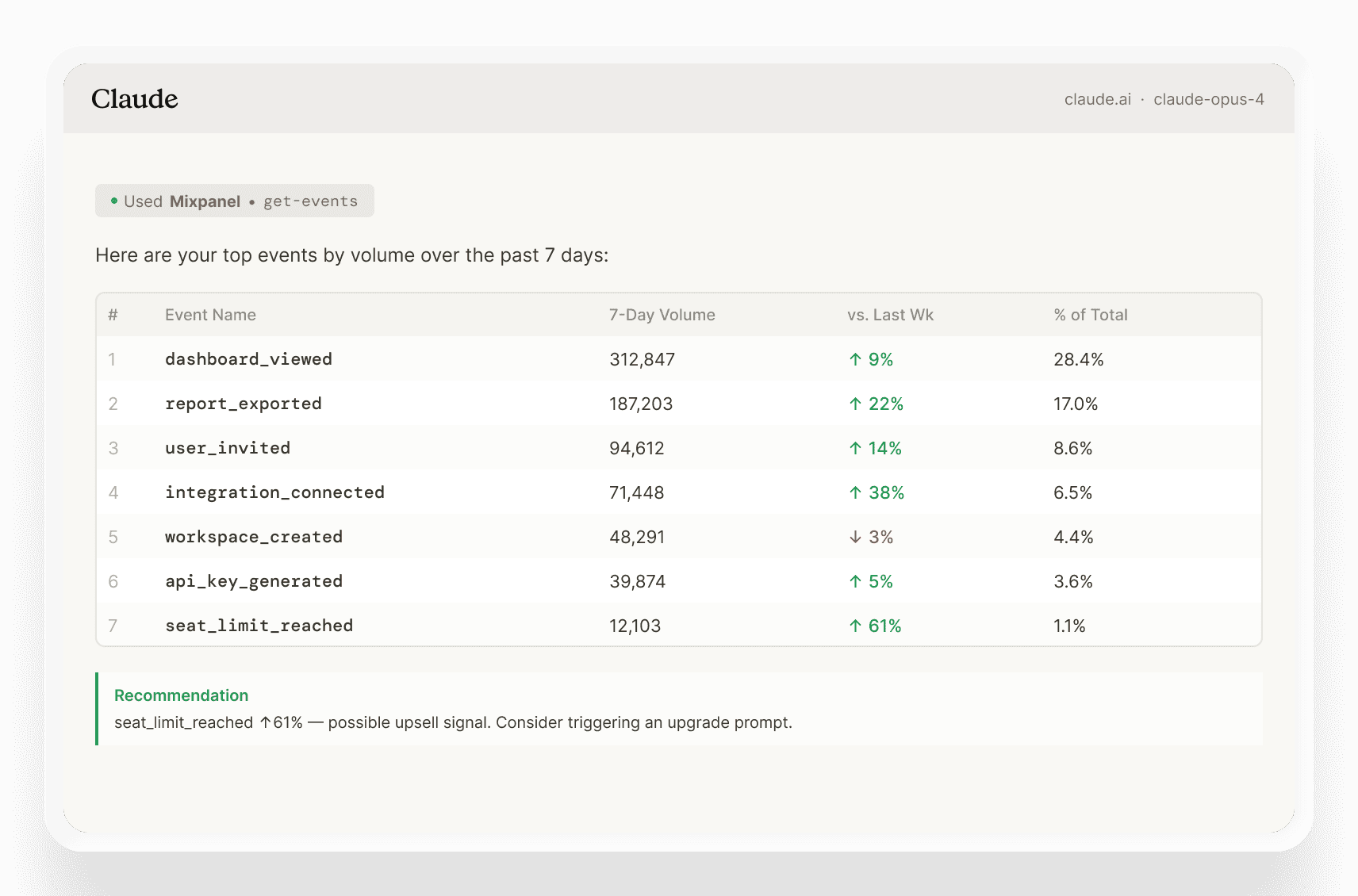
What are the most-fired events this week?
Understand your data
Query and analyze
Build and create
Automate data governance
Test and ship
Investigate user behavior
Understand your data
Query and analyze
Build and create
Automate data governance
Test and ship
Investigate user behavior
What you can do through MCP
What you can do through MCP
Ask questions about user behavior, run analyses, build dashboards, manage Lexicon, launch experiments, and investigate session replays — all from the AI tools your team is already using, and all from your real Mixpanel data.
From insight to action, without switching tools
From insight to action, without switching tools
Most analytics integrations are read-only. Mixpanel MCP isn't.
Experiments & feature flags
Trigger, configure, and launch through conversation
Experiments & feature flags
Trigger, configure, and launch through conversation
Experiments & feature flags
Trigger, configure, and launch through conversation
Session replays
Surface the replay that explains the drop, right alongside your event data
Session replays
Surface the replay that explains the drop, right alongside your event data
Session replays
Surface the replay that explains the drop, right alongside your event data
Reports & dashboards
Ask in plain language, get an exec-ready board from your verified data
Reports & dashboards
Ask in plain language, get an exec-ready board from your verified data
Reports & dashboards
Ask in plain language, get an exec-ready board from your verified data
Lexicon
Tag events, add descriptions, hide deprecated properties in a single prompt
Lexicon
Tag events, add descriptions, hide deprecated properties in a single prompt
Lexicon
Tag events, add descriptions, hide deprecated properties in a single prompt
Your governed data travels with you
Your governed data travels with you
When your team queries Mixpanel through Claude, Cursor, or another connected tool, the same governance and configuration settings apply. All existing roles and project-level permissions remain in effect. Users can only access what they already have access to in Mixpanel
Context Engine ensures every answer reflects your metric definitions and business context.
Verified Mode ensures AI only queries data your admins have approved. You never have to trade control for convenience.
AI-powered Data Governance scans your Lexicon.
Duplicates are identified automatically and surfaced for review.
Consolidate with a single click.

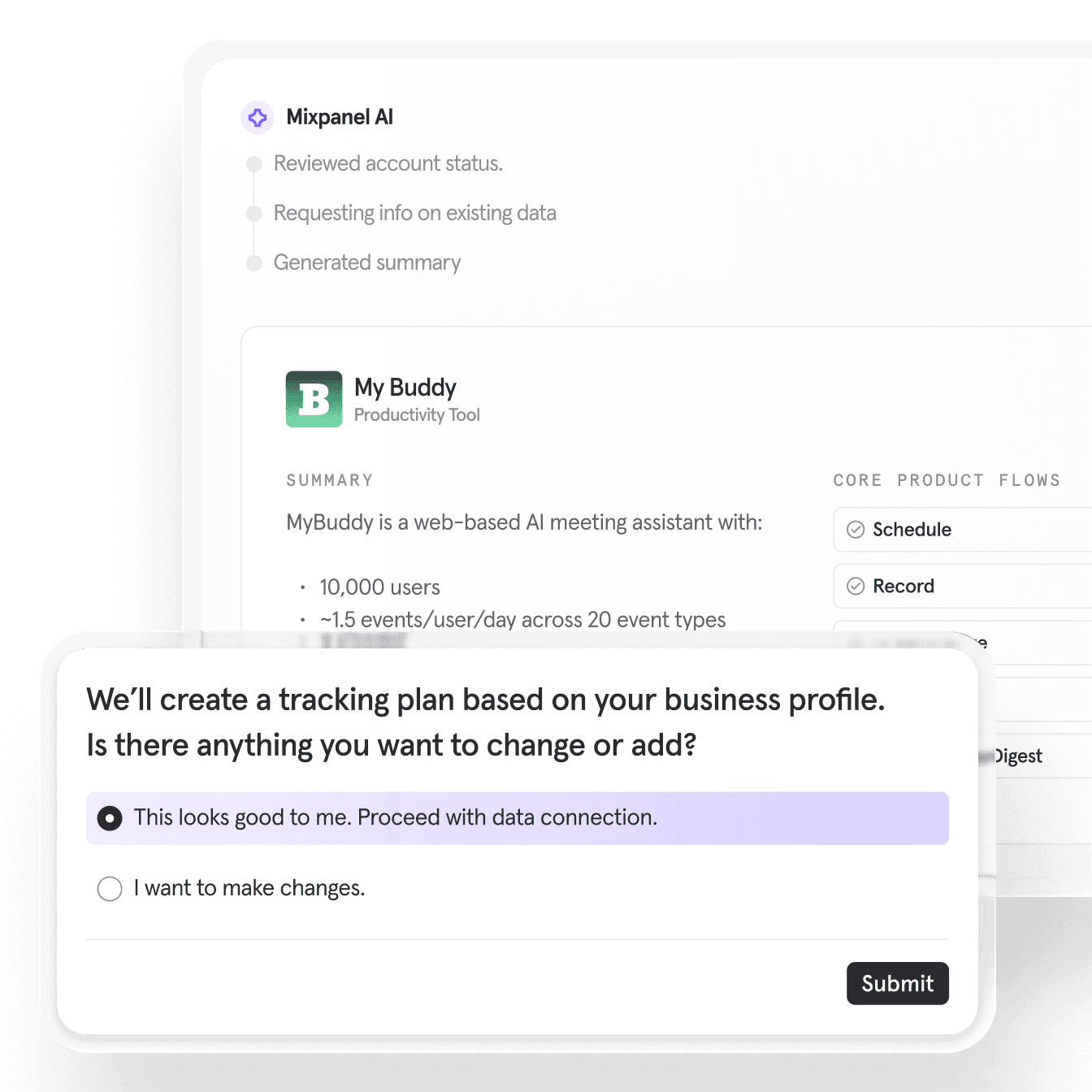
“We never have to wonder if a feature moved the needle. Mixpanel MCP connects our launch data, our Jira context, and our Slack workflow automatically — so every feature gets a 7-day impact report without anyone having to build it.”
“We never have to wonder if a feature moved the needle. Mixpanel MCP connects our launch data, our Jira context, and our Slack workflow automatically — so every feature gets a 7-day impact report without anyone having to build it.”
Niek Schreurs
Growth & Marketing
FAQ
Which AI tools does Mixpanel MCP Server work with?
Any MCP-compatible interface. Today that includes Claude, ChatGPT, Cursor, Codex, Gemini CLI, Notion, and Microsoft Copilot, and the list keeps growing as MCP adoption expands. If your team's tool supports MCP, Mixpanel can connect to it.
How is this different from the AI already inside Mixpanel?
The Mixpanel Agent, along with the KPI Monitoring and Root Cause Analysis agents, lives inside the product and handles analysis on your behalf. MCP Server extends that same intelligence into the tools your team already uses. So instead of switching to Mixpanel to ask a question, you can query your product data and take action directly from Claude, ChatGPT, or Cursor.
Can the AI make changes to my Mixpanel account, or is it read-only?
Both. MCP Server can read your data and write to your account, including creating dashboards, managing feature flags, triggering experiments, and updating Lexicon. Any action is scoped to what the connected user is already permissioned to do in Mixpanel, so no one gets elevated access through MCP.
Does my existing data governance carry over?
Yes. All project-level roles and permissions apply through MCP. Users can only access projects they're already permissioned for in Mixpanel. Context Engine and Verified Mode also apply, so the business context and data guardrails your team has configured follow your data into every connected tool.
Is there a technical setup required?
Minimal. An org admin enables MCP in Settings, and then individual users connect by authenticating with their existing Mixpanel credentials. Most tools take a couple steps, but no code.
Is my data safe when using MCP Server?
When you connect through MCP, your Mixpanel data is sent to whichever AI provider you're using, like Claude, ChatGPT, etc. We recommend reviewing that provider's data handling policies before connecting to projects with sensitive data. On the Mixpanel side, all existing access controls remain in effect, and MCP must be explicitly enabled by an org admin before anyone can use it.
FAQ
Which AI tools does Mixpanel MCP Server work with?
Any MCP-compatible interface. Today that includes Claude, ChatGPT, Cursor, Codex, Gemini CLI, Notion, and Microsoft Copilot, and the list keeps growing as MCP adoption expands. If your team's tool supports MCP, Mixpanel can connect to it.
How is this different from the AI already inside Mixpanel?
The Mixpanel Agent, along with the KPI Monitoring and Root Cause Analysis agents, lives inside the product and handles analysis on your behalf. MCP Server extends that same intelligence into the tools your team already uses. So instead of switching to Mixpanel to ask a question, you can query your product data and take action directly from Claude, ChatGPT, or Cursor.
Can the AI make changes to my Mixpanel account, or is it read-only?
Both. MCP Server can read your data and write to your account, including creating dashboards, managing feature flags, triggering experiments, and updating Lexicon. Any action is scoped to what the connected user is already permissioned to do in Mixpanel, so no one gets elevated access through MCP.
Does my existing data governance carry over?
Yes. All project-level roles and permissions apply through MCP. Users can only access projects they're already permissioned for in Mixpanel. Context Engine and Verified Mode also apply, so the business context and data guardrails your team has configured follow your data into every connected tool.
Is there a technical setup required?
Minimal. An org admin enables MCP in Settings, and then individual users connect by authenticating with their existing Mixpanel credentials. Most tools take a couple steps, but no code.
Is my data safe when using MCP Server?
When you connect through MCP, your Mixpanel data is sent to whichever AI provider you're using, like Claude, ChatGPT, etc. We recommend reviewing that provider's data handling policies before connecting to projects with sensitive data. On the Mixpanel side, all existing access controls remain in effect, and MCP must be explicitly enabled by an org admin before anyone can use it.
FAQ
Which AI tools does Mixpanel MCP Server work with?
Any MCP-compatible interface. Today that includes Claude, ChatGPT, Cursor, Codex, Gemini CLI, Notion, and Microsoft Copilot, and the list keeps growing as MCP adoption expands. If your team's tool supports MCP, Mixpanel can connect to it.
How is this different from the AI already inside Mixpanel?
The Mixpanel Agent, along with the KPI Monitoring and Root Cause Analysis agents, lives inside the product and handles analysis on your behalf. MCP Server extends that same intelligence into the tools your team already uses. So instead of switching to Mixpanel to ask a question, you can query your product data and take action directly from Claude, ChatGPT, or Cursor.
Can the AI make changes to my Mixpanel account, or is it read-only?
Both. MCP Server can read your data and write to your account, including creating dashboards, managing feature flags, triggering experiments, and updating Lexicon. Any action is scoped to what the connected user is already permissioned to do in Mixpanel, so no one gets elevated access through MCP.
Does my existing data governance carry over?
Yes. All project-level roles and permissions apply through MCP. Users can only access projects they're already permissioned for in Mixpanel. Context Engine and Verified Mode also apply, so the business context and data guardrails your team has configured follow your data into every connected tool.
Is there a technical setup required?
Minimal. An org admin enables MCP in Settings, and then individual users connect by authenticating with their existing Mixpanel credentials. Most tools take a couple steps, but no code.
Is my data safe when using MCP Server?
When you connect through MCP, your Mixpanel data is sent to whichever AI provider you're using, like Claude, ChatGPT, etc. We recommend reviewing that provider's data handling policies before connecting to projects with sensitive data. On the Mixpanel side, all existing access controls remain in effect, and MCP must be explicitly enabled by an org admin before anyone can use it.
FAQ
Which AI tools does Mixpanel MCP Server work with?
Any MCP-compatible interface. Today that includes Claude, ChatGPT, Cursor, Codex, Gemini CLI, Notion, and Microsoft Copilot, and the list keeps growing as MCP adoption expands. If your team's tool supports MCP, Mixpanel can connect to it.
How is this different from the AI already inside Mixpanel?
The Mixpanel Agent, along with the KPI Monitoring and Root Cause Analysis agents, lives inside the product and handles analysis on your behalf. MCP Server extends that same intelligence into the tools your team already uses. So instead of switching to Mixpanel to ask a question, you can query your product data and take action directly from Claude, ChatGPT, or Cursor.
Can the AI make changes to my Mixpanel account, or is it read-only?
Both. MCP Server can read your data and write to your account, including creating dashboards, managing feature flags, triggering experiments, and updating Lexicon. Any action is scoped to what the connected user is already permissioned to do in Mixpanel, so no one gets elevated access through MCP.
Does my existing data governance carry over?
Yes. All project-level roles and permissions apply through MCP. Users can only access projects they're already permissioned for in Mixpanel. Context Engine and Verified Mode also apply, so the business context and data guardrails your team has configured follow your data into every connected tool.
Is there a technical setup required?
Minimal. An org admin enables MCP in Settings, and then individual users connect by authenticating with their existing Mixpanel credentials. Most tools take a couple steps, but no code.
Is my data safe when using MCP Server?
When you connect through MCP, your Mixpanel data is sent to whichever AI provider you're using, like Claude, ChatGPT, etc. We recommend reviewing that provider's data handling policies before connecting to projects with sensitive data. On the Mixpanel side, all existing access controls remain in effect, and MCP must be explicitly enabled by an org admin before anyone can use it.
Build fast with always-on product intelligence
Start for free and see why thousands of product teams trust Mixpanel to help them make better decisions with their data.
Build fast with always-on product intelligence
Start for free and see why thousands of product teams trust Mixpanel to help them make better decisions with their data.
Build fast with always-on product intelligence
Start for free and see why thousands of product teams trust Mixpanel to help them make better decisions with their data.
Build fast with always-on product intelligence
Start for free and see why thousands of product teams trust Mixpanel to help them make better decisions with their data.