

The 6 best Heap alternatives for product teams outgrowing autocapture

For years, Heap made a compelling promise for product analytics: Install one snippet, and it captures everything. No event instrumentation planning, no engineering tickets, no waiting for data to exist before you can ask questions about it.
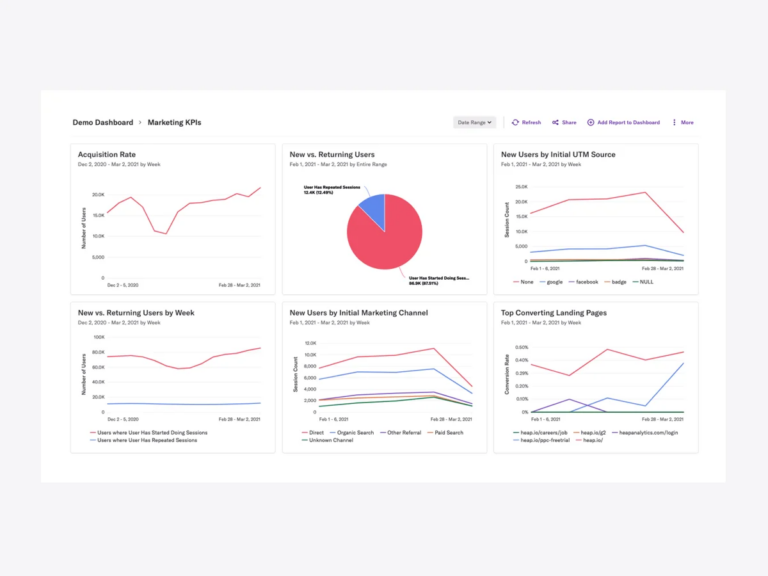
That promise is real—autocapture is genuinely useful, and teams shouldn't have to give it up to get serious about product analytics. The question is what you can do with the data once you have it.
Heap was designed around autocapture with some support for manual events. That's a reasonable starting point. But as product teams mature, the questions get harder: not just what users clicked, but why they came back, which cohorts convert, whether a new feature actually moved a metric. Answering those questions takes segmentation that goes beyond page and click data, controlled experiments, feature flag management, and the ability for both non-technical teammates to run their own analysis without filing a ticket or engineers to query everything programmatically when the situation calls for it.
Then there's the acquisition. Contentsquare—which also owns Hotjar—bought Heap in 2023. Contentsquare is a user experience analytics business that is slowly pivoting its focus beyond marketing teams, and the roadmap has reflected that. The capabilities that product development teams increasingly depend on—experiments, feature flags, metric trees, programmatic access—aren't part of what Contentsquare has built or acquired.
This guide covers six Heap alternatives, evaluated on analytical depth, data reliability, pricing, and fit for how product development teams actually work.
Why product teams are leaving Heap
Autocapture only gets you so far
Autocapture is a feature worth having—most serious product analytics platforms offer it. The issue with Heap is that it was designed around autocapture, with manual event tracking added on, rather than the other way around. That inversion matters when you start asking harder questions.
Capturing every click and pageview gets you a lot of data. It doesn't get you clean data. Useful events get buried under hundreds of irrelevant ones, and the cleanup work required before you can trust an analysis often takes longer than the analysis itself. When code changes—and it always does—tagged events break quietly, leaving reports wrong before anyone notices.
More fundamentally: Autocapture tells you what happened. The segmentation, cohort analysis, and behavioral funnels that turn "what happened" into "what to do next" require precise, intentional event structures. Teams that want both—the convenience of autocapture to get started, plus the analytical depth to mature—find the balance harder to strike in Heap than in tools designed for precision tracking first.
The acquisition has changed things
Contentsquare's acquisition of Heap brought it under the same roof as Hotjar—two behavioral analytics products now owned by a company whose core business had been session replay and heatmaps.
Experiments, feature flags, metric trees, and programmatic analytics access aren't part of Heap's platform—and there's no indication they're coming. For teams that want to run A/B tests on the same data they're already analyzing, manage feature rollouts, build a shared view of how metrics connect, or give engineers a headless layer to query without the UI—Heap under Contentsquare isn't the answer.
On top of that, users who stayed through the acquisition are running into a compounding problem: more product glitches, and less help when things go wrong.
The pricing scales faster than the value does
Heap's pricing is tied to session volume. As traffic grows, so does the bill—often faster than the team's ability to extract more value from the additional data. The baseline already runs higher than comparable analytics tools, and reviewers describe sticker shock when usage pushes into the next tier.
That promise holds early on. But at scale, it starts working against you.
Autocapture generates noise faster than most teams can clean it up. Events that matter get buried under hundreds that don’t. Code changes quietly break tags. And the pricing—tied to session volume—climbs in ways that are hard to predict and harder to justify.
This guide looks at six Heap alternatives for product analytics, evaluated on data reliability, analytical depth, pricing, and how well they fit the way product and growth teams actually work.
6 best Heap alternatives product managers are switching to
1. Mixpanel
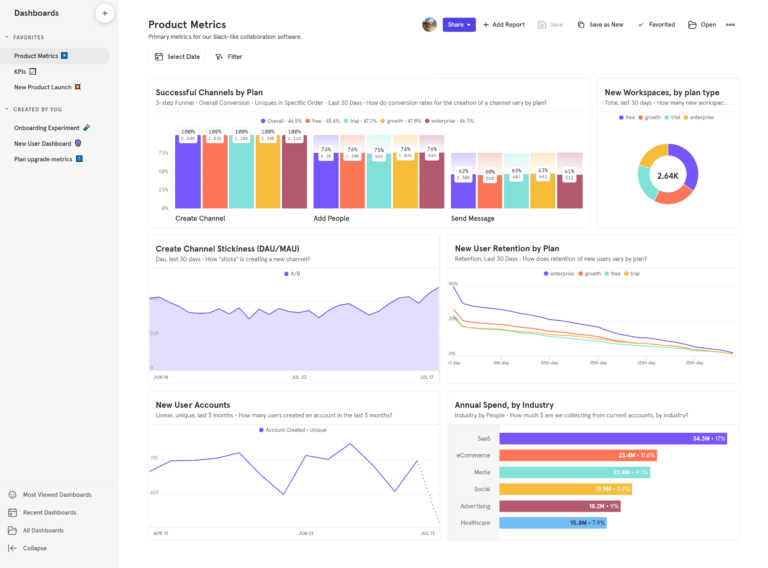
Mixpanel is an event-based product analytics platform that does both autocapture and precision tracking, so you don't have to trade one for the other. If you like, a single snippet can capture the common events automatically, while custom events that matter to your product can be instrumented by hand.
All these events become the foundation for analyzing things like product engagement, feature adoption, retention, and conversion across the entire user lifecycle.
How Mixpanel works
Mixpanel tracks the specific actions users take: signing up, completing onboarding, purchasing. Each event carries the context that makes it meaningful—plan tier, device type, region. Autocapture handles common interactions automatically from day one, and custom events layer in as the product matures. Both run on the same data model, so there's no split taxonomy to reconcile later.
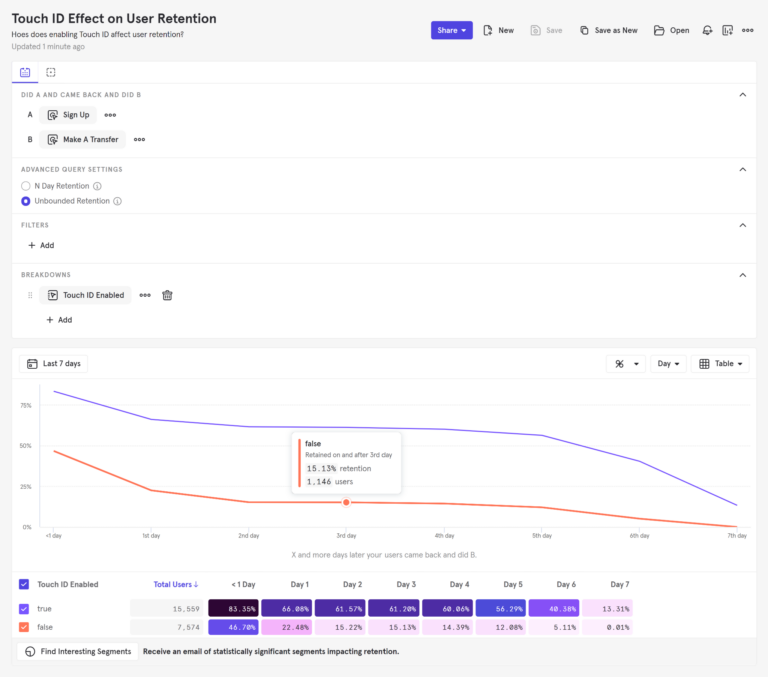
Identity resolution works automatically. Mixpanel connects a user's activity across sessions and devices as they move from anonymous to authenticated, so behavioral data follows a real person through the product rather than a series of disconnected sessions.
The query layer is where Mixpanel separates itself from analytics tools built on general-purpose databases. Arb is Mixpanel's purpose-built engine, returning results fast enough that a product manager can explore behavioral data without queuing up a request or writing SQL.
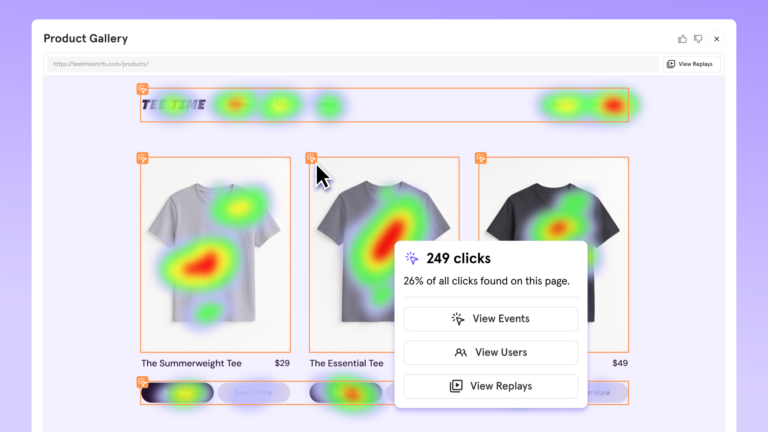
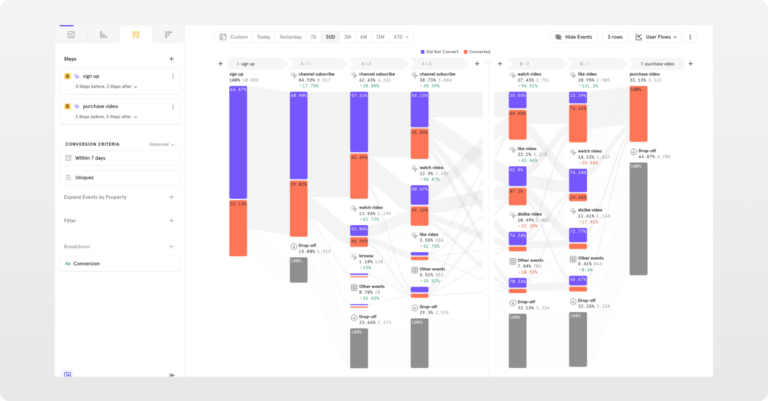
Funnels show precisely where users drop out of any multi-step flow. Retention measures who returns after performing a key action, and when. Flows map the actual paths users take through the product, including the ones no one expected. Session Replay with Heatmaps puts real sessions behind the numbers, so teams can watch what a drop-off looks like rather than just reading the rate.
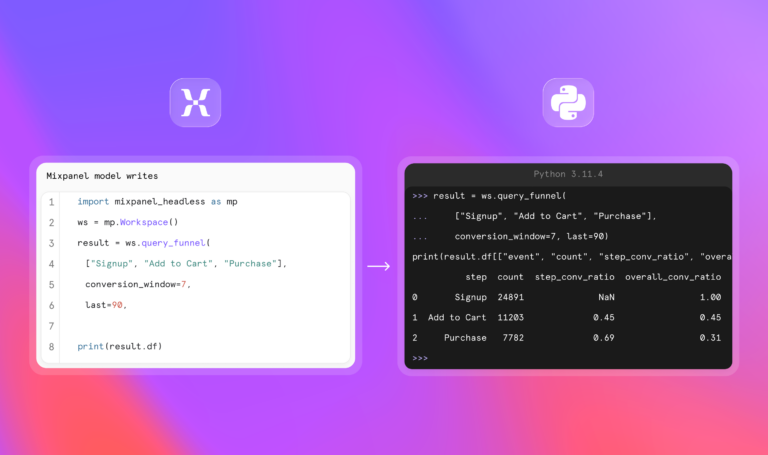
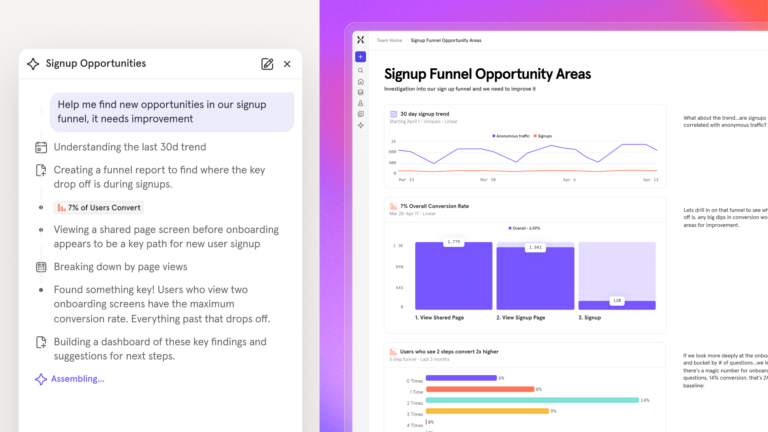
Mixpanel AI monitors key metrics continuously and surfaces what's changed before anyone thinks to check. For teams building or running AI coding agents, Mixpanel Headless makes the full analytics platform programmable: every funnel, cohort, and retention query is callable in Python, with results returned as DataFrames ready to join with any other data source.
Learn more: How long does it take to implement Mixpanel?
Key Mixpanel features
- Fast, accurate queries at scale: up to 7x faster than the data warehouse
- Autocapture and precision event tracking, running together
- Advanced Funnel, Flows, and Retention analysis
- Session Replay with server-side stitching and heatmaps
- Integrated experimentation with feature flags
- Real-time dashboards and alerts
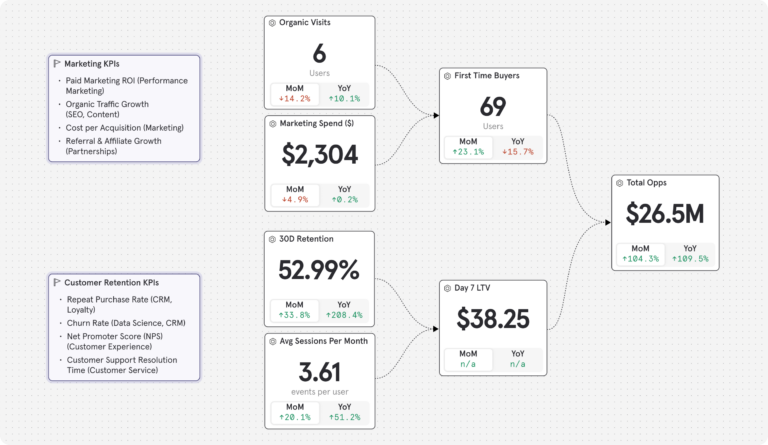
- Metric Trees: a real-time view of how each input metric connects to your North Star metric
- Mixpanel Headless: a Python SDK for AI coding agents to query and act on product data programmatically
- Mixpanel AI: always-on product intelligence that monitors metrics and surfaces anomalies
- Retroactive property updates and borrowed properties
- Data warehouse connectors
- Cohort analysis and user segmentation
- Automated data quality governance
How much does Mixpanel cost?
Mixpanel’s free plan has no time limit. It includes 1M monthly events, 10K monthly session replays, and up to 5 saved reports—enough for most teams to get real product insights from day one.
Paid plans:
- Growth: 1M events included, $0.28 per 1K events after that (volume discounts available). Unlimited reports, 20K monthly session replays, cohorts, and more.
- Enterprise: Unlimited events, advanced analytics, comprehensive data governance and security, and premium support.
Pricing scales with usage rather than punishing growth—no sudden tier jumps.
Experiments and feature flags are also included on all plans. The Free plan includes 1,000 monthly experiment users (MEUs) and up to 10 active flags. Growth starts at 5,000 MEUs and 50 active flags, with the option to scale to 100,000 MEUs via Plan Builder.
| If you're an early-stage startup, Mixpanel pricing is even better: Companies founded in the last five years, with up to $8 million in funding and no other Mixpanel offers already used, can get their first year free on the Startup Plan. Check the Startup Program for current terms or apply immediately. |
Mixpanel vs. Heap: How they stack up
| Feature | MIXPANEL | HEAP |
|---|---|---|
| Autocapture | ||
| Precision event tracking | Limited | |
| Behavioral funnels | ||
| Unlimited funnel steps | Limited | |
| Retention analysis | ||
| Session replay | ||
| Heatmaps | ||
| A/B testing & feature flags | ||
| Metric Trees | ||
| Lookup tables & data enrichment | Limited | |
| Data warehouse connectors | Higher tiers | |
| AI & automation | ||
| Always-on AI agent | ||
| Context-aware AI (knows your metrics) | ||
| Programmatic SDK for AI coding agents | ||
| Pricing & support | ||
| 1M free events | ||
| Email support on all plans | Limited |
What customers have to say
Without Mixpanel we would be less efficient in making our data actionable which would have all sorts of ramifications impacting our growth. From our product-led growth strategy to our product development life cycle and strategic roadmap planning, Mixpanel is critical to our success.”
Mixpanel helps us understand the way and the impact of our decisions. Before, we could only understand the what, or the business outcomes of our work. It has enhanced our ability to rapidly improve our products while not just being reactive but increasingly proactive.”
I’ve been using Mixpanel throughout my entire career in product management (6+ years), and to me, data-driven product management equals Mixpanel.
Without it, I wouldn’t be able to confidently ship serious features — nor truly understand what’s happening in production. I rely on Mixpanel to gather user feedback, monitor overall product health, identify patterns, debug stuff, and recruit users for qualitative research.
I use it almost every day. It’s intuitive, easy to use, and clearly built by people who understand what product managers and researchers need.
I’ve implemented Mixpanel across two companies, four products, and several side projects and I plan to continue championing it in future roles as well.
Also, the recent redesign was excellent — cleaner, faster, and a real step forward.
| The verdict: Should your team switch to Mixpanel? Mixpanel is a strong fit for teams that have outgrown autocapture and need analytical depth they can actually rely on—without the overhead of maintaining instrumentation that breaks when the code changes. |
2. PostHog
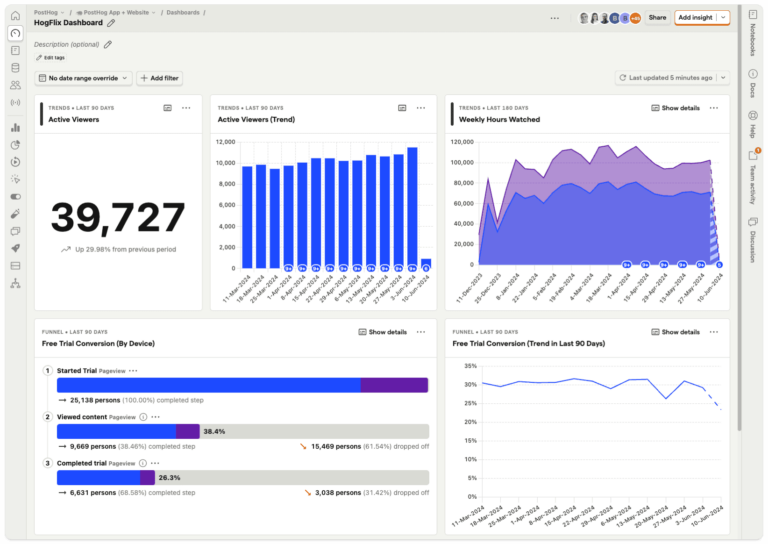
PostHog is an open-source product analytics platform that combines analytics, session replay, feature flags, experiments, and a data warehouse in a single SDK. It captures events automatically from the moment you install it and lets you define additional events in code—giving you autocapture’s speed without Heap’s taxonomy noise. Teams can run it on their own servers and keep all behavioral data in-house.
Key features
- Autocapture and code-based event tracking together
- Behavioral funnels, retention, and cohort analysis
- Session replay and heatmaps
- A/B testing and feature flags (native)
- SQL-based custom queries via HogQL
- Open-source, with self-hosted deployment option
- Built-in data warehouse
Pricing overview
PostHog starts free with a monthly allowance on every product: 1M analytics events, 5K session recordings. Past those limits, you pay per unit (approximately $0.00005 per event for analytics), with rates that drop as volume grows.
PostHog vs. Heap: How they stack up
| Feature | POSTHOG | HEAP |
|---|---|---|
| Event-based analytics | ||
| Autocapture | ||
| Behavioral funnels & retention | ||
| Session replay | ||
| Heatmaps | ||
| A/B testing & feature flags | ||
| Surveys | ||
| Built-in data warehouse | Top tiers only | |
| Self-hosted / open-source | ||
| SQL-based queries | ||
| Retroactive event definition | Limited | |
| Non-technical self-serve | Limited |
What customers have to say
| The verdict: Is PostHog right for your team? PostHog may work for engineering-led teams that want self-hosting, integrated feature flags, and deep customization in a single platform. The SQL requirement and engineering-first design mean a non-technical product manager will lean on engineering to get answers—the same bottleneck that often frustrated teams on Heap. |
3. Fullstory
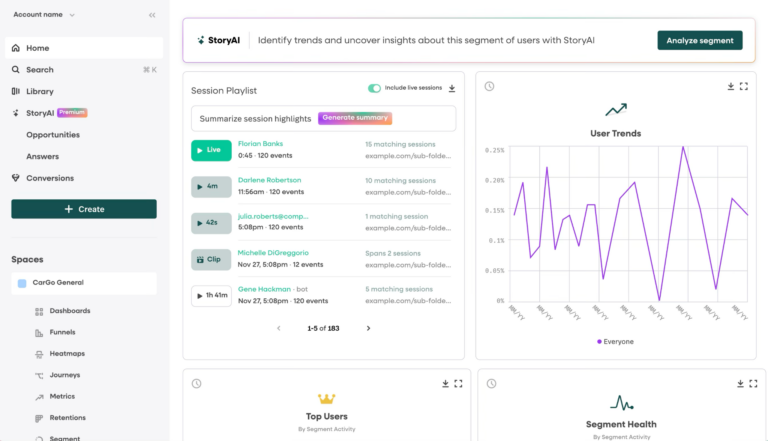
Fullstory is a digital experience intelligence platform that automatically captures every user interaction and reconstructs sessions as high-fidelity, searchable replays. It includes heatmaps and frustration signals—rage clicks, dead clicks, and error clicks—that surface problem areas without manual work. Teams often run it alongside a dedicated product analytics platform rather than instead of one.
Key features
- High-fidelity session replay
- Heatmaps and user journey mapping
- Rage click and frustration detection
- Autocapture
- Behavioral funnels and conversion analysis
- AI-powered session summaries (StoryAI)
- Data export
Pricing overview
Fullstory has a free tier covering up to 30K sessions per month. Paid plans are priced by session volume and require contacting sales for a quote.
Fullstory vs. Heap: How they stack up
| Feature | FULLSTORY | HEAP |
|---|---|---|
| Session replay | ||
| Heatmaps | ||
| Rage click & frustration detection | Limited | |
| Autocapture | ||
| Behavioral funnels | ||
| Retention & cohort analysis | Limited | |
| A/B testing & feature flags | ||
| Self-hosted / open-source | ||
| Retroactive event definition | ||
| Non-technical self-serve | ||
| Primary strength | UX research & qualitative | Behavioral product analytics |
What customers have to say
| The verdict: Is Fullstory right for your team? Fullstory can be suitable for teams whose primary job is diagnosing UX issues through session replay and frustration detection. Where it falls short is the quantitative depth that most teams leaving Heap are looking for—behavioral retention, cohort analysis, and experimentation typically require a separate platform alongside it. |
4. Pendo
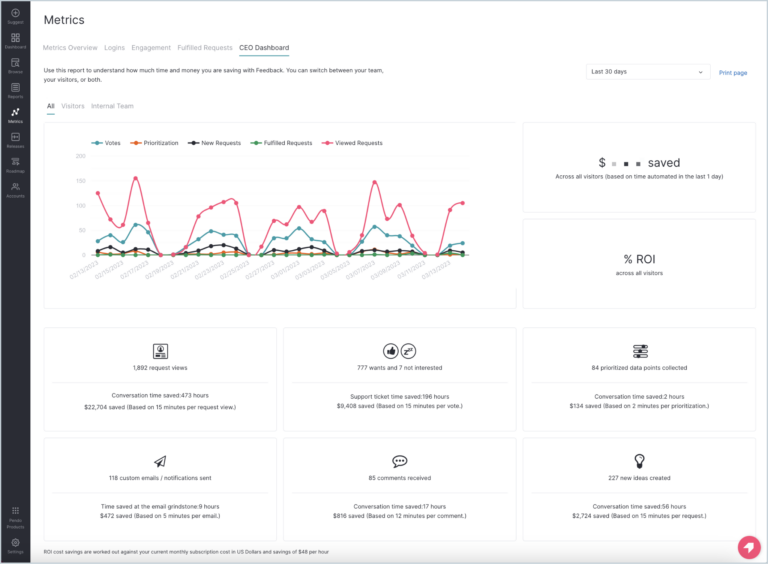
Pendo is a product experience platform that handles analytics, in-app guides, surveys, session replay, and roadmaps from a single snippet. Where most tools on this list measure what users do, Pendo also lets you act on it directly—deploying tooltips, onboarding walkthroughs, and in-app messages triggered by behavioral data, without engineering involvement.
Key features
- Autocapture and retroactive analytics
- Behavioral funnels, paths, retention, and cohort analysis
- In-app guides, onboarding flows, and tooltips
- NPS and in-product surveys
- User segmentation
- Product roadmaps and feedback collection
- Session replay
Pricing overview
Pendo has a free plan for up to 500 monthly active users. Three paid tiers (Base, Core, Ultimate) are custom-quoted based on monthly active users.
Pendo vs. Heap: How they stack up
| Feature | PENDO | HEAP |
|---|---|---|
| Autocapture & retroactive analytics | ||
| Behavioral funnels | ||
| Retention analysis | ||
| Session replay | ||
| In-app guides & onboarding | ||
| NPS & in-product surveys | ||
| Product roadmaps & feedback | ||
| A/B testing & feature flags | ||
| Advanced data-science workflows | Limited | |
| Self-hosted / open-source | ||
| Pricing model | MAU-based | Session-based |
What customers have to say
| The verdict: Is Pendo right for your team? Pendo may work for teams where product-led growth is the priority—specifically when in-app onboarding, guided walkthroughs, and user messaging are more urgent than deep behavioral analytics. The analytics are built mainly to power that guidance layer, so teams that need heavy data-driven workflows often find the reporting lighter than expected. |
5. Amplitude
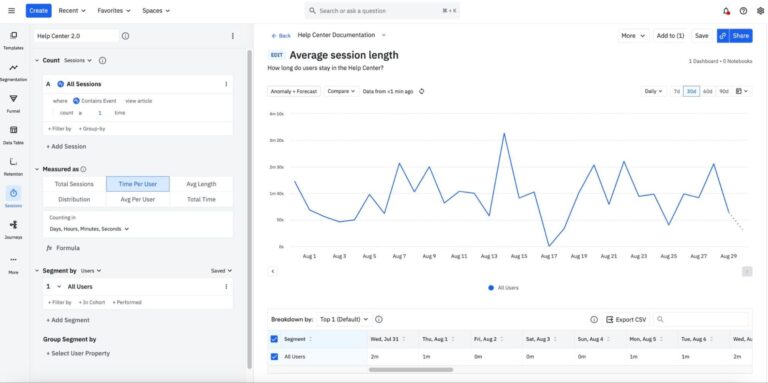
Amplitude is a product analytics platform built for behavioral analysis at scale. It measures events, funnels, retention, and user paths, then connects that data to experimentation, session replay, and activation in one place.
Key features
- Event-based behavioral analytics
- Advanced funnels, retention, and user paths
- A/B testing and feature flags
- Cohort analysis and segmentation
- Session replay
- Customer data platform (CDP)
- AI-powered insights
Pricing overview
Amplitude prices on monthly tracked users (MTUs). A free Starter tier covers up to 10K MTUs and 2M events. Paid plans (Plus from $49/mo, Growth and Enterprise custom-quoted) add advanced analysis, experimentation, and predictive audiences.
Amplitude vs. Heap: How they stack up
| Feature | AMPLITUDE | HEAP |
|---|---|---|
| Autocapture | ||
| Behavioral funnels & retention | ||
| Session replay | ||
| A/B testing & feature flags | ||
| Cohort analysis | ||
| Customer data platform (CDP) | ||
| Data governance & taxonomy | Limited | |
| Retroactive event definition | Partial | |
| Self-hosted / open-source | ||
| Non-technical self-serve | ||
| Learning curve | Steeper | Moderate |
What customers have to say
| The verdict: Is Amplitude right for your team? Amplitude may work for mature product teams with a dedicated analytics function that need deep behavioral analysis at scale. The MTU pricing model and steeper learning curve mean it tends to be a better fit for teams with engineering bandwidth and analyst support, whereas teams without that investment may find they’re paying for depth they can’t fully use. |
6. Google Analytics (GA4)
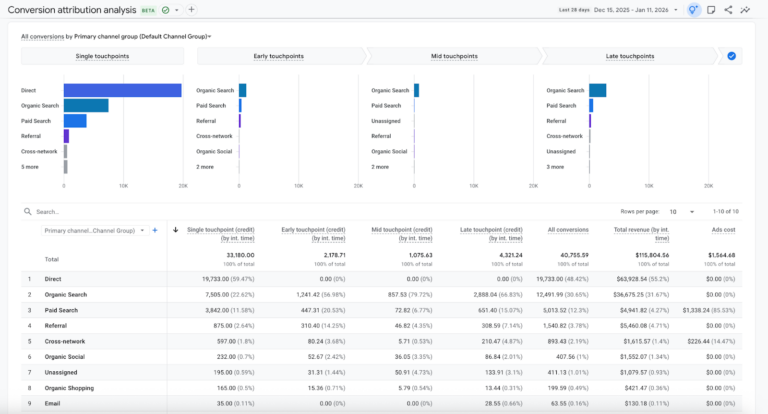
GA4 is Google’s free analytics platform for web and mobile apps. It tracks user sessions as events, connects to Google Ads for attribution, and exports raw data to BigQuery. Its focus is marketing—where traffic comes from, which campaigns convert, which audiences to retarget.
Key features
- Event-based tracking with Enhanced Measurement autocapture
- Marketing attribution and acquisition reporting
- Cross-platform tracking
- Ecommerce tracking
- Explorations (custom funnel, path, and cohort reports)
- BigQuery export
- Free at standard tier
Pricing overview
Google Analytics 4 is free up to approximately 10M events per month. Google Analytics 360 is the enterprise upgrade, custom-priced.
GA4 vs. Heap: How they stack up
| Feature | GOOGLE ANALYTICS | HEAP |
|---|---|---|
| Marketing attribution | ||
| Cross-platform tracking | ||
| Ecommerce tracking | Limited | |
| Free tier | ||
| Autocapture (basics) | Limited | |
| Behavioral funnels & retention | Limited | |
| Session replay | ||
| Retroactive data | ||
| A/B testing & feature flags | ||
| Unsampled data in UI | ||
| Primary use case | Marketing & acquisition | Product behavior |
What customers have to say
| The verdict: Is Google Analytics right for your team? GA4 covers acquisition reporting well, and it’s free—hard to beat on those terms. Where it falls short for teams leaving Heap is product analytics: The interface samples large datasets, history is limited, and the deeper behavioral questions end up in BigQuery behind SQL and a data hire. |
Which solution fits your situation?
We want fast, reliable product insights without the data cleanup → Mixpanel?
Mixpanel is built for product, data, and growth teams that need analytical depth and data they can trust. Intentional event tracking—whether manual or autocaptured—keeps the taxonomy clean. Funnels, retention, experiments, and session replay all run self-serve, so you’re not dependent on a data engineer to get answers.
We need the full open-source stack and are happy to work in SQL → PostHog?
PostHog may work for engineering-led teams that want self-hosting, integrated feature flags, and granular data control. The SQL requirement and developer-first design mean less technical team members will lean on engineering to build analyses.
We’re focused on product-led onboarding and in-app guidance → Pendo?
Pendo may work for teams where guided onboarding and in-app messaging are the priority. The analytics are built to power that guidance layer—teams that need deep behavioral analysis typically need a second tool alongside it.
We need high-fidelity session replay for UX research → Fullstory?
Fullstory’s session replay and frustration detection can work well for qualitative UX research. It’s typically used alongside a dedicated analytics platform rather than in place of one.
We need deep analytics and have engineering to run it → Amplitude?
Amplitude may work for mature product teams with a dedicated analytics function. Without an analyst who knows the platform and a budget to match, the full capability may go unused.
Our focus is acquisition and marketing attribution → GA4?
GA4 handles marketing attribution and web traffic at no cost. For behavioral product analytics—retention, cohort analysis, feature adoption—it reaches its limits quickly.
Switching to Mixpanel: What to expect in your first 30 days
For teams moving away from autocapture, the biggest concern is usually what you’ll lose. The reality is that a focused set of events you chose on purpose carries more signal than every click captured by default—and the difference shows up quickly.
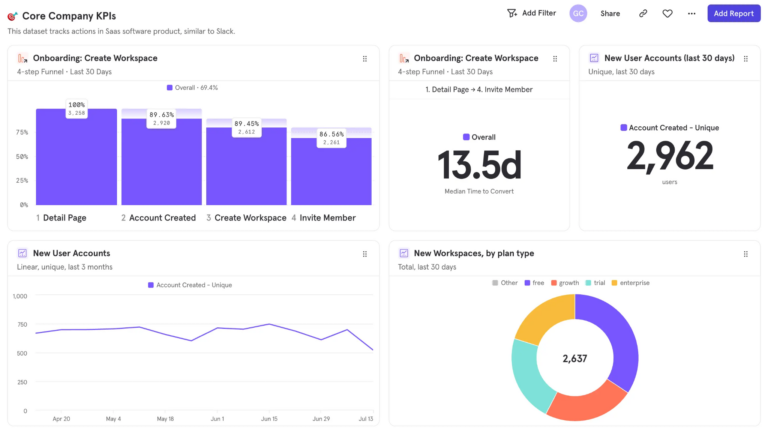
Most teams start by defining the events that matter most: signups, onboarding steps, feature usage. Once those events are flowing, Mixpanel builds them into funnels, retention reports, and behavioral insights that make it easier to see what’s actually happening inside the product.
Within a few weeks, the noise is gone and the data is trustworthy. Product managers explore user journeys on their own. Growth teams test ideas faster. Decisions come from actual behavioral signals rather than cleanup sessions.
| It only takes a few minutes to get started with Mixpanel and begin collecting self-serve insights. Book a demo or get started for free today. |