

8 Fullstory alternatives for teams that need more than session replay

Fullstory is known for its high-fidelity session replay, which shows exactly what a user did, click by click. That's made the platform a top pick for UX and support teams chasing down a broken flow or a confusing screen.
But if you're reading this, session replay alone probably isn't cutting it anymore.
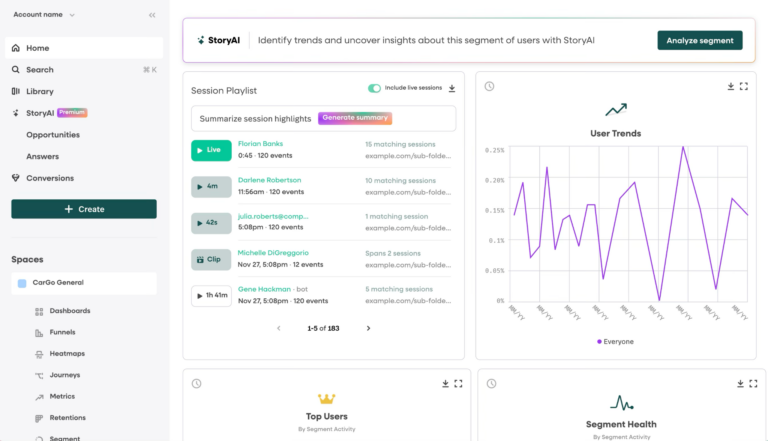
You need to know which drop-off is costing you the most, whether retention is improving, and whether that improvement is because of what you shipped. Fullstory wasn't built to answer those questions. And the pricing, which is tied to how many sessions you record, gets harder to justify the bigger you grow.
This breakdown covers eight of the most-evaluated Fullstory alternatives, assessed on quantitative analytics depth, pricing scalability, feature breadth, and how well each one pairs session replay with the numbers behind it.
Before diving in, learn why teams are leaving Fullstory in the first place. The reasons will help you figure out which alternative actually fits your situation.
Why product teams are leaving Fullstory: Limited quantitative data and inflexible tracking
Fullstory's whole pitch is to record everything, so nothing about the user experience is a mystery. It's great for revealing qualitative user behavior. But ask it to do more than diagnose, and the cracks start to show.
Here's what users are saying:
- Replay isn't analytics: While Fullstory excels with session replays and heatmaps, teams struggle to build complex conversion funnels, map out multi-step user journeys, or measure retention over months. One user notes how Fullstory makes it difficult to see quantitative insights for specific use cases like B2B SaaS. Others caution that information overload can send you down a rabbit hole, leading you to spend hours watching session playbacks and investigating segments.
- Importing and exporting data can be challenging: Fullstory's own site frames its warehouse feature primarily around exporting data to your CRM or cloud storage, but even that path isn't as seamless as it sounds because there's no easy way to import outside data. Users also say sharing data outside the platform can be cumbersome. "When you export dashboards or reports as PDFs, you lose that interactivity and much of the data simply doesn't display or gets cut off since it was designed to be viewed in the tool."
- Inflexible data tracking and configuration: Fullstory relies heavily on autocapture for its analytics, which can get you started quickly but eventually leads to data drift since data management and governance options are limited. "Data governance is still challenging," says one user, who explains it's hard to distinguish 'official' metrics vs. user-generated ones. "Data capture and data cleanliness have been a concern for us with Fullstory," says another user. "It's likely because we didn't yet have proper data governance in place. As a result, we've been using the platform mainly for directional insights rather than treating the data as fully reliable."
- Steep learning curve: It can take a lot of time and trial-and-error to figure out the right way to build views, interpret signals, or confirm you're looking at the "right" data in Fullstory. One user notes that "the level of detail means it's not super intuitive, requiring a user to spend a lot of time in the tool to familiarize and make the most of the capability," adding that without someone on the team dedicated to it, "it's hard to know you're getting the full value from the tool." Another user says that "navigating the software isn't always straightforward, and it often demands a certain level of knowledge and training to achieve what you need."
- Scale comes at a cost: The price increases fast once you're past the entry tier. One user notes that "it can become expensive at scale, and the large amount of session data can feel overwhelming to filter and analyze." Other users say data retention limits also restrict longitudinal analysis unless you upgrade tiers.
Fullstory shows you what happened, but leaves you to figure out why it matters, wrangle the data yourself, and pay more the bigger you grow. None of that makes it a bad tool. It's just built for a narrower job than most product teams eventually need done.
8 best Fullstory alternatives for product managers
1. Mixpanel
What is Mixpanel?
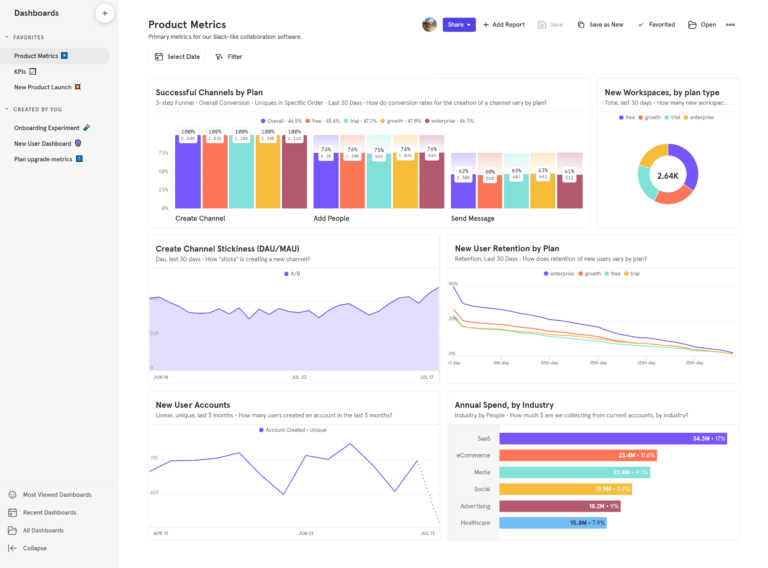
Mixpanel is an AI product intelligence platform that grows with mature product teams. Unlike Fullstory, it combines deep behavioral analytics with Session Replay, experiments, and feature flags in a single platform. This means teams can understand what users do, see exactly how they do it, and test what to ship next, all in one place. It runs on a flexible, fully governed data foundation, so every decision your team makes is backed by data you can trust. Query results come back fast, it connects natively to your data warehouse via integrations, and tracking is fully customizable, which is why teams lean on Mixpanel as the hub for deep quantitative analysis, AI-powered proactive insights, and working together in one place.
How Mixpanel works
For most teams, Mixpanel fits into the existing tech stack. It pulls in governed, high-quality event data from your data warehouse, CDPs, or direct implementations, and a data management layer keeps that data accurate along the way.
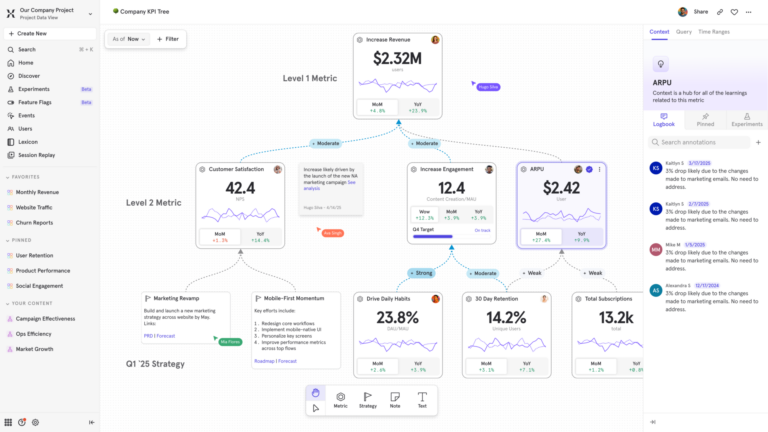
From there, your team can run advanced exploratory analytics, keep an eye on top-line business metrics with Metric Trees, build headless data apps, and let AI agents surface anomalies automatically right where your team already works.
Key features
- Mixpanel AI: Specialized AI agents continuously monitor your product, proactively investigate root causes of metric shifts, and automatically spin up tracking boards. Unlike passive dashboards, Mixpanel Agent is always on.
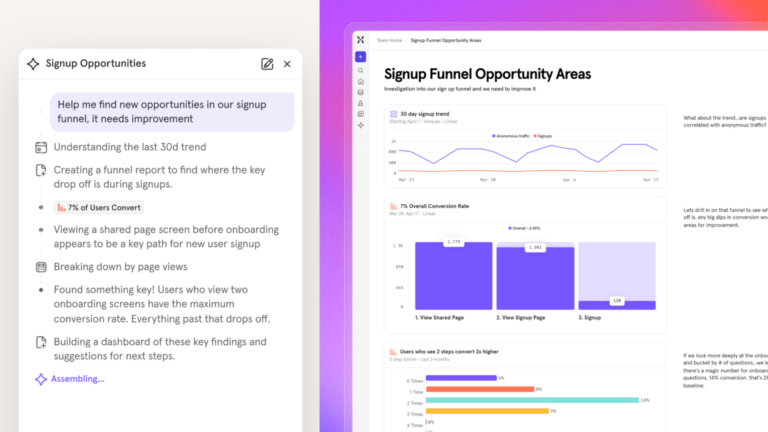
- Experiments and feature flags: Design, launch, and analyze statistically valid A/B tests and feature rollouts in the same platform where you measure user behavior. Included on all plans—Free, Growth, and Enterprise.
- Metric Trees: Replace static dashboards with an interactive map of live metrics that connects day-to-day product behavior to top-line business strategy.
- Session Replay with AI: AI-powered Magic Playlists group pixel-perfect replays and summarize them, so you spend time on friction that matters, not watching recordings one by one.
- Behavioral funnels, retention, and flows: Build complex, multi-step funnels, analyze how user cohorts behave over time, and map retention curves across any time window—without writing SQL.
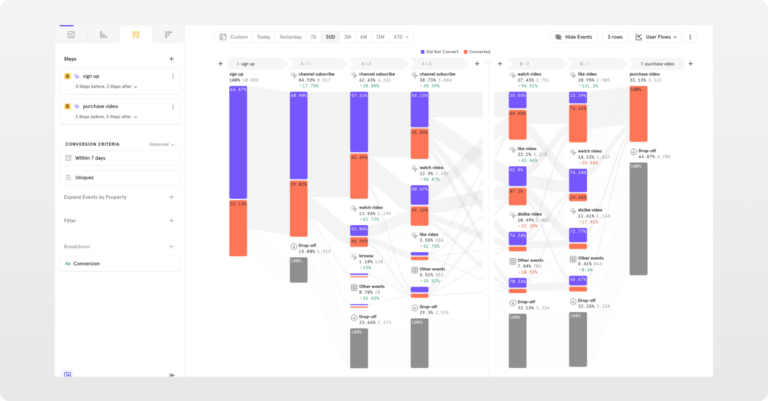
- Robust data management and custom tracking: Complete control via custom properties, custom metrics, and drop filters. Mixpanel's AI-driven Context Engine and Verified Mode keep the data clean and governed.
- Advanced analytics (mobile included): Build complex funnels, analyze custom dynamic cohorts, and map product usage directly to business KPIs. Comprehensive mobile analytics are included natively at no extra cost.
- Warehouse connectors and integrations: Natively connect to your preferred data warehouse, CDP, and DevOps tools so product data lives exactly where you need it.
- Mixpanel Headless and MCP: Build deterministic loops and custom data apps with a single line of Python. With the MCP, embed Mixpanel's context into LLMs like Claude, ChatGPT, or Cursor.
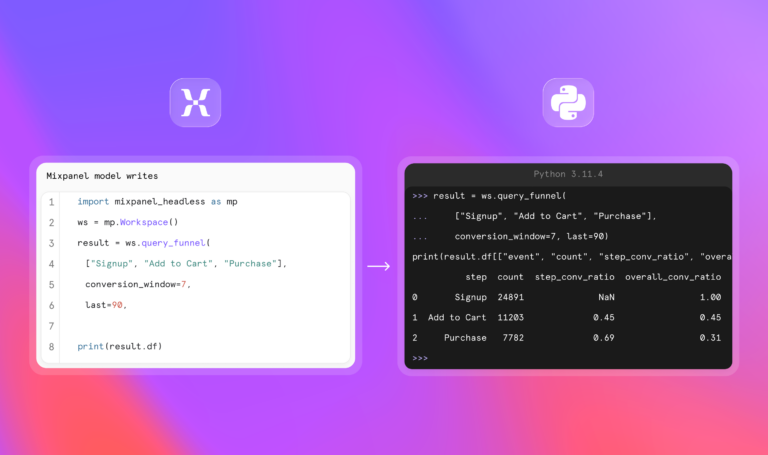
- Proactive collaboration and alerts: Inline comments, Slack integration, AI-powered anomaly detection, and custom alerts that proactively notify the moment critical drop-offs or metric shifts occur.
How much does Mixpanel cost?
Mixpanel's free plan doesn't expire. It comes with 1M monthly events, 10K session replays every month, and enough saved reports to start getting product insights right away.
Paid plans:
- Growth: 1M monthly events included; $0.28 per 1K events after that (volume discounts available). Unlimited reports, 20K monthly session replays, cohorts, and more.
- Enterprise: Unlimited monthly events, advanced analytics, comprehensive data governance and security, and premium support.
The price grows with how much you use Mixpanel, not with how many people on your team need access to it.
Experiments and feature flags are also included on all plans. The Free plan includes 1,000 monthly experiment users (MEUs) and up to 10 active flags. Growth starts at 5,000 MEUs and 50 active flags, with the option to scale to 100,000 MEUs via Plan Builder.
| Exclusive pricing for startups: Early-stage companies that were founded less than five years ago, have up to $8M in total funding, and haven't redeemed any other offers can receive their first year free on the Startup Plan. Explore our Startup Program. |
How companies are using Mixpanel
To see every customer touchpoint and use those insights to build a more elegant, data-driven user experience.
We’ve tied in Mixpanel to be able to understand what our customers are doing at every part of the journey.”
To test hypotheses about how customers use products and gain clearer visibility into what resonates with each customer segment.
Mixpanel customer reviews
Today Mixpanel is the starting point for any product discussion. Before deciding what we’re going to prioritize, flow we redesign or feature we launch, we always use Mixpanel to decide.”
Mixpanel is powerful enough to handle the volume of our data, but flexible and intuitive enough for non-technical teams to use.”
Mixpanel vs. Fullstory: How they stack up
| Feature | MIXPANEL | FULLSTORY |
|---|---|---|
| Core Analytics | ||
| Session Replay | ||
| Heatmaps, scroll maps & click maps | ||
| Autocapture | ||
| Advanced product analytics | Limited | |
| Mobile analytics | Limited | |
| Behavioral funnels | Limited | |
| Retention analysis | ||
| Free session replay quota | 10,000/mo | Session-based pricing |
| Feature Development | ||
| A/B testing & feature flags | ||
| Experiments (run and analyze) | ||
| Data & Infrastructure | ||
| Native warehouse connectors | Limited | |
| Data governance / event taxonomy | Limited | |
| Borrowed properties | ||
| Retroactive property updates | ||
| Advanced Analytics | ||
| Metric Trees | ||
| Cohort analysis | Limited | |
| Anomaly detection & alerts | Limited | |
| AI | ||
| Always-on AI agent | Limited | |
| Context-aware AI (knows your metrics & events) | ||
| MCP server | ||
| Programmatic SDK for AI coding agents (Headless) | ||
| Pricing & Support | ||
| Pricing model | Event-based | Session-based (scales fast) |
| Free tier | 1M events/mo | Limited |
| Email support on all plans | ||
| Free training (Mixpanel University) | ||
| Unlimited user seats | ||
| Self-hosted deployment |
The verdict: Who should switch to Mixpanel?
If you're frustrated by juggling a replay tool for qualitative research and a separate tool for hard metrics, Mixpanel brings it all into one scalable workflow. You get the visual context of session replay anchored in deep, trustworthy behavioral data—not just a video of what happened, but the funnels, retention, and governance to understand why.
Switch if you've hit the ceiling on what autocapture and ungoverned, short-lived data can tell you, and you actually need warehouse connectors, strict event governance, and mobile analytics included from day one.
Mixpanel is built for teams who are done watching sessions one at a time and are ready to know, with real data, what's actually happening across their products.
| Watching sessions is nice. Knowing why they happened is better. Mixpanel delivers both. See what that difference looks like. |
2. Amplitude
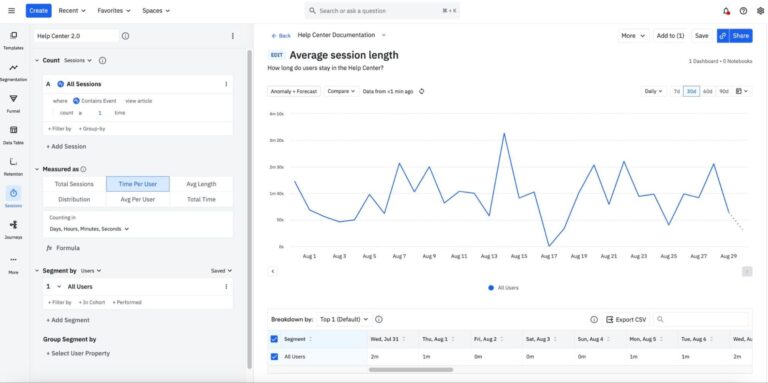
What is Amplitude?
Amplitude is an enterprise-grade product analytics platform built for rigorous quantitative analysis. It benefits teams with dedicated data infrastructure and engineering support. These teams have the bandwidth to invest in deliberate, structured event tracking. That structure is what lets large teams run complex queries on user behavior, retention, and predictive modeling with real confidence in the data underneath.
Key features
- Complex behavioral analysis: Build highly customizable funnels and retention charts.
- Strict data governance: Enforces intentional tracking to maintain a clean data taxonomy, though custom workflows require upfront setup time to define metrics correctly and keep them maintained as the product evolves.
- Predictive analytics: Uses machine learning to forecast user churn and conversion likelihood.
- Session replay: Amplitude has added session replay to its platform as well, though it's a newer addition rather than the core strength it is for a dedicated replay tool like Fullstory.
Pricing overview
Amplitude's free plan currently includes 2M events a month, along with product analytics and 10K monthly session replays. Paid tiers scale from there, with Plus starting at $0 and scaling to 70M events. Growth and Enterprise tiers move to custom, event-volume-based pricing, so plan your budget accordingly.
Amplitude vs. Fullstory: How they stack up
| Feature | AMPLITUDE | FULLSTORY |
|---|---|---|
| Event-based analytics | Limited | |
| Session replay | ||
| Automatic interaction capture | Limited | |
| Behavioral funnels | ||
| Retention analysis | Limited | |
| UX friction detection | Limited | |
| Rage click / frustration detection | ||
| Product analytics | Limited |
Amplitude is built entirely around quantitative data and hard metrics, while Fullstory is built for qualitative observation. Getting the most out of Amplitude still tends to require real engineering investment for setup and maintenance, whereas Fullstory leans on immediate autocapture to get you moving fast.
Amplitude customer reviews
The verdict: Is Amplitude right for your team?
Amplitude is highly effective for massive, data-mature organizations with dedicated analytics engineers, and it now covers session replay too, so you won't lose visual context entirely by leaving Fullstory. But replay is a newer, secondary feature there, not the specialized, high-fidelity tool it is at Fullstory. If that visual depth is the main thing you'd miss, it's worth checking Amplitude's replay quality against your specific needs before committing.
3. Pendo
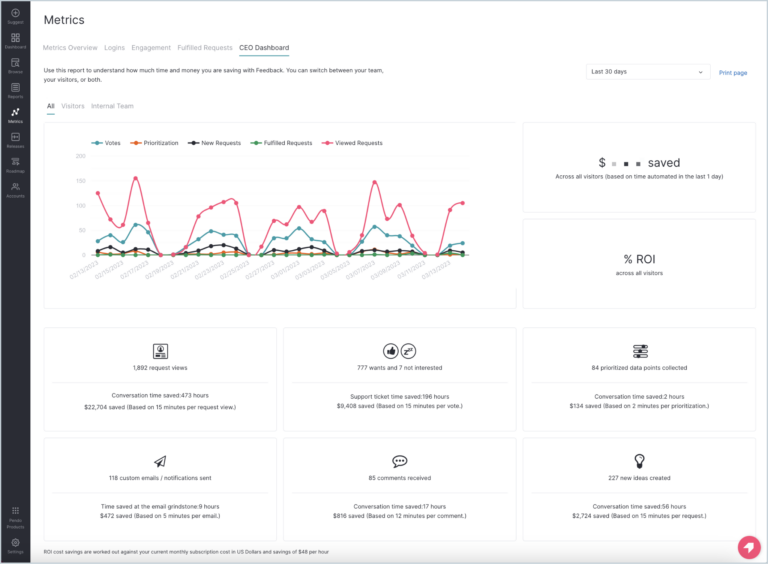
What is Pendo?
Pendo is a product experience platform that treats analytics as the foundation for in-app guidance, user onboarding, feature adoption, and product-led growth. Fullstory helps you observe what's happening in your product, while Pendo acts on it—nudging users toward the right next step with contextual messaging, walkthroughs, or tooltips triggered by behavioral data.
Key features
- In-app messaging: Launch personalized tooltips, walkthroughs, announcements, and onboarding flows based on user behavior.
- Visual, code-free tagging: Define trackable features by clicking elements directly in the product UI through Pendo's browser extension, no code or deployment required.
- Product feedback and roadmaps: Collect feature requests and NPS in-app, and share upcoming product plans to gather user feedback on what's next.
- Segmentation and targeting: Build user cohorts from any mix of properties (role, account tier, signup date) and behaviors (features used, frequency, recency).
Pricing overview
Pendo offers a free tier for basic features. Paid plans are custom-quoted and generally priced for mid-market and enterprise software companies.
Pendo vs. Fullstory: How they stack up
| Feature | PENDO | FULLSTORY |
|---|---|---|
| Session replay | Limited | |
| In-app messaging & guides | ||
| Product usage analytics | Limited | |
| UX friction / rage-click detection | ||
| Feature adoption tracking | Limited | |
| Product feedback & roadmap tools | ||
| Visual, no-code tagging |
Pendo is an activation and messaging tool first, while Fullstory focuses on observation and debugging. Pendo does have some lightweight session replay and usage tracking, which supports its guidance layer—but it isn't the pixel-perfect, high-fidelity replay Fullstory uses to diagnose UI friction.
Pendo customer reviews
The verdict: Is Pendo right for your team?
Choose Pendo if your go-to-market leans on the product itself to drive adoption without heavy sales or customer success involvement. The tradeoff shows up if you're leaving Fullstory specifically for deeper diagnostic power. So if complex funnel or cohort analysis is the real goal, Pendo's analytics may feel thinner than what you're used to.
4. Heap
What is Heap?
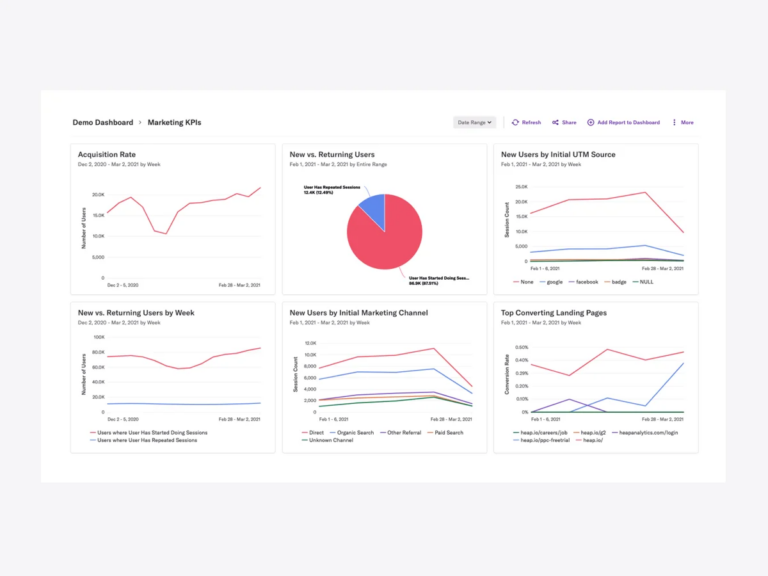
Heap (now part of Contentsquare) centers its analytics platform on retroactive autocapture. The moment its snippet or SDK is installed, it automatically tracks every click, tap, form submission, and pageview on web and mobile. No engineering is required to manually instrument events upfront, so teams can define events and build funnels weeks or months after users actually took those actions. This allows teams to query historical data as if they'd been tracking it from day one.
Key features
- Retroactive autocapture: Collects every click, scroll, tap, and pageview automatically from installation.
- Event visualizer: Define events directly from the interface by selecting elements within the product UI, then apply that definition retroactively to historical data.
- Custom event properties: Enrich automatically captured events with extra context through JavaScript calls or a server-side API.
- Heap SQL: Direct SQL access to the full event dataset for custom analysis beyond Heap's pre-built reports.
- Heap Illuminate: Automatically surfaces hidden friction points, drop-offs, and unusual usage patterns from your data.
Pricing overview
Heap's free plan covers up to 10K monthly sessions with core analytics and a 6-month data history. Growth, Pro, and Premier packages all scale with session volume, but session replay isn't included by default. Because Heap captures everything by design, costs can climb fast on high-traffic sites.
Heap vs. Fullstory: How they stack up
| Feature | HEAP | FULLSTORY |
|---|---|---|
| Autocapture | ||
| Retroactive event definition | Limited | |
| Funnel & retention analysis | Limited | |
| Direct SQL / custom querying | ||
| Session replay | Add-on (Pro tier+) | |
| UX friction / rage-click detection | Limited | |
| Data warehouse integration | Higher tiers | Limited |
Heap offers stronger quantitative analytics workflows than Fullstory, such as more sophisticated funnels, retention, and SQL-level querying. But both lean heavily on autocapture, so both can end up with messy, hard-to-manage data taxonomies and pricing that gets unpredictable as traffic scales.
Heap customer reviews
The verdict: Is Heap right for your team?
Heap suits teams that haven't fully instrumented tracking yet and need behavioral data flowing fast, without an upfront engineering lift. But because it still relies on capturing interactions, it shares Fullstory's core weaknesses—a bloated event taxonomy that takes real discipline to keep clean as the product grows.
5. LogRocket
What is LogRocket?
LogRocket gives software engineers a frontend application monitoring and session replay tool built for their workflow. It captures user sessions alongside deep technical elements like network logs and console errors, so engineering teams can reproduce and fix bugs instead of just knowing they happened.
Key features
- Developer-focused replay: View network requests, Redux state, and JavaScript errors alongside user sessions.
- Performance monitoring: Track frontend performance metrics like load times and CPU usage.
- Error tracking: Automatically surface the highest-impact bugs affecting the user experience.
- AI session summaries: Get AI-generated summaries and issue detection across sessions, though reviewers note the summaries can be sparse on holistic session activity.
Pricing overview
LogRocket offers a 14-day free trial. Paid plans are priced by session volume starting with their Core plan. Users must have the Pro or Enterprise tier to use the AI intelligence layer.
LogRocket vs. Fullstory: How they stack up
| Feature | LOGROCKET | FULLSTORY |
|---|---|---|
| Session replay | ||
| Developer-focused replay | Limited | |
| Performance monitoring | Limited | |
| Error tracking | Limited | |
| UX friction / rage-click detection | Limited | |
| Non-technical / self-serve interface | Limited |
LogRocket is built for developers debugging code, while Fullstory is built for UX and product teams observing behavior. Non-technical teams might find Fullstory's interface easier to use and more approachable than LogRocket's.
LogRocket customer reviews
The verdict: Is LogRocket right for your team?
LogRocket is the perfect alternative if your engineering team is the primary user and needs to diagnose complex frontend bugs. The replay-plus-telemetry combination is built exactly for that. But if your product managers need to run cohort analyses or measure business impact, LogRocket doesn't have the quantitative analytics depth to do that job.
6. Quantum Metric
What is Quantum Metric?
Quantum Metric is an enterprise Continuous Product Design platform that combines session replay, technical anomaly detection, and business impact quantification. The platform connects what's breaking in your product directly to what it's costing you in revenue.
Key features
- Business impact scoring: Automatically calculates the potential revenue lost due to a specific UI friction point.
- Real-time anomaly detection: Alerts teams instantly when conversion rates drop or error rates spike.
- Cross-functional dashboards: Unifies data for engineering, product, and business leadership in one place.
Pricing overview
Quantum Metric generally offers enterprise-focused, custom-quoted pricing only. Pricing is based on annual session volume, product add-ons, and other factors such as the amount of professional services needed.
Quantum Metric vs. Fullstory: How they stack up
| Feature | QUANTUM METRIC | FULLSTORY |
|---|---|---|
| Session replay | ||
| Business impact / revenue scoring | ||
| Real-time anomaly detection | Limited | |
| Cross-functional dashboards | Limited | |
| UX friction / rage-click detection | ||
| Enterprise e-commerce focus | Moderate |
Quantum Metric ties technical errors directly to financial impact, while Fullstory focuses more on visual observation. Quantum Metric is also geared heavily toward enterprise ecommerce and finance, where Fullstory has a broader mid-market presence.
Quantum Metric customer reviews
The verdict: Is Quantum Metric right for your team?
Quantum Metric is ideal for large ecommerce enterprises that need to immediately quantify the dollar amount lost because of a bug or user friction point. For startups or mid-market teams, its price tag and heavy enterprise deployment make it overkill.
7. PostHog
What is PostHog?
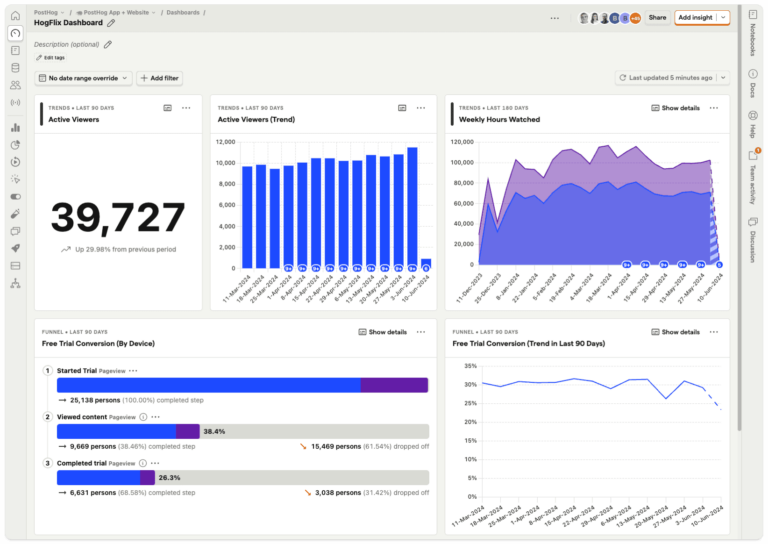
PostHog is an open-source, all-in-one platform for engineers, combining session replay, product analytics, feature flags, and A/B testing in one environment. It offers a self-hosted deployment option alongside its managed cloud service, giving teams full control over where their data lives, which matters for organizations with strict data residency or compliance needs.
Key features
- All-in-one toolkit: Combines session replay, analytics, feature flags, and surveys in one environment.
- HogQL for custom queries: A SQL-like query language for custom analyses beyond PostHog's pre-built reports.
- Feature flags and experiments: Built-in A/B testing and gradual feature rollouts without deploying new code.
- Self-hosting capability: Deploy on your own infrastructure for strict data privacy and compliance.
Pricing overview
The free tier includes 1M events, 5K session replays, and 1M feature flag requests a month, resetting monthly. Past that, they charge based on usage for everything above the free allowance. Users can set up billing limits and alerts as well.
PostHog vs. Fullstory: How they stack up
| Feature | POSTHOG | FULLSTORY |
|---|---|---|
| Session replay | ||
| Product analytics | Limited | |
| Feature flags | ||
| A/B testing / experiments | ||
| Custom SQL querying | ||
| Self-hosted deployment | ||
| Non-technical / self-serve interface | Limited |
PostHog requires technical proficiency and SQL knowledge to get the most out of it, while Fullstory is immediately accessible to non-technical users. PostHog also offers native feature flagging and experimentation, which Fullstory doesn't have at all.
PostHog customer reviews
The verdict: Is PostHog right for your team?
PostHog is a great choice for highly technical, engineering-led teams that want to consolidate their stack and write custom SQL queries. But product and UX managers migrating from Fullstory often find PostHog's learning curve steep and its interface less intuitive for quick visual insights.
8. Glassbox
What is Glassbox?
Glassbox is a digital experience analytics platform that automatically captures 100% of user sessions on web and mobile. This end-to-end visibility lets users analyze every step of the customer journey and pinpoint friction areas at each stage. It also helps users in regulated industries maintain compliance and reduce fraud.
Key features
- Tagless capture: Records all data from the client side and network side without manual tagging.
- Struggle scoring: Automatically identifies sessions where users experience friction or frustration.
- Compliance and security: Offers robust data masking to ensure sensitive PII is never recorded.
Pricing overview
Pricing packages target users in product operations, marketing, or product roles. Pricing depends on which package tier you choose, how long you retain session data and analysis, and your session volume.
Glassbox vs. Fullstory: How they stack up
| Feature | GLASSBOX | FULLSTORY |
|---|---|---|
| Session replay | ||
| Struggle / friction detection | ||
| Tagless, no-code capture | ||
| On-premise deployment | ||
| PII masking / compliance controls | Strong | Moderate |
| Deployment model | Cloud or on-premise | Cloud-only |
Glassbox offers comprehensive on-premise deployment options for heavily regulated industries, whereas Fullstory is cloud-based only. Both offer strong session replay and struggle detection, but Glassbox leans more heavily into enterprise compliance and security.
Glassbox customer reviews
The verdict: Is Glassbox right for your team?
Glassbox is a strong contender if you're a large bank, insurance company, or healthcare provider that requires on-premise hosting and strict PII masking. For typical SaaS or ecommerce teams, it's likely too heavy and expensive compared to more agile alternatives.
Honorable mentions
The following platforms have lighter feature sets compared to the other Fullstory alternatives listed above, but they're worth considering, especially for teams with tight budgets.
- Hotjar (now part of Contentsquare): Great for basic heatmaps and surveys.
- Mouseflow: Strong for straightforward session recording and form analytics.
- Smartlook: Good for mobile app session replays and basic event tracking.
Which product analytics platform is right for you?
We want powerful analytics seamlessly connected to session replay → Mixpanel?
Mixpanel is built for teams that need to know both what is happening and why. By integrating targeted session replay into deep quantitative analytics, you go straight to the sessions behind a specific funnel drop-off or conversion spike, instead of sifting through recordings at random. You also get advanced funnels, retention tracking, and visual context in a fast, self-serve UI.
We need strict quantitative depth and have engineers to maintain it → Amplitude?
Amplitude offers rigorous depth for mature enterprise teams. The tradeoff is a heavy reliance on engineering for setup. While session replay is available, Fullstory's session replay feature is more advanced.
We can't instrument tracking yet and need behavioral data flowing fast → Heap?
Heap keeps Fullstory's autocapture-first approach but adds real funnel and retention depth on top. The tradeoff is that it shares Fullstory's core weakness—a bloated event dictionary and pricing that climbs fast with traffic.
We're an engineering-led team debugging frontend code → LogRocket?
LogRocket is excellent for diagnosing technical errors alongside replays. The tradeoff is that it lacks the product analytics depth product managers need to measure long-term metrics.
We want to trigger in-app messages based on user behavior → Pendo?
Pendo is excellent for launching onboarding walkthroughs and driving adoption. The tradeoff is that its analytics are lighter than the high-fidelity replay and cohort depth that made Fullstory valuable.
We need to quantify the financial impact of UX errors → Quantum Metric?
Quantum Metric is a powerhouse for enterprise ecommerce. The tradeoff is a massive price tag, often into six figures annually, and a highly complex deployment.
We want one consolidated, self-hosted stack and have the engineers for it → PostHog?
PostHog bundles analytics, replay, feature flags, and experimentation, with full control over where your data lives. The tradeoff is a learning curve, as it takes SQL comfort and technical investment to get the most out of it.
We're in a heavily regulated industry and need on-premise hosting → Glassbox?
Glassbox matches Fullstory's session replay and struggle detection with stronger compliance and PII masking. The tradeoff is a price tag and deployment complexity that's overkill for typical SaaS or ecommerce teams.
What happens when you switch from Fullstory to Mixpanel?
Leaving Fullstory can feel like giving up a safety net. "Record everything" means you never have to guess whether the session you need is in there somewhere, and letting go of that instinct is the real adjustment that comes with switching to a platform anchored in structured data. In practice, that adjustment pays off fast—in speed and clarity you didn't have before.
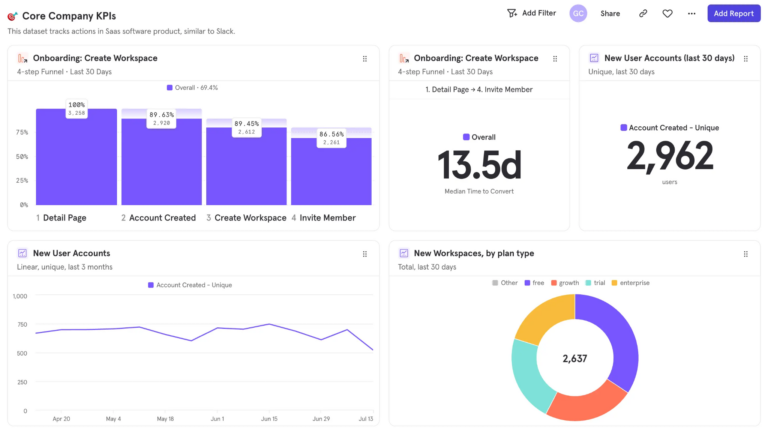
Here's what the first 30 days typically look like:
- Start by tracking 5 to 10 core events, such as signups and checkouts.
- Once those events are flowing, Mixpanel's self-serve UI turns them into funnel and retention reports almost immediately, no analyst required.
- When a funnel shows a drop-off, click straight into the session replays of the exact users who didn't convert.
- Within a few weeks, most teams notice they're spending less time managing the analytics tool and more time learning from it.
- Product managers explore user journeys on their own, and decisions start coming from real behavioral signals instead of guesswork.
| It only takes a few minutes to get started with Mixpanel and begin collecting self-serve insights. Book a demo or get started for free today. |