

Top 8 Google Analytics alternatives for product teams that need true behavioral insights

For over a decade, Google Analytics has been the default, ubiquitous analytics platform for tracking web traffic, attribution, and digital footprints worldwide.
But with the mobile app explosion, website views went from the key to only a mere part of understanding digital product usage.
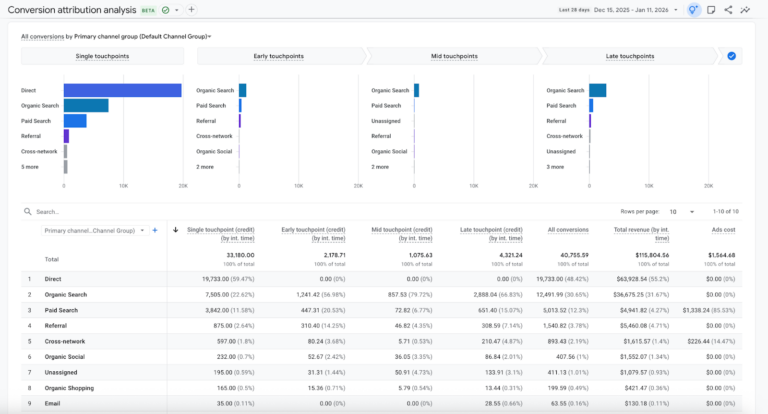
Its latest, most advanced version, Google Analytics 4, arrived in 2020 to add potential for app usage insights, but it included a steep learning curve, an overly complex configuration required for basic reports, thresholding issues, and data delays. The challenges and drawbacks of GA4 have been enough to prompt some teams to look for other options.
If your team is one of them, this article is here to help. This comparison article will evaluate the best GA4 alternatives across criteria like data privacy and compliance, ease of use, reporting speed, and behavioral analytics depth.
Why product teams are leaving GA4
GA4 was supposed to be a massive leap forward. By moving to an event-based data model, Google promised to unify web and app tracking while adapting to a privacy-first world.
Instead, the mandatory switch left millions of marketers and product managers feeling stranded. What used to take two clicks in previous GA versions now requires a complex configuration, a custom exploration report, or a data export.
Even with its added complexity, GA4 remains limited in what it can do, lagging behind the increased features and functionality that competitors have added in recent years. GA4 does beat many other options on price, but that’s in large part because of its limited scope; it still primarily focuses on web analytics. For everything else, it requires add-ons and complementary tools.
When it comes to AI, GA4 offers MCP support and a general chatbot, but it does not offer any specific agents or headless AI.
Here’s what users are saying:
8 best Google Analytics alternatives to switch to
1. Mixpanel
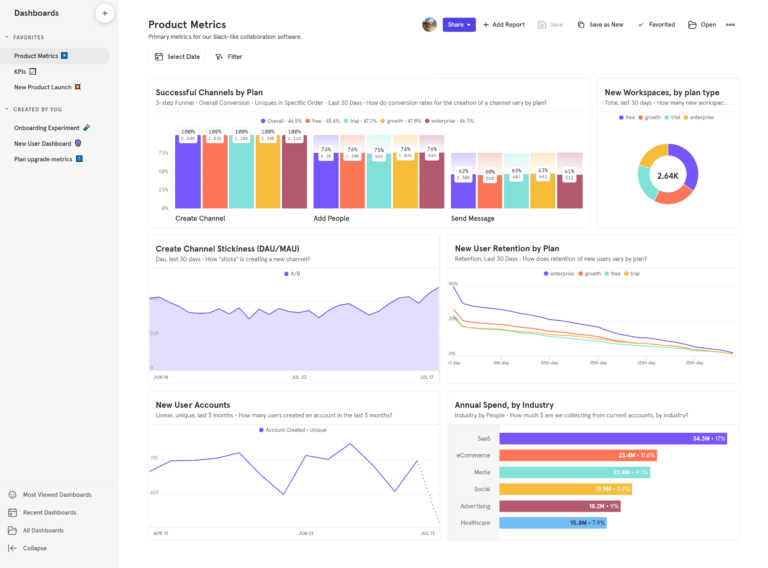
Mixpanel is a product intelligence platform that helps teams improve every stage of product development, from understanding user behavior to validating ideas through experiments and safely rolling out new features. While GA4 looks at high-level traffic acquisition, Mixpanel focuses heavily on what happens after the user arrives, allowing users to track retention, user journeys, and feature adoption seamlessly.
It also includes an array of features to help product and engineering teams manage the entire development lifecycle — experiments, feature flags, and session replay — as well as extensive AI interoperability, including in-platform agents, an MCP server, and Mixpanel Headless.
How Mixpanel works
Mixpanel offers real-time analytics and serves complex query results in seconds (powered by its proprietary Arb database), eliminating GA4's multi-day data latency. Data collection runs via lightweight SDKs, APIs, or data warehouse syncs, and users can manage their data model using Lexicon and extensive data governance controls. Product, growth, and engineering teams can build funnels, find retention trends, and uncover optimization opportunities without needing an analyst to construct custom reports.
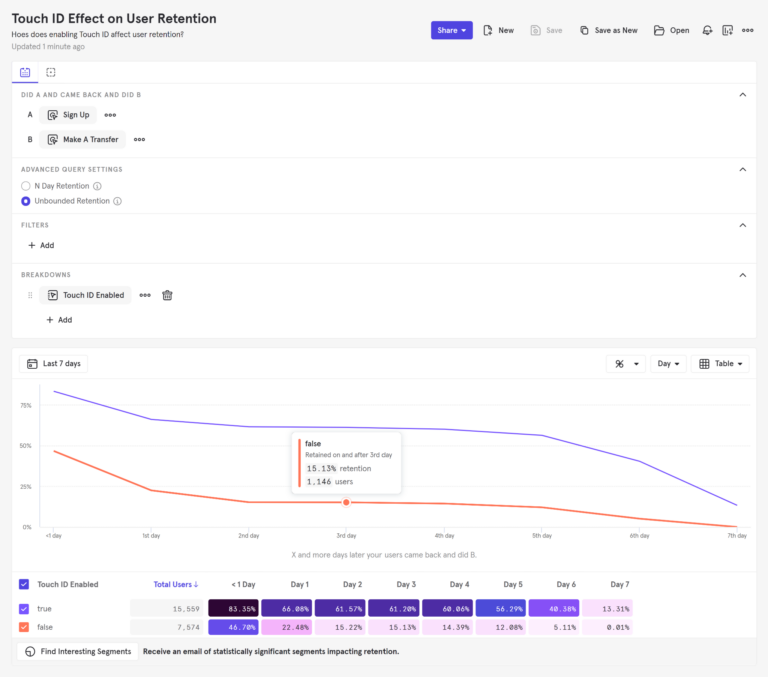
In addition to analytics, Mixpanel offers a suite of products to help product builders, such as Session Replay, Feature Flags, Experiments, and Metric Trees. Each product is connected, meaning users can flow from a report on a new feature, to viewing how users are interacting with it via session replay, to creating an experiment, to rolling out the winning variant.
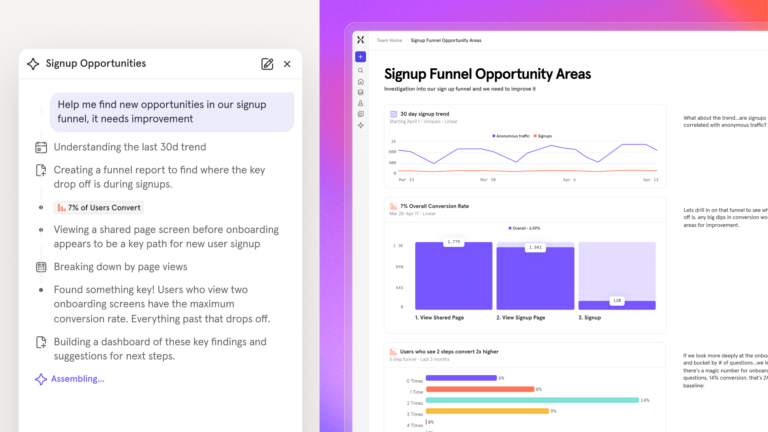
Mixpanel has also made the platform AI-native, delivering always-on product intelligence by combining specialized agents, a business-aware Context Engine, and an MCP server for integrating Mixpanel into existing AI workflows. The AI agents are purpose-built to monitor metrics continually, diagnose what's driving them, and help teams act.
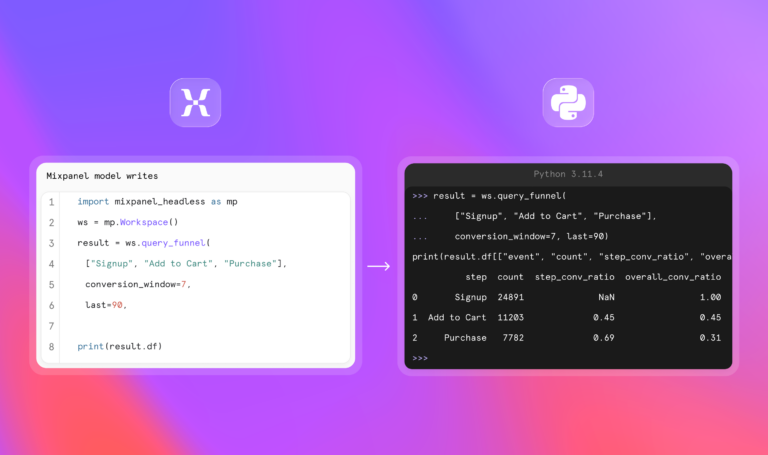
Mixpanel Headless takes these capabilities even further. Designed for more technical PMs and AI-native teams, it exposes the full analytics layer as a typed Python SDK to give AI coding agents direct programmatic access to every funnel, cohort, and experiment. Teams can then build on top of Mixpanel, such as creating custom data apps or sophisticated, deterministic workflows.
Key Mixpanel features
- Fast, accurate queries at scale: up to 7x faster than the data warehouse
- Autocapture and precision event tracking, running together
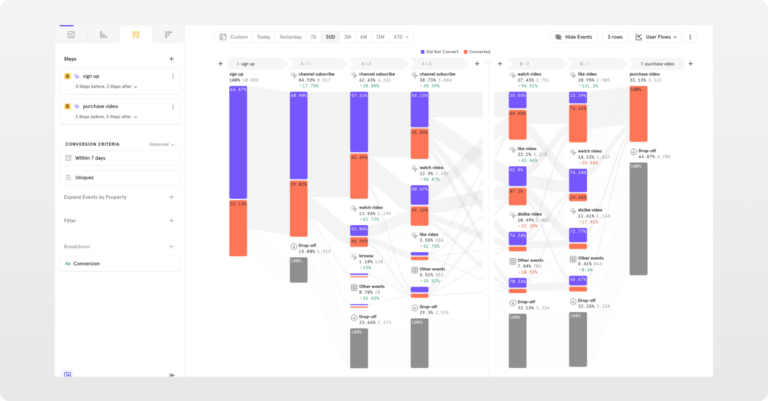
- Advanced Funnel, Flows, and Retention analysis
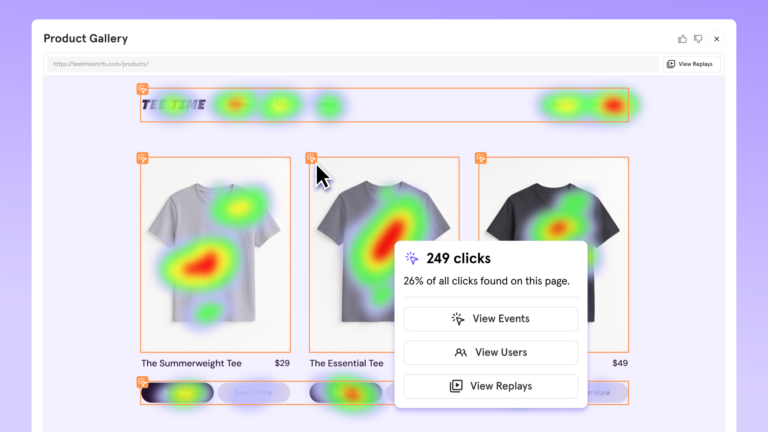
- Session Replay with server-side stitching and heatmaps
- Integrated experimentation with feature flags
- Real-time dashboards and alerts
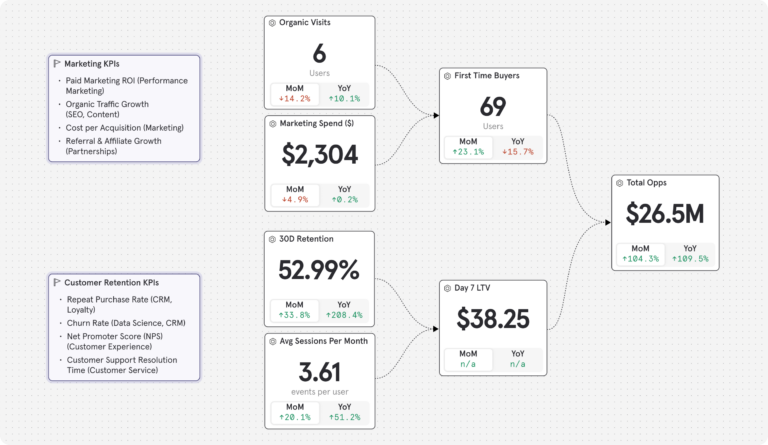
- Metric Trees: a real-time view of how each input metric connects to your North Star metric
- Mixpanel Headless: a Python SDK for AI coding agents to query and act on product data programmatically
- Mixpanel AI: always-on product intelligence that monitors metrics and surfaces anomalies
- Retroactive property updates and borrowed properties
- Data warehouse connectors
- Cohort analysis and user segmentation
- Automated data quality governance
Key areas where Mixpanel beats GA4:
- No data latency: Get instant, real-time data visualization without waiting 24 to 48 hours.
- Extended data retention and data management: Avoid GA4's strict 14-month retention wall to analyze long-term historical user behavior, and has extensive in-platform data controls to ensure accurate, trusted answers
- Native experimentation, feature flags, and Session Replay: Watch user behavior or run A/B tests with feature flags directly within your reporting workflows.
- Headless: Create custom data apps, deterministic workflows, and build on top of Mixpanel with agentic CLIs.
Learn more: How long does it take to implement Mixpanel?
How much does Mixpanel cost?
Mixpanel operates on event-based pricing not seat licenses, offering both free and paid plans. The free plan includes 1M monthly events, 10K monthly session replays, and up to 5 saved reports, with no time limit.
Mixpanel’s paid plans:
- Growth: 1M events included, $0.28 per 1K events after that (volume discounts available). Unlimited reports, 20K monthly session replays, cohorts, and more.
- Enterprise: Unlimited events, advanced analytics, comprehensive data governance and security, and premium support.
Experiments and feature flags are included on all plans. The Free plan includes 1,000 monthly experiment users (MEUs) and up to 10 active flags. Growth starts at 5,000 MEUs and 50 active flags, with the option to scale to 100,000 MEUs via Plan Builder.
Pricing scales with usage rather than punishing growth.
Mixpanel also offers special pricing for early-stage startups: Companies founded in the last five years, with up to $8 million in funding and no other Mixpanel offers already used, can get their first year free on the Startup Plan and full access to the Mixpanel platform. Check the Startup Program for current terms.
What Mixpanel customers have to say
The Mixpanel product enables democratized, self-service access to important product usage analytics and data across your product ecosystem. The interface is easy and straightforward to use, allowing users to quickly discover and act on insights.”
It’s the speed. I can go from a question to a shareable answer in minutes—no SQL, no waiting on anyone. The funnel breakdowns and retention charts are ridiculously useful once you get the hang of them. It stays out of your way and lets you actually focus on the analysis.”
Mixpanel provides the value of 10+ dedicated analysts at a fraction of the cost. Day-of-release monitoring, core product dashboards, understanding where users churn in key workflows, instant analysis into key feature metrics—adoption, stickiness, velocity—and measuring impact in A/B testing.”
We chose Mixpanel because it provides the purest form of analytics—clear, event-based insights without unnecessary complexity. It allows our teams to track exactly what matters, build funnels and retention cohorts with precision, and make decisions based on real user behaviour in real time.”
Mixpanel vs. GA4: How they stack up
| Feature | MIXPANEL | GOOGLE ANALYTICS |
|---|---|---|
| Autocapture / instant setup | ||
| Behavioral funnels | Limited | |
| Unlimited funnel steps | Limited | |
| Retention analysis | Limited | |
| User-level analytics | Limited | |
| Session replay | ||
| Heatmaps | ||
| A/B testing & feature flags | ||
| Metric Trees | ||
| Real-time data | 24–48hr delay | |
| Unsampled data | ||
| Extended data retention | 14 months max | |
| Data warehouse connectors | Limited | |
| Lookup tables & data enrichment | ||
| AI & automation | ||
| Always-on AI agent | ||
| Context-aware AI (knows your metrics) | ||
| Programmatic SDK for AI coding agents | ||
| Pricing & support | ||
| 1M free events / month | ||
| Email support on all plans | ||
| Free training (Mixpanel University) |
The verdict: Is Mixpanel right for your team?
Mixpanel is the best choice for SaaS, ecommerce, and product teams that have outgrown GA4's superficial web traffic metrics and want a more holistic, intuitive, fast platform to build products that lead to long-term engagement and retention.
Teams that want to focus on low-cost web analytics and don’t need to dive deeper into product analytics, AI, session replay, or experimentation should stay with GA4.
2. Plausible
What is Plausible?
Plausible is a lightweight, open-source web analytics tool built with a strict focus on data privacy. It serves as a direct antidote to GA4's complexity, providing a single-page dashboard with essential traffic metrics.
Key features
Plausible focuses on web analytics and does not track individual user paths, session replays, or complex funnel analyses.
Plausible’s core capabilities include:
- Privacy-first tracking: Fully compliant with GDPR, CCPA, and PECR out of the box. No cookie banners or user consent popups required.
- Ultra-lightweight script: The tracking script is under 1 KB, keeping page speeds fast compared to Google's heavy tagging scripts.
- Simple single-page dashboard: Displays key metrics like unique visitors, page views, bounce rate, and top referral sources on one clean page.
Pricing overview
Plausible offers a 30-day free trial followed by tier-based pricing based on monthly page views, starting at $9/month.
Plausible vs GA4: How they stack up
| Feature | GOOGLE ANALYTICS | PLAUSIBLE |
|---|---|---|
| GDPR compliant out of box | ||
| Cookieless tracking | ||
| No cookie banner required | ||
| Open-source option | ||
| Self-hostable | ||
| Marketing attribution | Basic | |
| Custom event tracking | Limited | |
| Mobile app tracking | ||
| Behavioral funnels & retention | Limited | |
| Free tier | ||
| Primary use case | Marketing & acquisition | Privacy-first web analytics |
Plausible customer reviews
The verdict: Is Plausible right for your team?
Plausible is perfect for content sites, independent creators, and digital marketing teams who only care about baseline traffic, referral attribution, and website performance without dealing with complex event setups or cookie consent laws. For product teams or companies that want access to more in-depth user analytics, Plausible probably isn’t the right fit.
3. Fathom Analytics
What is Fathom Analytics?
Fathom is another pioneer in the minimalist, privacy-focused analytics space. It strips away all tracking of personally identifiable information (PII) to offer a fast, simple alternative to Google's data extraction model.
Like Plausible, Fathom is a relatively lightweight website analytics tool, with no product analytics and no functionality for tracking specific user behavior, feature adoption, or retention within a web or mobile app.
Key features
Fathom Analytics is geared towards small and medium-sized businesses that need straightforward reporting on pageviews, top content, and traffic referrers without collecting personal user data.
Fathom’s main selling points include:
- Cookieless tracking: Bypasses cookie banners completely while accurately measuring unique visitors using anonymous routing.
- Uptime monitoring: Built-in alerts that ping your team immediately if your website goes down.
- Advanced ad-blocker bypassing: Employs custom domains to ensure tracking data isn't broken by aggressive browser privacy extensions.
Pricing overview
Fathom operates on a usage-based monthly pricing model starting at $15/month for up to 100,000 pageviews, with no free tier available.
Fathom Analytics vs GA4: How they stack up
| Feature | GOOGLE ANALYTICS | FATHOM ANALYTICS |
|---|---|---|
| Privacy-first tracking | ||
| Dark mode | ||
| Easy data export | ||
| Email reports | ||
| Public dashboard sharing | ||
| Uptime monitoring | ||
| Marketing attribution | Basic | |
| Behavioral funnels & retention | Limited | |
| Free tier | ||
| Primary use case | Marketing & acquisition | Privacy-first web analytics |
Fathom Analytics customer reviews
The verdict: Is Fathom Analytics right for your team?
Fathom belongs on your list if data compliance is your highest priority and you want a clean, simple, customizable dashboard that takes less than five minutes to master, while sacrificing advanced behavioral tracking to maintain user anonymity.
4. Matomo
What is Matomo?
Matomo is a comprehensive, open-source Google Analytics alternative that specializes in 100% data ownership. Available as both a cloud service and a self-hosted platform, it allows teams to store all user data on their own servers.
Key features
Matomo is designed for organizations in compliance-heavy industries that prioritize privacy and don’t require in-depth user analytics. The platform’s main benefits include:
- No data sampling: Unlike GA4, Matomo always runs reports against 100% of your raw data, ensuring accuracy.
- Self-hosting flexibility: Keep complete data sovereignty to comply with strict local security regulations.
- Built-in behavioral tools: Use more advanced web analytics tools like heatmaps, session recordings, and custom form analytics right within the core dashboard.
Pricing overview
Free if self-hosted on your own infrastructure. The cloud-hosted alternative scales linearly with your monthly traffic tier.
Matomo vs GA4: How they stack up
| Feature | GOOGLE ANALYTICS | MATOMO |
|---|---|---|
| Self-hosted option | ||
| 100% data ownership | ||
| Open-source | ||
| No data sampling | ||
| GDPR compliance tools | Partial | |
| Built-in heatmaps | Paid add-on | |
| Session recordings | Paid add-on | |
| Marketing attribution | ||
| Free tier | Self-hosted only | |
| Primary use case | Marketing & acquisition | Privacy & data sovereignty |
Matomo customer reviews
The verdict: Is Matomo right for your team?
Matomo is designed for government agencies, enterprise tech platforms, and healthcare brands that require a feature-rich web analytics engine but legally (or philosophically) can’t pass customer data into Google's public cloud.
It’s generally better suited to organizations prioritizing privacy and data ownership than teams focused on product analytics.
5. Piwik PRO
What is Piwik PRO?
Piwik PRO is an enterprise-focused digital analytics platform designed to replace Google Analytics 360. It offers web and app tracking with built-in tag management and explicit privacy compliance systems designed for industries with heavy regulations and compliance requirements.
Key features
Piwik Pro gives companies autonomy over where and how their data is stored. Main features include:
- Integrated Consent Manager: Sync your data tracking dynamically based on user choices made via cookie consent notices.
- Built-in Tag Manager: Manage marketing and tracking pixels without relying on Google Tag Manager.
- Custom user journeys: Map out intricate multi-step funnels and user paths using granular raw data.
Pricing overview
The platform offers a robust free Core plan (up to 500k monthly actions) but reserves advanced features for its tailored quotes. Enterprise plans scale up based on custom SLAs and dedicated cloud hosting requirements.
Pricing for Piwik Pro starts lower than Google Analytics 360 (GA4’s enterprise version) and includes more support.
Piwik PRO vs GA4: How they stack up
| Feature | GOOGLE ANALYTICS | PIWIK PRO |
|---|---|---|
| Data privacy & ownership | ||
| Integrated consent manager | ||
| Automated compliance | ||
| Built-in tag manager | ||
| Unsampled data | ||
| Analytics & reporting | ||
| Free tier | ||
| Primary use case | Marketing & acquisition | Enterprise compliance |
Piwik PRO customer reviews
The verdict: Is Piwik PRO right for your team?
Piwik PRO is the ideal drop-in replacement for large corporations and marketing teams who loved the structured reporting style of old Google Analytics but need an updated, GDPR-compliant platform that respects corporate data boundaries. Like Google Analytics, Piwik Pro is heavily focused on web analytics and isn’t explicitly designed for in-depth product analytics.
6. Amplitude
What is Amplitude?
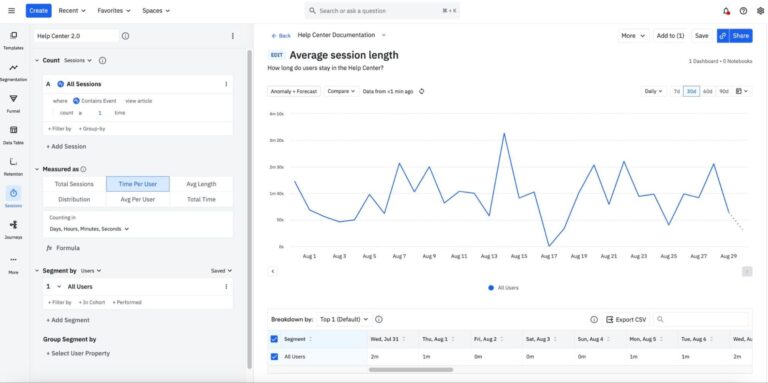
Amplitude is a behavioral analytics engine that helps product managers dive into complex user lifecycles, user segmentation, and retention formulas across web and mobile platforms.
Key features
Amplitude is built for teams with dedicated data infrastructure, engineering support, and the bandwidth to invest in setup and ongoing maintenance. Some of its key features include:
- Complex behavioral cohorts: Group users dynamically by sequences of historical actions to study long-term engagement.
- Predictive analytics: Utilize built-in machine learning models to forecast conversion likelihood and user churn.
- Data governance frameworks: Clean, manage, and verify data tracking taxonomies at scale with enterprise-grade features
Pricing overview
Amplitude offers a free tier tracking up to 10,000 monthly tracking units (MTUs) and 2 million events, with customizable advanced growth and enterprise contracts.
Amplitude vs GA4: How they stack up
| Feature | GOOGLE ANALYTICS | AMPLITUDE |
|---|---|---|
| Behavioral cohorts | Limited | |
| Predictive analytics | ||
| Complex funnel analysis | Limited | |
| A/B testing | ||
| Data governance | ||
| Real-time data | ||
| Marketing attribution | Limited | |
| Free tier | ||
| Primary use case | Marketing & web | Product & mobile |
Amplitude customer reviews
The verdict: Is Amplitude right for your team?
Amplitude is the right choice if you are running a complex, high-traffic SaaS application and have the engineering bandwidth and budget for its technical requirements.
7. Adobe Analytics
What is Adobe Analytics?
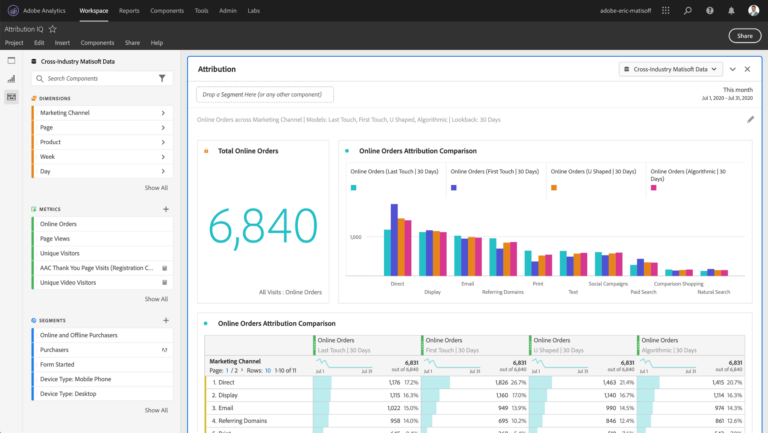
Adobe Analytics is a highly customizable, enterprise-level multichannel analytics platform built for large organizations. It acts as a central hub connecting online and offline consumer data points and is part of the Adobe Experience Cloud.
Key features
Adobe Analytics allows organizations to track user journeys across web, mobile, and IoT devices, with the help of AI and advanced machine learning.
- Analysis Workspace: A flexible, drag-and-drop report builder that provides infinitely customizable visualization layouts.
- Omnichannel data integration: Tie web interactions to offline point-of-sale data, call centers, and CRM software.
- Cross-Device Co-op: Stitch together user experiences across various devices to construct a unified customer journey map.
Pricing overview
Adobe Analytics requires custom enterprise contracts; prices reportedly start at $50,000.
Adobe Analytics vs GA4: How they stack up
| Feature | GOOGLE ANALYTICS | ADOBE ANALYTICS |
|---|---|---|
| Unlimited data retention | ||
| Processing unsampled data | ||
| Omnichannel data integration | ||
| A/B testing | ||
| Out-of-the-box tracking | ||
| Free tier | ||
| Pricing | Free | ~$50,000+/yr |
| Implementation time | Days | 3–6 months |
| Primary use case | Marketing & acquisition | Enterprise multichannel |
Adobe Analytics customer reviews
The verdict: Is Adobe Analytics right for your team?
Adobe Analytics is ideal for Fortune 500 enterprises that have large budgets and need a robust data engine deeply integrated into a broader suite of legacy Adobe tools.
8. Heap (Contentsquare)
What is Heap?
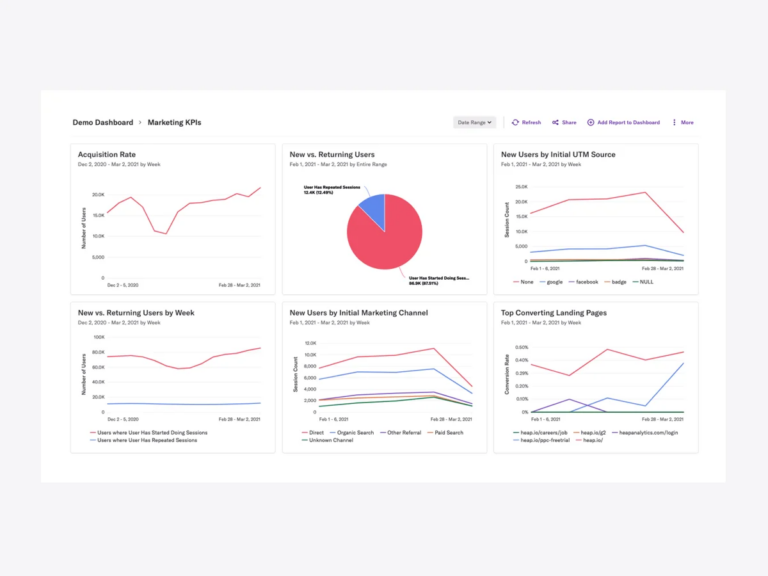
Heap is a product analytics and digital experience platform famous for its "autocapture" approach. Rather than requiring developers to manually set up event tracking like GA4, Heap automatically collects every click, pageview, and form submission from the moment it is installed, allowing teams to analyze behavior retroactively. Digital experience platform Contentsquare acquired Heap in 2023.
Key features
Heap is known for its codeless implementation that doesn’t require upfront engineering to begin capturing data.
Main characteristics include:
- Retroactive autocapture: Drop a single script onto your site and immediately begin tracking every user interaction without waiting for engineering tickets.
- Visual event tagging: Define custom events retroactively by clicking elements on their website directly, bypassing the need for Google Tag Manager.
- Digital experience tools: Understand how users navigate your pages via built-in native web heatmaps (click maps, scroll depth, and attention maps).
Pricing overview
Heap offers a free tier for up to 10k monthly sessions, and paid tiers range from $3,600/year for starter plans up to $100,000+ for enterprise. Because its autocapture design generates significantly more events per session than intentional tracking tools, pricing can inflate quickly as website traffic scales.
Heap vs GA4: How they stack up
| Feature | GOOGLE ANALYTICS | HEAP |
|---|---|---|
| Autocapture / no-code tracking | ||
| Behavioral funnels | Limited | |
| Retention analysis | Limited | |
| User-level analytics | Limited | |
| Session replay | ||
| Heatmaps | ||
| Retroactive event definition | ||
| Unsampled data | ||
| Real-time data | 24–48hr delay | |
| Marketing attribution | Limited | |
| Free tier | ||
| Primary use case | Marketing & web | Product & UX |
Heap customer reviews
The verdict: Is Heap right for your team?
Heap is ideal for non-technical product and digital marketing teams who lack engineering resources and want immediate visibility into website and app behavior. Teams that want to move beyond autocapture to get more detailed insights into product performance like why users came back, which cohorts convert, and whether a new feature actually moved a metric will need a more robust product analytics solution.
Honorable mentions
The solutions above represent the best overall replacements for GA4. But a couple of alternative platforms might also be a fit, depending on your specific use case:
Clicky
Clicky provides real-time, no-frills website traffic tracking and basic heatmaps without a complex implementation process. It functions purely as a high-level marketing dashboard rather than an engineering or product analytics engine.
This makes Clicky a solid choice for immediate pageview data, but it lacks the advanced segmentation and behavioral funnel capabilities required to track complex user journeys.
Simple Analytics
This privacy-first web counter bypasses cookie consent banners to provide a clean, single-page dashboard of essential traffic metrics.
While Simple Analytics is a good fit for marketing sites that need strict privacy compliance, it does not support deep cohort retention or multi-step funnels. Because of this limitation, it cannot replace a quantitative product analytics solution designed to optimize application features and in-app adoption.
Which solution fits your situation?
We want real-time product insights across the full user journey → Mixpanel?
Mixpanel is built for product, growth, and data teams that need to understand what users do after they land—not just where they came from. Funnels, retention, cohort analysis, session replay, and experiments all run self-serve, without waiting on a data engineer or a 48-hour report delay. For teams that have hit GA4's ceiling on behavioral analytics, it's the most direct path to answers.
We want simple, privacy-first traffic metrics and no cookie banners → Plausible or Fathom?
Plausible and Fathom may work for content sites, creators, and marketing teams that need clean traffic data and nothing else. Both skip consent friction and keep setup lightweight. The trade-off is that neither supports behavioral funnels, user retention, or feature-level analysis—so they can't replace a product analytics platform for teams that need to understand what users actually do.
We need complete data ownership and can manage a self-hosted instance → Matomo?
Matomo may work for compliance-heavy organizations that need to store all user data on their own servers. It offers more analytical depth than the lightweight privacy alternatives and gives teams full data sovereignty. The maintenance overhead of self-hosting is a real operational cost, and the configuration complexity is comparable to—or greater than—GA4's.
We're a large enterprise replacing Google Analytics 360 → Piwik PRO or Adobe Analytics?
Piwik PRO may work for organizations with strict GDPR requirements that want a structured enterprise web analytics platform with built-in tag management and consent tooling. Adobe Analytics can handle omnichannel data integration at the Fortune 500 level. Both carry significant complexity and cost compared to GA4—Adobe contracts reportedly start above $50,000 per year, and implementation can take months.
We need deep predictive analytics and have dedicated data infrastructure → Amplitude?
Amplitude may work for mature product teams with data engineers to manage the setup and ongoing taxonomy. Its behavioral cohort analysis and predictive models are genuinely powerful. The tradeoffs are a steep learning curve, pricing that climbs fast with scale, and a platform that's difficult to explore without dedicated analyst support.
We need retroactive autocapture and can't wait on engineering → Heap?
Heap's autocapture can be useful when engineering cycles are frozen and you need behavioral data quickly. The trade-off is that the analytical depth is limited once you move past surface-level behavior—teams that need complex funnel analysis, long-term retention cohorts, or native experimentation will outgrow it.
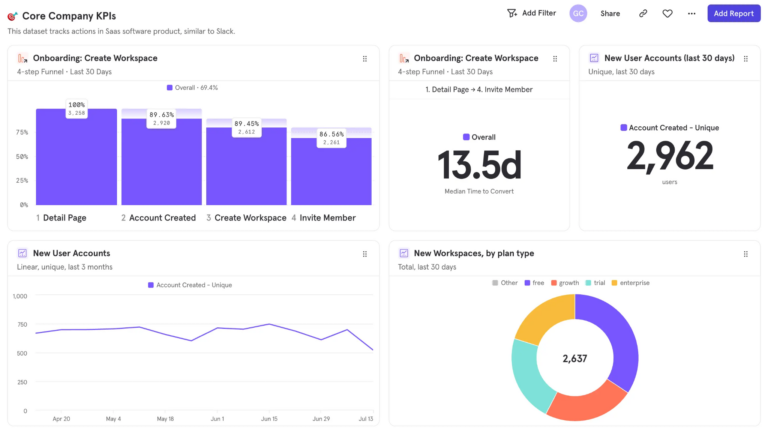
What happens when you switch from GA4 to Mixpanel
For teams moving away from GA4, one of the biggest concerns is losing Google’s default tag system. But starting with 5 to 10 core events is simple and allows you to immediately begin gathering real-time behavioral insights.
It only takes a few minutes to get started with Mixpanel and begin collecting self-serve insights.
| If your team has outgrown traffic reporting and needs deeper visibility into user behavior, get started with Mixpanel for free or book a demo to see how event-based product analytics compares to GA4. |
FAQs
How do GA4 alternatives handle user privacy and personal data?
Many alternatives like Plausible and Fathom are cookieless and do not collect personal data. This privacy-friendly approach means you often do not need to display a cookie consent banner to comply with privacy concerns and regulations like GDPR.
Can I use an on-premise solution for better data protection?
Yes, self-hosting gives you complete ownership of your data. Matomo and PostHog are popular open-source alternatives that allow you to host the software on your own infrastructure to strictly manage demographics and user data.
Will switching from Google Analytics break my Google Ads tracking?
Removing Google tags entirely can impact the data sent to ad platforms, as ad-blockers routinely intercept client-side tracking scripts. To maintain accurate attribution across social media and Google Ads touchpoints, you can use server-side tracking solutions to securely push functionality and events to ad platform APIs.
Are there free alternatives that allow me to import historical data?
There are completely free options available, such as Cloudflare Web Analytics for basic traffic counts and Microsoft Clarity for heatmaps. Furthermore, paid and open-source tools like Plausible, Fathom, and Matomo offer functionality to easily import your historical data from GA4 so you don’t lose past SEO insights.