


Beyond the model: How we’re shaping Mixpanel Agent around the way people work

AI usage across Mixpanel has increased 10x since we launched Mixpanel Agent. The growth is the easy part to report. The interesting part is what we changed along the way and why. That growth came from listening closely to customers, understanding what wasn’t working, and making deliberate changes to improve.
All of the agent’s changes trace back to feedback, which comes in many different forms. Most people never click a feedback button. Fewer than 1% of agent turns (one prompt, and the agent's response to it) get user feedback. So when someone does write in, we take it seriously.
Since Mixpanel Agent went GA in June 2026, we've seen a 80% weekly happiness score from that vocal group of users.
We love seeing the positive reactions. But we especially appreciate constructive feedback because it’s a clear signal for where we can improve. This post dives into some of the ways we collected feedback, key learnings, and what we shipped in response.
AI agents need their own way to measure success
Direct feedback is one valuable signal, but alone didn’t tell us if the agent was working. So we measured the agent the way we'd measure any feature:
- Activation: what share of active users try the agent, and how fast they get to a first prompt
- Depth: prompts per conversation, conversations per user, variety of tools used
- Retention: whether people come back
On top of that, we measure workflows and outcomes specific to Mixpanel Agent: the share of all reports in Mixpanel that the agent creates, clickthrough rates on what it generates, and how often people save an agent-generated Board and keep iterating on it.
Understanding those natural flows and funnels is important. Especially connecting agent usage to key value moments in the product that we want the agent to drive. The tricky part is that a single prompt can mean different things. Sometimes users get a perfect first answer and move on. Other times the first run was a bad experience, such as an error or a low quality response.
Retention is where we teased that apart. We dug into questions like "does a user who only sends one prompt still come back to the agent in their next Mixpanel session?" Then we segmented that by other data, such as latency, cost, and tool error rates.
Raw engagement isn’t enough to tell you if an agent worked. You have to dig in deeper and look at what happens after.
User feedback won’t show you everything
We turned the Agent on itself. Mixpanel Agent can analyze Session Replay data. So instead of spending hours watching replays, we asked:
"Analyze session replays and tell me where there's friction in the Mixpanel Agent experience."
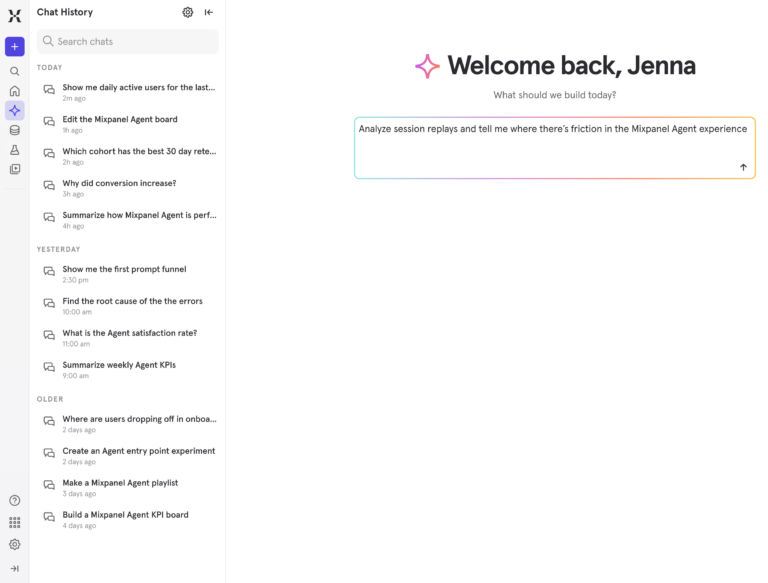
That’s how we learned the Agent wasn’t showing all its work. Answering an analysis question often takes several inputs. Take this question: “How does Mixpanel Agent engagement and retention differ for new Mixpanel users vs users who have used Mixpanel for 6 months vs over a year.”
That takes three cohorts and two metrics. The agent was building all five and answering the question, but only showing one output. If a user wanted to dig into the different pieces themselves, they were missing all the details.
What we shipped: an Artifacts section
This new Artifacts section surfaces everything the agent generates in a response.
Once Artifacts existed, the agent caught something else. People were trying to click into the reports generated, but nothing happened. Turns out, only the body of the output was clickable but not the title. We fixed that and the clickthrough rate on agent-created content went up 10%.
That's friction that didn't show up in error logs, user feedback, or evals.
Context beats model quality
What we learned: the agent hallucinated about Mixpanel
Early on, users reported that Mixpanel Agent sometimes answered questions about Mixpanel incorrectly or was missing information. Digging in, we found it was piecing answers together from memory instead of checking Mixpanel Docs. A rough example of this was the agent telling someone a feature didn't exist, when the feature actually did.
What we shipped: answers grounded in Docs
The agent already had a tool specifically for accessing Mixpanel Docs so we rewrote the guidance around this tool. Now Docs is the default source for any question about Mixpanel.
This also gives our teams a lever to pull to improve the agent. If the agent struggles with a pattern, we can add details or clarity to our docs and fix it at the source. That helps our agent, external agents, and of course, our human readers.
What we learned: numbers changed and users didn’t know why
A second version of this lesson showed up on Boards. During a customer interview, we heard how when they added an agent-generated report to a Board, the data changed. They lost trust. We noticed the agent had built the report using the last 30 days, and dropping it onto the Board switched the report to the Board's date range. The customer didn't catch the date change. It reasonably looked like the agent had gotten the numbers wrong.
What we shipped: the agent inherits your context
Now the agent inherits the Board's date range when it builds inside of Boards. If you already have a report open, it can also edit that one instead of starting from scratch.
People expected the agent to keep working when they leave
What we learned: people don't wait
At GA, the agent was tied to your open browser tab. That worked for quick questions. But three signals told us it wouldn't hold up:
- We always planned on expanding what the agent could do, which meant longer-running tasks like root cause analysis.
- Some users wrote in with negative feedback about errors. When we looked into it, they had navigated away mid-run.
- We spotted the pattern a lot in Session Replay. It’s very common for users to have Mixpanel open in several browser tabs and jump between them.
What we shipped: background runs
We moved the agent to run in the background. Now if you close the tab, lose your wifi, or start a new conversation, you can still come back to the answer later in your history.
Since making this change, 7% of all agent turns run async. Those are turns that would have otherwise created a frustrating experience for users who had to start over.
Listen to your customers
Right after GA, people started trying to use the agent for everything they could already do in the Mixpanel UI. Some of the best signals on what to add next came straight from customers who hit these edges and asked for more. We used that to prioritize. Support for Custom Properties, Custom Buckets, Lookup Tables, and more all shipped from this demand.
What’s next for Mixpanel Agent
Mixpanel Agent was designed to be embedded in how you already work. Every lesson we’ve learned has pushed us further in that direction.
Next up is bulk editing. After that we're working on delivering more insights before you ask, and adding more layers of context and customization. Follow along on all the updates in the Changelog.
Keep pushing on the agent and telling us what's missing. Our goal is to continue making Mixpanel Agent stronger, getting you even better answers, faster.