

Top 6 Pendo alternatives for product managers outgrowing basic insights

Pendo is a popular platform for understanding user behavior and product adoption. Its bundling of product analytics and in-app onboarding guides makes it an attractive option for companies that want to consolidate parts of their product stack.
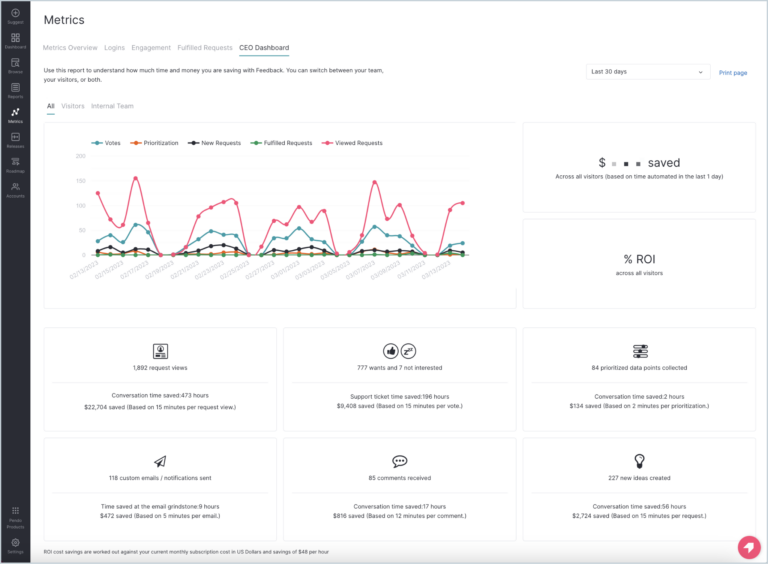
That approach generally works well—up to a point. As the speed of product development in the AI age continues to pick up, teams expect analytics platforms to do more than report what happened. They want help understanding not only why it happened, but what to do next.
Maturing organizations also start asking increasingly sophisticated questions. Which onboarding flow drives long-term activation rather than short-term engagement? Which experiments move business metrics instead of vanity metrics? And how can we safely roll out those changes without jumping between multiple tools?
The result: Many teams find themselves paying for onboarding and in-app messaging capabilities while still needing a separate platform for feature flags and experiments. Others run into delayed reporting or pricing that grows rapidly alongside monthly active users (MAUs).
Today's product analytics market offers several strong alternatives depending on what you're trying to accomplish.
This guide compares six of the best Pendo alternatives based on data quality and reporting speed, analytical depth, experimentation capabilities, pricing transparency, ease of use, scalability, and AI functionality that helps put it all together.
But first, let’s look at reasons why some product teams want to move on from Pendo.
Why product teams are leaving Pendo
Pendo built its reputation on a simple premise: Measure what your users are doing, and immediately launch a tooltip or product tour to guide them in the same tool. For early-stage teams, consolidating basic analytics, onboarding, and in-app messaging into a single platform sounds efficient and cost-effective.
But as companies scale, the tradeoffs become harder to ignore as deeper analytics aren’t just “nice to have” anymore. Product teams need to move seamlessly between understanding user behavior, testing hypotheses, and measuring impact on the business. When those capabilities live in separate tools, it forces teams to spend more time stitching together workflows than shipping improvements.
Here’s what users typically run into:
The reporting hits a ceiling
Pendo didn’t design its data pipeline for real-time behavioral exploration. They provide simplistic reporting, and users quickly find themselves hitting a wall when they're after analysis that uncovers the "why," not just basic reporting. That ceiling shows up in two places.
The first is report depth: more advanced platforms like Mixpanel offer Funnels, Flows, Retention, Root Cause Analysis, and Metric Trees that let teams keep asking follow-up questions instead of stopping at a single chart. The second is the data foundation underneath. Lexicon, verified events and properties, saved metrics and formulas, custom events and properties, data standards, and group analytics give you a governed, trusted layer to build on, so the analysis still holds up when the questions get harder.
As product questions become more sophisticated (such as building multi-step funnels or analyzing cohort retention changes), this delay can become limiting.
Understanding user behavior is also only part of the development process. Because Pendo doesn't offer experiments, feature flags, and metric trees natively, many organizations end up adopting separate platforms for testing and feature management. This spreads insights, releases, and performance measurement across different systems, which makes it harder to iterate quickly and confidently.
The pricing structure punishes scale
Pendo bases its pricing on custom enterprise contracts that scale primarily with Monthly Active Users (MAUs). On paper, this aligns cost with growth, but in practice, it often creates the opposite effect: as products succeed and user bases expand, analytics costs rise sharply, even if usage patterns remain stable.
This makes forecasting difficult for finance teams and introduces friction during renewals, especially for companies experiencing rapid user growth. Instead of paying for the depth of analysis or volume of events, teams often end up paying for audience size.
Guides still require engineering
Although Pendo markets itself as a no-code product experience platform, users frequently report that building polished, fully native-looking in-app guides requires CSS overrides, design work, or engineering assistance.
What starts as a promise of self-serve onboarding can turn into a hybrid workflow where product managers design the flow, but you still need engineers to make it production-ready.
6 best Pendo alternatives to switch to
1. Mixpanel
What is Mixpanel?
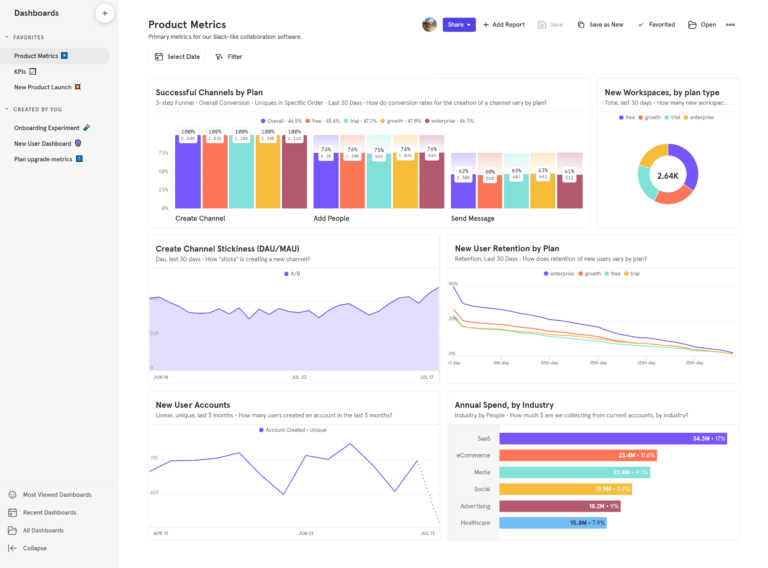
Mixpanel is a product intelligence platform that helps teams improve every stage of product development, from understanding user behavior to validating ideas through experiments and safely rolling out new features.
As opposed to bundling onboarding tools with basic analytics, Mixpanel equips product teams to discover opportunities, ship improvements, and measure business impact in real time, in one ecosystem.
Everyone gets the same behavioral data, which eliminates the context switching common with disconnected tools.
How Mixpanel works
Mixpanel acts as a central hub for product growth analytics that replaces fragmented workflows spanning multiple tools. It connects analytics, experimentation, and product release tracking into a single continuous feedback loop.
One unique thing about Mixpanel is its proprietary Arb database, which powers lightning-fast queries even on large datasets, so product managers can get clean behavioral data without waiting for analysts or engineering teams.
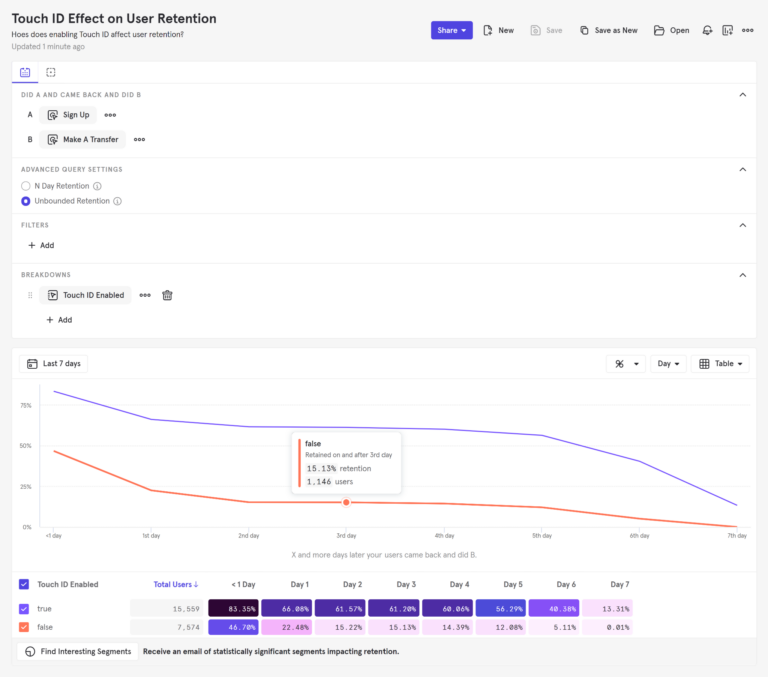
On top of its analytics and experimentation layer, there’s Mixpanel AI, which gives you always-on product intelligence incorporating specialized agents and a business-aware Context Engine. Instead of requiring teams to inspect dashboards manually or set up alerts for every scenario, Mixpanel Agent continuously monitors key product metrics and surfaces noteworthy changes as they happen, highlighting what actually needs attention before someone goes looking for it.
For more technical or AI-native teams, Mixpanel Headless extends this capability further, exposing the full analytics layer as a typed Python SDK to give AI coding agents direct programmatic access to every funnel, cohort, and experiment.
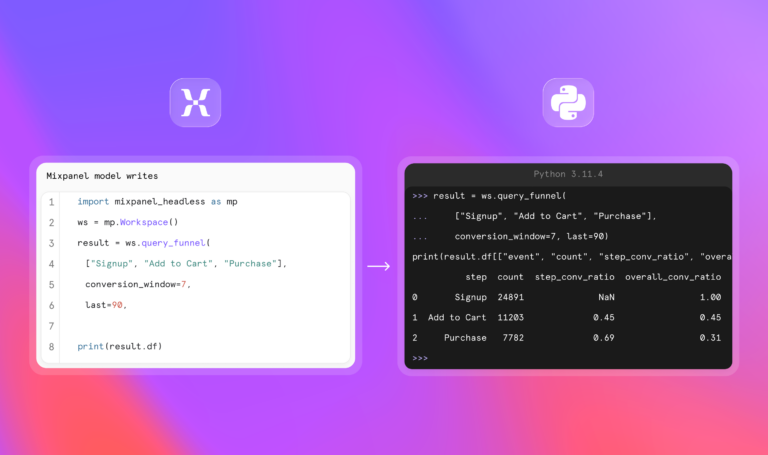
This turns Mixpanel from an analytics platform into a live decision system that not only reports what’s happening but also helps teams respond in real time.
Key Mixpanel features
- Unlimited funnel steps: Build complex conversion paths without limits.
- Experimentation and Feature Flags: Test and roll out features in the same platform where you measure them, instead of having to switch back and forth constantly.
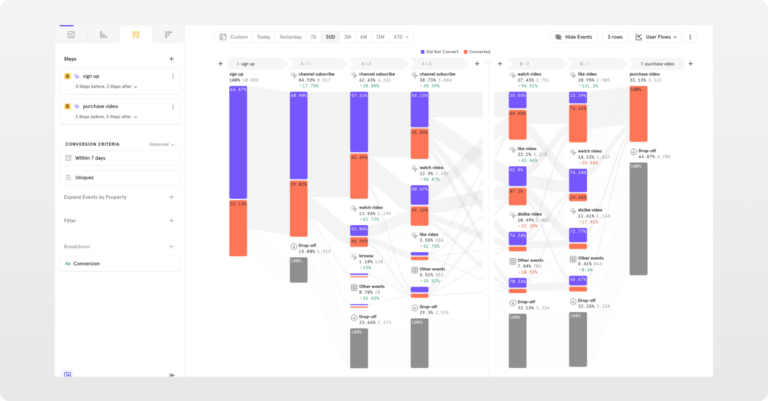
- Mixpanel AI: Interprets plain-language requests, designs experiments, explains the results, and even recommends next steps conversationally.
- MCP: Bring Mixpanel into the AI tools your team is already using, like Claude, ChatGPT, and Cursor. Ask questions about user behavior, run analyses, build dashboards, launch experiments, and investigate session replays, all from your real-world Mixpanel data.
- Mixpanel Headless: Let engineering teams build data apps and deterministic workflows by exposing every dashboard, cohort, experiment, report, and action programmatically through a typed Python SDK.
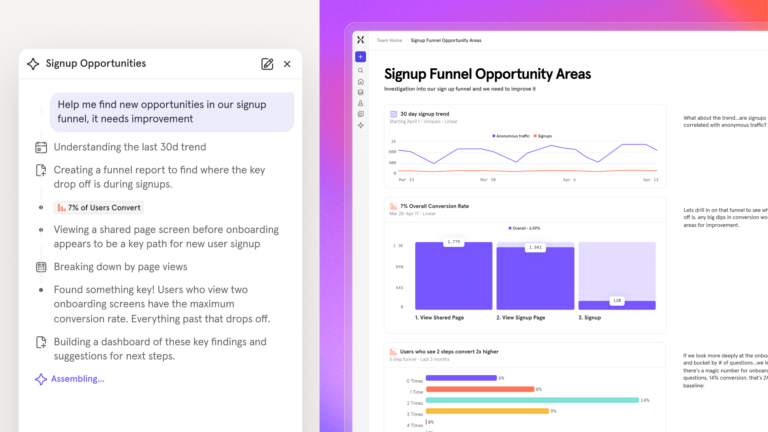
- Proprietary Arb database: Deliver lightning-fast querying for deep, complex behavioral data without the lag associated with Pendo.
- Metric Trees: Map day-to-day product usage directly to top-line business metrics.
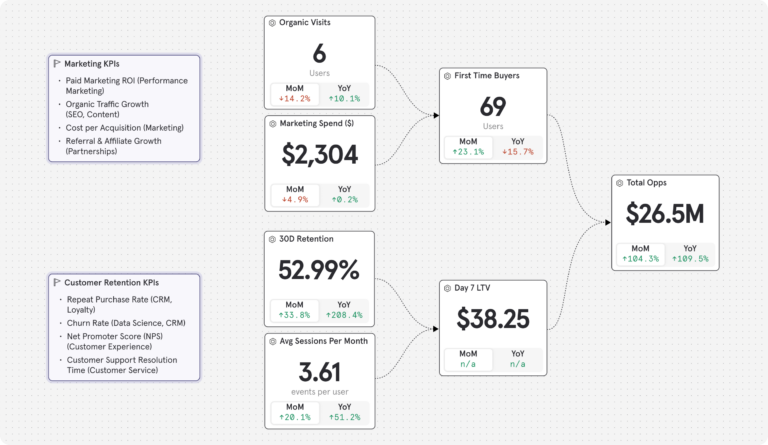
- Lookup tables and data enrichment: Bring in broader business context without overloading the event taxonomy.
- Lexicon: Manage your events and data, such as creating saved metrics and formulas, verifying events and cohorts, and building custom and borrowed properties.
How much does Mixpanel cost?
Mixpanel offers both free and paid plans.Mixpanel’s free tier has no time limit and includes 1M monthly events, 10K monthly session replays, and up to five saved reports. That’s enough for most teams to start getting real product insights on day one. For paid plans, the platform is based on event-based pricing, not seat licenses, unlike many other SaaS products.
| Do you qualify for the Startup Program? Early-stage companies that were founded less than five years ago, have up to $8M in total funding, and haven’t redeemed any other offers can receive their first year free on the Startup Plan. |
There are also two paid plans:
- Growth: 1M monthly events included free; $0.28 per 1K events after that (volume discounts available). Unlimited reports, 20K monthly session replays, cohorts, and more.
- Enterprise: 1T monthly events, advanced analytics, comprehensive data governance and security, and premium support.
Paid plans scale transparently based on event volume rather than monthly active users, making costs easier to predict as your product grows.
Experiments and feature flags are also included on all plans. The Free plan includes 1,000 monthly experiment users (MEUs) and up to 10 active flags. Growth starts at 5,000 MEUs and 50 active flags, with the option to scale to 100,000 MEUs via Plan Builder.
How companies are using Mixpanel
Companies are using Mixpanel to give every product and non-technical team access to fast, self-serve behavioral analytics.
Mixpanel is powerful enough to handle the volume of our data, but flexible and intuitive enough for non-technical teams to use.”
They're also using Mixpanel to replace surface-level engagement reporting with precise, event-based analytics. By focusing on the user behaviors that drive activation, retention, and conversion, teams can build more accurate funnels and cohorts, and make better product decisions based on real-time customer behavior.
We chose Mixpanel because it provides the purest form of analytics—clear, event-based insights without unnecessary complexity. It allows our teams to track exactly what matters, build funnels and retention cohorts with precision, and make decisions based on real user behavior in real time.”
Mixpanel customer reviews
The biggest shift we’ve seen with MCP is speed and accessibility. What used to require hours of investigation from a specialized engineer can now be done in minutes by anyone on the team.”
Mixpanel has been a game-changer for us. We can now visualize the entire customer journey and pinpoint exactly where we can make improvements. This has allowed us to be much more data-driven in our product development and marketing efforts.”
Mixpanel vs. Pendo: How they stack up
| Feature | MIXPANEL | PENDO |
|---|---|---|
| Instant, no-code setup with autocapture | ||
| Product, mobile, and web analytics | ||
| Session replay and heatmaps | ||
| Group/account analytics | ||
| Metric Trees | ||
| Root cause analysis | ||
| Unlimited funnel steps | ||
| Saved and verified custom metrics | ||
| Data warehouse connectors | ||
| Proprietary Arb database for lightning-fast querying | ||
| Automated data quality governance | ||
| Lookup tables for data enrichment | ||
| Experimentation & AI | ||
| Experiments | ||
| Feature Flags | ||
| Install with AI | ||
| Pricing & access | ||
| 10,000+ free monthly session replays | ||
| 1M free events / month | ||
| Transparent, event-based pricing |
The verdict: Is Mixpanel right for your team?
Mixpanel is the natural next step for product teams that have outgrown Pendo's analytics and need a more flexible, AI-native platform via Headless, and to validate ideas through experimentation, roll out features safely, and measure business impact in the same platform.
If your team is facing issues with siloed workflows, opaque pricing, or the inability to run deep cohort analyses, Mixpanel offers a significant analytical upgrade.
2. Amplitude
What is Amplitude?
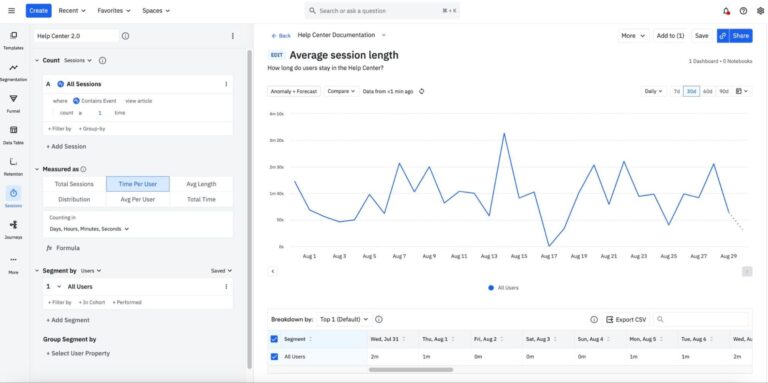
Amplitude is a sophisticated product analytics platform for teams that want complex behavioral analysis and predictive insights at scale. It helps product managers turn behavioral data into actionable insights by making funnels and retention analysis accessible without requiring SQL expertise.
Key features
- Predictive cohorting: Uses AI to predict which user cohorts are most likely to convert or churn.
- Cross-channel journey mapping: Lets teams track complex user paths across multiple platforms.
- Strict data governance tools for enforcing rigorous event taxonomies.
Pricing overview
Amplitude offers a free tier that includes up to 10K MTUs (monthly tracked users) and 2M events. Paid plans scale based on usage (MTUs), which require custom quotes and can increase significantly as products grow.
Amplitude vs Pendo: How they stack up
| Feature | AMPLITUDE | PENDO |
|---|---|---|
| Behavioral analytics | ||
| Funnels & retention | Limited | |
| Cohort analysis | Limited | |
| Retroactive event definition | Limited | |
| Experimentation | ||
| Advanced data science workflows | ||
| In-app guides | ||
| Session replay |
Amplitude customer reviews
The verdict: Is Amplitude right for your team?
Amplitude works best for mature product organizations that treat analytics as a core discipline and have dedicated analysts or engineers supporting it.
But if you’re switching from Pendo because you’re looking for fast, self-serve insights without heavy setup overhead, you might find Amplitude more complex than necessary for day-to-day product decisions.
3. Heap (by Contentsquare)
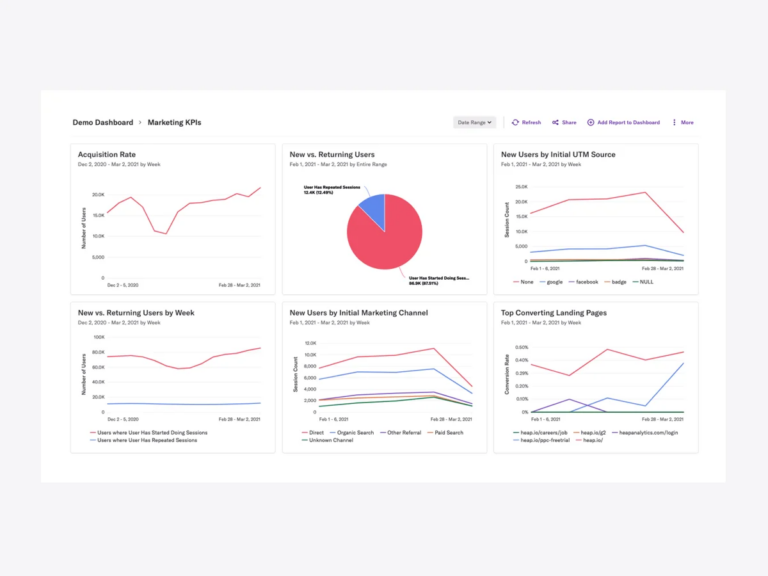
What is Heap?
Heap is a product analytics platform that’s best known for its retroactive autocapture feature. It automatically records all user interactions without needing teams to define events first, which allows teams to collect huge amounts of data easily.
Key features
- Autocapture: Automatically track clicks, swipes, and form submissions from day one.
- Retroactive funnels: Build funnels using historical data without needing to set up events in advance.
- Visual event labeling: Tag events right from your website's interface.
Pricing overview
Heap offers four pricing options: Free (capped at 10K monthly sessions), Growth, Pro, and Premier. Contact their sales team for a quote on paid plans.
Heap vs Pendo: How they stack up
| Feature | HEAP | PENDO |
|---|---|---|
| Autocapture & retroactive analytics | ||
| Behavioral funnels | ||
| Retention analysis | ||
| Session replay | ||
| In-app guides | ||
| NPS & in-product surveys | ||
| Product roadmaps & feedback | ||
| A/B testing & feature flags | ||
| Advanced data science workflows | Limited | |
| Pricing model | Session-based | MAU-based |
Heap customer reviews
The verdict: Is Heap right for your team?
Heap works well for teams that don't have significant engineering resources and want to retroactively measure every click. The trade-off is that autocapture often produces large, noisy datasets, and it also doesn’t replace Pendo's in-app capabilities if your team needs onboarding guidance features.
4. Fullstory
What is Fullstory?
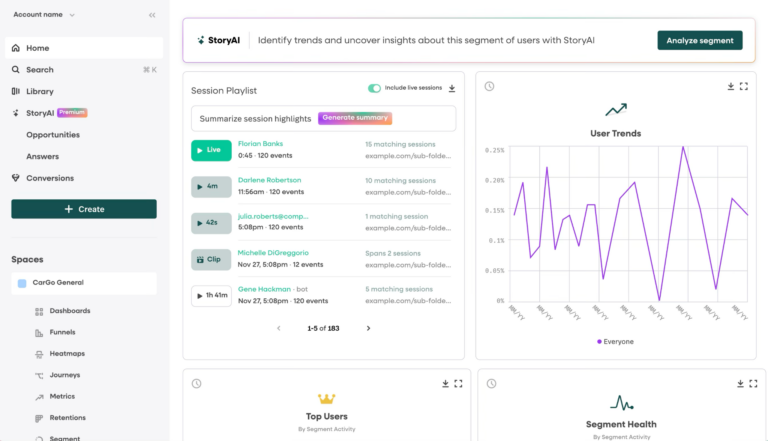
Fullstory is a digital experience intelligence platform that helps teams understand the why behind user behavior. It automatically captures every user interaction and reconstructs complete session replays, allowing teams to watch real customer journeys unfold.
Key features
- High-fidelity session recordings: Reproductions of user interactions on a website or web application exactly as the user experienced it.
- Rage click tracking: Automatically identify drop-offs caused by confusing UI elements.
- Heatmaps: Visualize scrolling and clicking behavior to understand what holds users’ attention and what they ignore.
Pricing overview
Fullstory offers three plans: Analytics, Workforce, and Anywhere. You’ll have to contact their sales team for a quote. There’s also a free option for individuals and small teams that offers up to 30,000 monthly sessions and 12 months of data retention.
Fullstory vs Pendo: How they stack up
| Feature | FULLSTORY | PENDO |
|---|---|---|
| Session replay | ||
| Funnels & behavioral funnels | ||
| Retention analysis | Limited | |
| In-app guides | ||
| UX debugging | Limited | |
| A/B testing & feature flags |
Fullstory customer reviews
The verdict: Is Fullstory right for your team?
Fullstory could be a good fit if your priority is understanding why users struggle and not just whether they convert. It isn’t a complete product analytics solution in itself, so teams that need experimentation, feature management, or deep behavioral analysis typically pair it with a more robust analytics platform.
5. WalkMe
What is WalkMe?
WalkMe is a digital adoption platform that helps users complete workflows inside complex enterprise software systems through guided experiences and automation. Unlike most product analytics platforms, WalkMe is less about analyzing behavior and more about shaping it through structured guidance.
Key features
- Cross-application guidance: Walk users through workflows in different enterprise software platforms.
- Workflow automation: Automate repetitive internal tasks to reduce errors and improve efficiency.
- Enterprise-grade security: Complies with strict security standards for large organizations.
Pricing overview
There are two WalkMe plans, one for driving customer adoption and one for driving employee adoption. Expect enterprise pricing for both, with costs dependent on your deployment scale, usage, and organizational requirements.
WalkMe vs Pendo: How they stack up
| Feature | WALKME | PENDO |
|---|---|---|
| In-app guidance | ||
| Funnels & behavioral analysis | Limited | |
| Workflow automation | Limited | |
| Feature adoption analytics | ||
| Session replay | ||
| A/B testing & feature flags | ||
| Target users | Typically employees | Product users |
WalkMe customer reviews
The verdict: Is WalkMe right for your team?
WalkMe works best for enterprise IT and operations teams focused on internal software adoption. If your team is trying to optimize user behavior for your own SaaS product or run deep behavioral analyses, a behavioral analytics platform designed for product teams would be a better fit.
6. Whatfix
What is Whatfix?
Whatfix is a digital adoption platform that helps organizations onboard users and guide them through complex workflows. It also has some product analytics capabilities that combine in-app guidance with automation and training tools.
Key features
- Interactive walkthroughs: Create step-by-step guidance overlays for users navigating new software.
- Automatic translation: Translates in-app content into multiple languages for global rollouts automatically without teams having to create content from scratch.
- Sandbox environment creation: Allows teams to create no-code replicas of applications to safely train users without impacting live operational data.
Pricing overview
Whatfix offers three plans: Standard, Premium, and Enterprise, with the Standard plan offering 25 user action tags. Contact their sales team for a quote.
Whatfix vs Pendo: How they stack up
| Feature | WHATFIX | PENDO |
|---|---|---|
| In-app guidance | ||
| Session replay | ||
| Retention analysis | ||
| User onboarding | ||
| A/B testing & feature flags | ||
| Retroactive analytics |
The verdict: Is Whatfix right for your team?
Whatfix is a solid option if you need to train employees on third-party tools in an enterprise organization and would like basic product analytics bundled in the same platform. But if your main objective is understanding user trends within your own product, Pendo's analytics are more robust. And if you need deep behavioral analysis capabilities such as A/B testing and feature flags, you’d still need to invest in a separate platform.
Honorable mentions
These tools aren’t always direct replacements for full product analytics platforms, but they often appear alongside them in modern growth stacks.
Appcues
Appcues is a digital adoption platform focused on no-code onboarding experiences. It allows product and growth teams to build in-app guides, checklists, and tooltips without engineering support. Teams commonly pair Appcues with a dedicated analytics platform that lets them measure user behavior, evaluate onboarding performance, and decide what to improve next.
Userpilot
Product-led growth teams use Userpilot to deliver contextual onboarding, personalized in-app messaging, and behavior-based experiences that increase activation and feature adoption. It enables segmentation-driven experiences and micro-surveys to drive activation and feature adoption, but while Userpilot provides light engagement analytics, it doesn’t replace a full behavioral analytics engine.
Userlane
Userlane focuses on enterprise software adoption, particularly for internal tools and complex workflows. It helps organizations reduce training overhead through guided, step-by-step onboarding flows. Like WalkMe, its strength is operational enablement, not behavioral analytics, making it more suitable for internal transformation than product optimization.
Chameleon
Chameleon provides highly customizable in-app experiences, including onboarding flows, surveys, and product tours that blend into native UI. However, it lacks deep analytics capabilities, so it typically requires integration with a dedicated analytics platform like Mixpanel for measurement and optimization.
Which product analytics platform is right for you?
We want deep, real-time product insights without data delays or interface headaches → Mixpanel?
Mixpanel is built for product teams that need fast, self-serve behavioral analytics they can actually trust. You get funnels, retention analysis, cohort breakdowns, and metric exploration without waiting on engineers or writing SQL.
Its two major strengths are its depth and speed of iteration. The combination of event-based modeling, real-time querying via the proprietary Arb engine, and AI tools like Mixpanel Agent, MCP, and Headless help teams move from question to insight to decision in minutes.
We need the absolute deepest analytics and have dedicated engineers to maintain it → Amplitude?
Amplitude offers rigorous behavioral analytics depth for enterprise teams that treat data as a discipline. It supports advanced segmentation, experimentation, and large-scale behavioral modeling. The tradeoff is a notoriously steep learning curve and operational overhead. Amplitude typically assumes mature instrumentation practices, dedicated analytics ownership, and strong engineering support to maintain taxonomy integrity. Without that, teams often struggle to fully operationalize its power.
We want to retroactively measure every click without setup → Heap?
Heap’s autocapture capabilities let teams analyze historical behavior with minimal upfront instrumentation planning, which is valuable early on, especially when teams don’t yet know which events matter. The tradeoff is long-term data hygiene, since autocapture tends to generate large volumes of low-signal events. As products scale, maintaining a clean and meaningful event taxonomy becomes increasingly difficult.
We need to visually diagnose UX friction and reproduce bugs → Fullstory?
Fullstory is best-in-class for session replay and qualitative UX analysis. It helps teams understand exactly what users saw, clicked, and struggled with, down to individual sessions. The tradeoff is quantitative limitations. Fullstory excels at “what happened in this experience,” but it’s not designed for deep behavioral modeling like retention curves, cohort analysis, or product-wide experimentation frameworks.
We need enterprise-wide software adoption across internal systems → WalkMe?
WalkMe excels at guiding users through internal workflows with interactive walkthroughs, automation, and contextual assistance that reduce training time and support tickets across large organizations. The tradeoff is analytical depth. While WalkMe helps people complete tasks more effectively, it doesn’t answer sophisticated product questions like which onboarding behaviors drive long-term retention or how experiments affect conversion.
We need scalable onboarding and global software adoption across multiple markets → Whatfix?
Whatfix is a strong fit for organizations rolling out software across large, distributed teams or customer bases, with its interactive walkthroughs, automated localization, and training environments. The tradeoff is that while Whatfix offers some behavioral insights, teams that need advanced retention analysis, experimentation, deep funnel exploration, or real-time product intelligence will often outgrow its analytics capabilities and pair it with a purpose-built product analytics platform.
How to switch from Pendo to Mixpanel
Leaving a hybrid platform like Pendo can feel daunting. When you’re used to measuring what users are doing and popping up in-app tips from the same tool, it's natural to worry about the potential complexity of moving to a best-in-class analytics stack.
In practice, the first month is usually straightforward. Instead of trying to recreate every tracked interaction, teams begin by simply defining the five to 10 events that matter most, like signups, onboarding milestones, feature adoption, and other core product actions. After importing historical data and instrumenting those key events, Mixpanel immediately turns them into funnels, retention reports, cohorts, and user journeys.
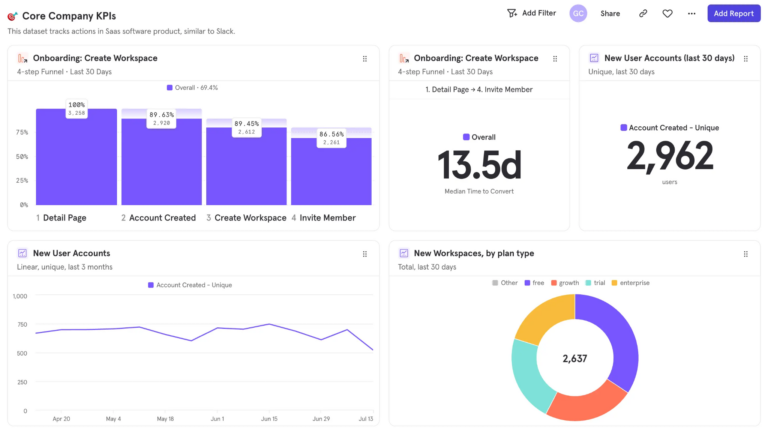
Because Mixpanel makes self-serve exploration easy and every query runs on the proprietary Arb database, product managers can start answering questions in seconds without waiting for scheduled data refreshes or analyst support. Within days, teams are exploring trustworthy retention reports, measuring onboarding performance, and identifying opportunities to improve activation.
| Start with Mixpanel's free plan or book a personalized demo to see how quickly you can get real-time behavioral insights with a best-in-class analytics platform. |
FAQs
What are the trade-offs of using a bundled platform for product analytics?
Bundled platforms try to consolidate any combination of analytics, onboarding, messaging, and UX tools into a single system. While this technically reduces the number of tools you use, it introduces limitations like:
Shallow data engines: The bundled approach often results in basic dashboards that lack retroactive flexibility, making it hard to uncover true actionable insights.
Surface-level engagement focus: What a hybrid platform like Pendo offers in breadth, it compromises in technical capabilities for scaling product teams.
Difficulty scaling: As teams grow, choosing best-in-class tools gives up a bit of convenience, but in exchange, you get an analytics engine that isn't limited by the capabilities of your in-app guidance layer.
What pricing pitfalls should scaling companies watch out for?
Pricing models in product analytics often become a hidden scaling constraint because of a few factors:
The MAU tax: Some pricing plans charge based on Monthly Active Users, meaning your bill skyrockets as your user base grows, even if event volume or analytical usage stays flat.
Forced bundling: Some platforms like Pendo bundle analytics with messaging or UX tools, leading teams to pay for functionality they don’t use.
Unpredictable scaling: Tools whose pricing depends on event volume or modular add-ons can quickly become expensive without careful instrumentation discipline.