

Is your agent worth it? We built Agent Intelligence to find out.

Agent Intelligence is now available in early access. Sign up to try it here.
Over the past year, we've talked to a lot of product teams building agents. Some already had one live. Some were halfway through building one. A few were rebuilding their entire product around one.
Almost all of them had the same problem: They couldn't tell if their agent was driving ROI or not.
They weren't short on data. Most could tell you how many conversations happened, what each one cost, and how long responses took. What they couldn't tell you was what happened to their customers at scale.
- Were the people who used the agent more likely to convert?
- Did they stick around?
- Or did they have a frustrating conversation and quietly leave?
To answer those questions, you would need to see the whole journey: what someone was doing before they opened the agent, what happened in the conversation, and what they did after. Most teams had the pieces, but none of them had the complete picture.
Two tools and a lot of duct tape
The clearest signal we observed was how teams were working around it.
Most teams were measuring their agent in a separate observability tool, which makes sense. When you're building an agent, you need something to trace requests and debug when things break. But those tools sit apart from the rest of your product data. So teams were exporting AI events into Mixpanel, building cohorts by hand, and trying to stitch the agent back into the rest of the customer's experience themselves.
One customer put it bluntly. They were rebuilding their product around an agent, and they asked us: “When most of the user experience happens inside a conversation, how are we supposed to connect that back to everything else we measure?” It was a great question, and one we wanted to answer.
We were doing the same thing
Here's the thing: We weren't just hearing about this problem; we were also living it.
Once our own Mixpanel Agent was in customers’ hands, we found ourselves asking the same question as everyone else: “Is this actually helping?” We used one tool to track cost, latency, and errors. Then we used Mixpanel to understand how the agent was changing what people did in the product. Two tools, two sets of data, and a lot of manual work every time we wanted to connect the two.
Here's a question that was a frequent thorn in our side: Was the agent conversation actually successful? We could count conversations by stitching prompts together by ID. But the conversation itself wasn’t something we could easily analyze. We couldn’t see how many went well, how many turns a good conversation took versus a bad one, or whether people who had good conversations stuck around longer. To answer those questions, we had to build a custom Conversation_Ended event and manually tag every outcome. It was a deceivingly simple question with a surprisingly messy answer.
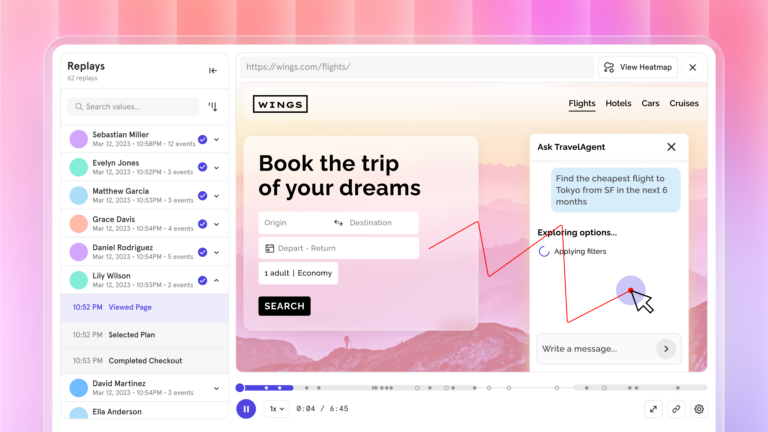
We did make progress. Watching Session Replays of people using the agent led to fixes that increased click-through on agent-created content by 10%. But every deeper question, the kind that connects what the agent did to whether a customer came back, meant stitching things together by hand. Again.
So when we built Agent Intelligence, the goal was simple: put the agent and the rest of the customer journey in one place, so you can finally tell whether your agent is improving customer experiences.
Two decisions that shaped it
A couple of calls early on shaped almost everything else.
Conversations come first
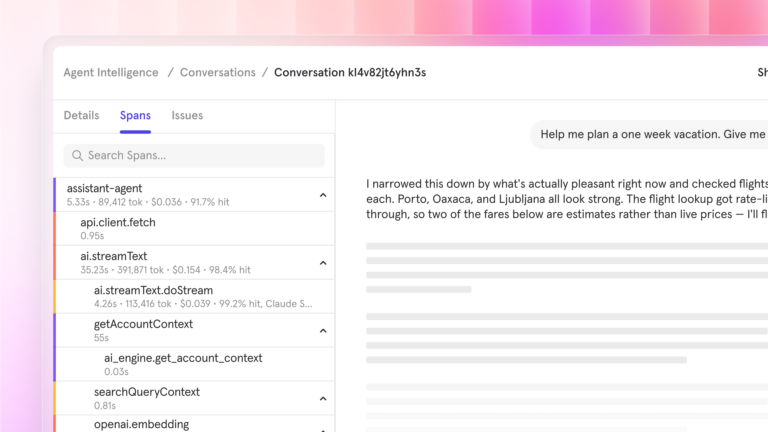
Most agent tooling is organized around spans and traces: each model call, each tool call, each log line. That's the right view for an engineer debugging a single request.
But if you're a PM trying to understand what your customer went through, you don't think in spans. You think in conversations. What did the customer ask? How did the agent respond? Did they get what they needed, or did they have to ask three times?
So we made the conversation the main thing you see. It's the unit closest to what your customer actually experienced, and it's the piece that connects naturally to everything else they do in your product.
The detail lives inside the conversation
We didn't want to trade depth for simplicity, though. Everything underneath a conversation is nested inside it: each turn, each span, each tool call and what it returned. You start with the conversation, and when you need to know exactly where something went wrong, it's one click down.
That's how we already worked on our own agent. It turned out to be how most of the teams we talked to wanted to work, too.
What you can finally answer
The big question is the one we started with: Is your agent driving positive ROI? Here's how Agent Intelligence helps you get there.
Tell a good conversation from a bad one, without building anything
Cost, latency, error, and volume metrics are there as soon as your traces land. There's no dashboard to build, and you don't have to decide which metrics matter before you've seen any data.
That matters because engagement on its own is misleading. A user sending six prompts might be going deeper, or they might be rephrasing the same question because the agent keeps getting it wrong. On a usage chart, those look identical. Once you can open the conversation and see what happened, they don't.
See what happened before and after
This is the part we’re most excited about. Agent conversations land in Mixpanel tied to the same user as everything else in your product. The agent stops being a black box off to the side and becomes one step in a journey you can actually follow.
So you can finally ask questions like:
- Do users who engage with the agent convert at a higher rate than users who don't?
- How does agent usage differ between your power users and people in their first week?
- Did a frustrating conversation show up as churn a month later?
- What were people doing right before they started a conversation with the agent?
Check out our docs for more details on setting up Agent Intelligence.
Then make the agent better
Most teams aren’t shipping agents just to burn tokens. You ship it to make something better for your customers.
Here's what that looks like in practice. You spot a group of users who aren't coming back after using your agent. You dig into their conversations and find they were mostly trying to do the same thing. You ask Mixpanel Agent where those conversations went wrong, and it's the same failing tool call every time. So you fix it, ship the new version behind a feature flag, and run it as an experiment to see if retention improves. You go from noticing a problem to proving the fix without leaving Mixpanel.
Plenty of tools can tell you one prompt scored better than another on an eval. What we've always wanted to know is which one made more customers stick around.
Getting started
We built Agent Intelligence on OpenTelemetry because most teams building agents already use it. There's no Mixpanel SDK to add. You send the traces you're already collecting to Mixpanel, alongside whatever other tools you use, and include a user ID so each conversation connects to the person behind it. Check out our docs for more details.
We’ve built several agents at Sprout, including Listening and Insights. But knowing an agent responded doesn’t tell us whether the customer achieved their goal, and that’s what matters most to us.
Before Agent Intelligence, we tracked each agent interaction as a separate custom event. Now we can see the full conversation in one view, including what the customer did and whether it solved their request.”
Come build this with us
If you're building an agent and struggling to figure out whether it's actually paying off, we’d love for you to try this. Agent Intelligence is in early access!
Request early access and tell us what you're trying to answer. We're still shaping a lot of this, and the questions you're asking are the ones we want to help with next. You can also read the docs to see what setup looks like.