

What is an analytics agent? How AI agents are changing analytics

If you feel like you’ve seen the word "agent" attached to almost every analytics announcement lately, you're not imagining it. The category is moving quickly and, according to The 2026 State of Digital Analytics Report, the rise of autonomous analytics is one of the top macro trends reshaping business value. Analytics agents are emerging as one of the ways teams are putting that shift into practice.
An analytics agent is an AI system that carries out analysis on your behalf, including interpreting a question or goal, choosing and running the queries needed to answer it, chaining multiple tools together as needed, and taking an action—without a person specifying each step. Unlike a simple assistant, an analytics agent can also proactively monitor and surface what needs your attention.
In other words, don’t call an analytics agent a chatbot with a nicer interface. It’s actually a system that can decide what to do next.
For product managers, growth leaders, and analysts, that distinction is a key starting point. It tells you what to look for when an analytics product calls itself "agentic," what these systems can realistically do today, and what to check before trusting one with an important decision.
Why analytics agents are suddenly everywhere
Interest in the term "analytics agent" has risen sharply over the past few years. At the same time, major analytics, BI, and data platforms have begun shipping more agentic products and publishing guidance related to analytics agents.
It’s not surprising; software teams can now produce more changes than ever, but they still need to understand what those changes do. AI coding agents have dramatically compressed and accelerated parts of the software development cycle.
That creates corresponding pressure on analytics. If a team ships dozens of changes, that makes it difficult for analysts and product managers to manually open dashboards, build reports, investigate anomalies, and answer follow-up questions at the same pace.
Instead of the analyst doing the querying and interpreting, the analytics agent can take on more of the repeatable analytical work.
What makes an analytics agent an agent?
The simplest test is: Who decides the next step?
A chatbot generally responds to the instructions and steps you give it, while an agent receives a question or goal and determines how to pursue it. So you could ask, "Why did activation fall last week?" A basic analytics chatbot would follow a fixed series of steps, like looking up the activation metric, running a predefined query, and returning a chart or summary.
An analytics agent might:
- Find your organization's definition of activation.
- Check whether the decline is meaningful.
- Break the metric down by platform, acquisition source, or user type.
- Identify where the change is concentrated.
- Compare the timing against a product release.
- Run another query to test a hypothesis.
- Summarize the evidence and recommend what to investigate next.
The agent chooses those steps rather than requiring you to specify them one by one.
That ability to select and chain tools is the defining quality of an analytics agent. It might use a query engine for one step, a semantic layer for another, and a session replay platform for another. You supply the objective; the agent determines the route within its available tools and permissions.
The difference between "analytics agent" and "agent analytics"
While some people may use these two terms interchangeably, an analytics agent is an agent that performs analytics, while AI agent analytics increasingly means analytics about AI agents (like measuring how an agent performs, what interactions succeed, and how much those interactions cost).
Analytics agent vs. chatbot, copilot, and alert
These categories overlap in practice, what matters is what the system does behind the scenes. An agent can have a chat interface, while a copilot can incorporate agentic technology. What matters is how the system works behind the scenes.
For example, a copilot might help you analyze a drop in conversion by surfacing relevant data or suggesting possible explanations. An analytics agent, on the other hand, can investigate the problem more independently. It can query the underlying data, compare those results with historical patterns, investigate related changes, and synthesize its findings into a likely explanation.
The key difference between the analytics agent and other systems is that its underlying workflow allows it to determine and execute the steps needed to reach the goal.
| System | What it does | Who chooses the steps? | Proactive? |
|---|---|---|---|
| Scheduled alert | Reports a predefined condition | Person defines the rule | Within the rule |
| Chatbot | Answers a question | Mostly the person | Usually no |
| Copilot | Helps complete an analysis | Mostly the person, with AI assistance | Usually limited |
| Analytics agent | Pursues an analytical goal autonomously | The agent, within constraints | Yes |
The five jobs analytics agents are being built for
"Analytics agent" sounds like one category, but in practice, it's already splitting into several distinct jobs. A useful way to understand the category is to look at what teams are asking agents to do.
1. Onboarding
This may be one of the least flashy applications, but it's foundational. An agent can help teams set up their analytics correctly by inspecting a codebase or product architecture, identifying useful events, and proposing a tracking plan. It can also surface inconsistent naming, missing properties, and instrumentation gaps.
An analytics agent platform can’t escape the quality of the data underpinning it. If three teams define "active user" differently, an agent can still produce a coherent answer using the wrong definition. If an event fires inconsistently, no amount of AI reasoning can recover the missing data.
A strong tracking plan, governed metrics, and robust business context are essential to giving an agent something reliable to work with.
2. Dashboard
Agents can also turn plain language requests into analytical artifacts. You might ask, "Build a dashboard showing activation, week-one retention, and conversion for enterprise customers."
The agent can interpret that request, find the relevant metrics and events, select visualizations, and put together the results.
All you have to do is describe what you need and let the agent handle the work of turning that request into a finished dashboard.
3. KPI monitoring
Agents can watch important metrics continuously and highlight changes that need your attention.
Traditional analytics assumes someone will open a dashboard and notice a change. Agents improve that workflow by notifying you when a predefined threshold is crossed, investigating the movement, and providing context around it.
For example, if weekly retention drops, an agent can look across geography, acquisition channel, and signup cohort to identify where the change is most noticeable.
4. Root cause analysis
Root cause analysis builds on that monitoring capability. Once an agent finds a meaningful change, it can investigate what might explain it by running additional queries and exploring related product behavior.
Keep in mind that the result isn't necessarily proof of causation. "Most of the decline came from Android users" is an observation, while "Android caused the decline" is a causal claim.
A trustworthy agent should make that distinction clear and show the evidence behind its conclusion.
5. Experimentation
An agent can help turn a product hypothesis into an experiment, define success metrics, configure the analysis, monitor the test, and interpret the results.
That combination is powerful and risky. Experimentation joins analytical work to operational workflows, so an agent that interprets a test may also be given authority to launch changes that affect real users. The latter requires stronger controls, approvals, and statistical safeguards.
Because of this, it’s currently the least mature of the five jobs. For now, treat experimentation as an emerging direction rather than a solved problem.
What analytics agents can and can’t do
The biggest mistake is to confuse autonomy with reliability.
An analytics agent can choose its own analytical steps, but it still depends on the quality and permissions of the systems around it.
The first limitation is data quality. Inconsistent tracking, missing properties, and competing metric definitions can produce misleading answers even when the agent's analysis is technically sound.
The second is probabilistic behavior. A conventional query follows explicit instructions. An agent can choose different paths for similar requests. That flexibility makes it useful, but it also means you need visibility into what it did.
The third is scope of action. Reading data, creating a draft report, and changing a product experiment all represent different levels of risk. Most useful systems today operate within boundaries that humans set: approved data sources, permissions, and actions that require confirmation.
That's more of a feature than a failure. The goal is to automate useful work while keeping humans in the loop for consequential decisions.
This means AI agents can take on repetitive investigation, monitoring, reporting, and first-pass exploration. That frees up analysts to spend more time evaluating evidence, designing experiments, understanding business context, and deciding what the findings mean.
What to check before you trust an analytics agent
Before putting an agent into a decision-making workflow, ask these six questions.
1. Can you see how it got the answer?
You should be able to inspect the queries, filters, and sources that materially shaped the result. You don't need every internal model operation, but you do need enough evidence to reproduce or challenge the analysis.
2. Does it use governed metrics?
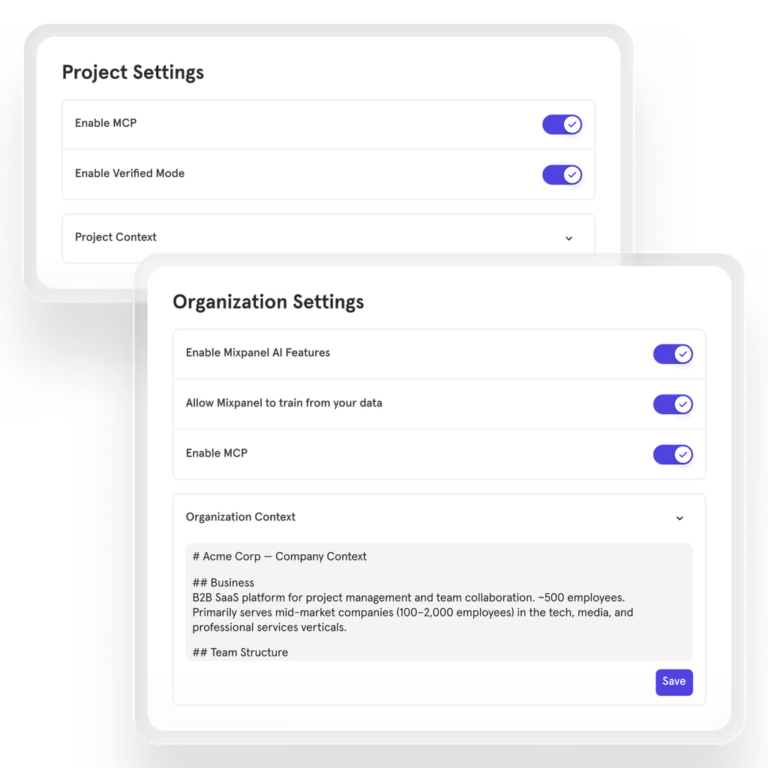
Ask whether the analytics agent tool uses your organization's approved definitions for activation, retention, conversion, and revenue. If it invents definitions from whatever happens to be in the data, the natural language interface can hide a serious governance problem. Look for governance features such as Mixpanel Agent's Verified Mode, which restricts responses to trusted, organization-approved data.
3. Does it understand your business context?
Events like “signup_completed” aren’t very useful without context. A good agent should understand what your team means by important events and metrics and which data sources are authoritative.
4. What can it do without approval?
Ask what the agent can create, change, launch, or send. Reading data and drafting a report carry different risks compared to changing a production experiment.
5. How do permissions work?
An agent may access everything the person using it can access and potentially connect that access across several systems. Check whether it respects existing roles and data restrictions, and whether its actions are auditable.
6. Can it act, or can it only answer?
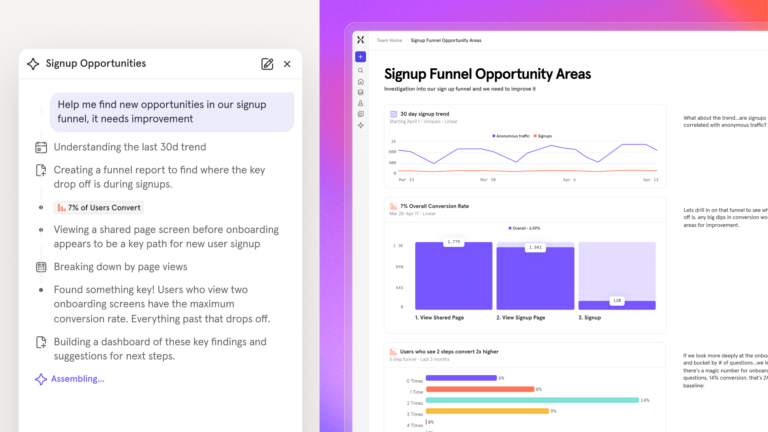
This tells you what you're evaluating. An agent that answers questions can save analytical time. One that monitors, investigates, creates artifacts, and triggers approved workflows can save both analytical and operational time, but needs more guardrails.
Neither is automatically better; the right level of autonomy depends on the job.
The next step: putting analytics agents to work
Analytics agents are taking on more and more tasks, from KPI monitoring to surfacing product usage insights.
But the strongest systems pair this autonomy with the fundamentals that make analytics trustworthy: reliable data, business context, clear evidence, and human oversight when the stakes are high.
Mixpanel Agent, for example, can create dashboards and investigate user behavior, all while being grounded in product data, organizational context, and governed metrics. That means the agent’s analysis stays connected to how the business measures and understands product behavior.
For product and data teams, there’s a real opportunity to make analytics more self-serve and uncover insights without waiting for every question to pass through an analyst.
If you're ready to see how this plays out in practice, the best way is to see it working on real product questions.
| Learn more about Mixpanel Agent and its sub-agents. |
Analytics agents FAQ
What is an analytics agent?
An analytics agent is an AI system that acts autonomously to perform analysis on a user's behalf. It interprets a question or goal, chooses the queries and tools needed to investigate it, combines multiple steps when necessary and returns an answer, creates an analytical artifact or takes an approved action.
How is an analytics agent different from a chatbot?
A chatbot primarily responds to the instruction it receives. An analytics agent can decide its own intermediate steps, including which data to query, which dimensions to investigate, and which tools to use.
Is an analytics agent the same as agent analytics?
No. An analytics agent performs analytical work. AI agent analytics generally measures or analyzes AI agents based on their usage, quality, costs, and so on.
Can analytics agents replace data analysts?
Not really: Analytics agents can automate parts of an analyst's workload, like repetitive exploration, monitoring, reporting, and first-pass investigation. However, you still need humans for analytical judgment, metric governance, and experimental oversight.