

The 6 best PostHog alternatives for product analytics

PostHog is an all-in-one product analytics and development platform with open-source flexibility and over 100,000 users. As you can tell from their positioning and customer list, PostHog is designed primarily for product engineers working at startups.
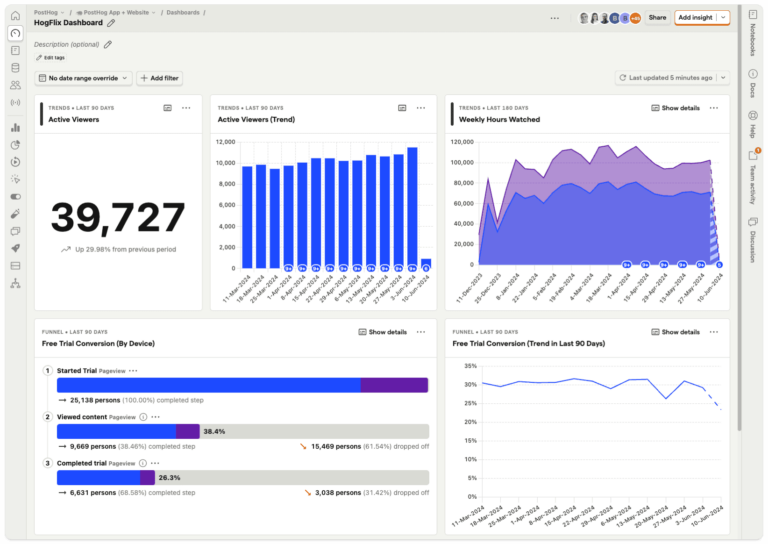
But designing a platform for engineers and startups does come with some drawbacks. Because it’s built with engineers in mind, non-technical users have a hard time accessing information, which can create bottlenecks and friction for other teams. And it lacks the features, scale, and support needed for product builders at mid-market and enterprise.
PostHog’s open-source model and self-hosting option appeal to teams prioritizing data control and customizability. But there can be significant hidden costs to self-hosting, including infrastructure, maintenance, and engineering time. Plus, because it is built on top of ClickHouse—instead of proprietary data base meant for product data—it often struggles to handle large data loads at the scale and speed needed for larger customers. It also lacks security and support: Every deal with Posthog is via credit card, and you're expected to go it at on your own.
All of these factors mean that PostHog is a powerful product analytics tool, but it’s definitely not the right fit for every company. Even for startups, it's worth asking if you want to invest in a solution that—assuming you're successful—you'll be growing out of and need to replace. Here's a look at why teams are leaving PostHog, along with six alternatives based on ease of use, depth of insights, pricing, and how well each one fits with the way product teams actually work today.
Why product teams are leaving PostHog
PostHog offers an all-in-one platform with analytics, feature flags, and session replay, built with an open-source ethos.
But most product and growth teams just need reliable, fast answers about user behavior. That gap between engineering flexibility and product management usability is where the friction starts.
Here’s what users are saying:
It requires too much engineering reliance
While plenty of developers love the platform, product managers can hit a wall. Building advanced funnels or custom reports frequently requires knowing SQL, which creates a bottleneck and prevents true self-serve analytics.
The all-in-one approach clutters the experience
The all-in-one approach is appealing to teams who want to reduce their tech stack. But because the platform tries to be everything at once, users routinely mention that the interface feels overwhelming. Finding simple insights takes more clicks and context-switching than it should.
6 best PostHog alternatives product managers are switching to
1. Mixpanel
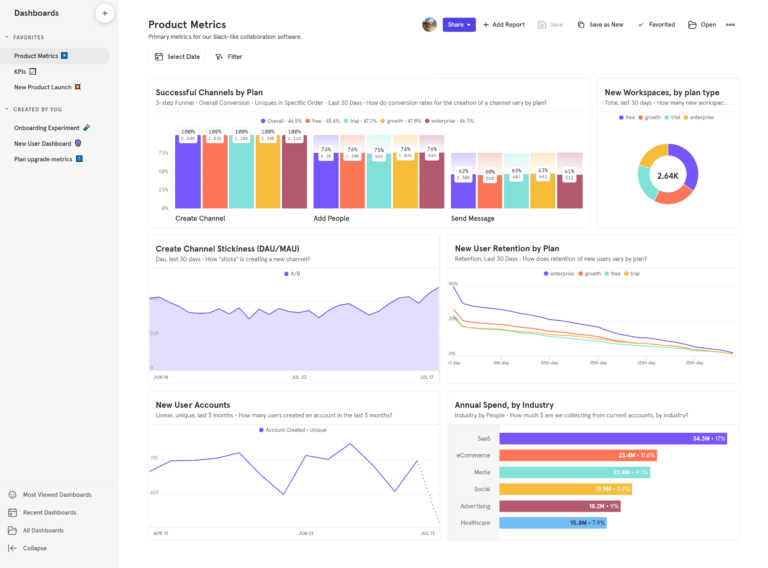
Mixpanel is an event-based product analytics platform that tracks specific user actions (like "Sign Up" or "Added Item to Cart") to analyze engagement, retention, and conversion.
How Mixpanel works
Teams instrument events through Mixpanel's SDKs or APIs, defining the actions and properties that matter: plan tier, device type, geographic region. Teams that want data immediately can skip instrumentation entirely at the start and use autocapture to get up and running. Either way, Mixpanel's ID Merge handles identity resolution automatically, stitching anonymous sessions and signed-in users into a single continuous journey.
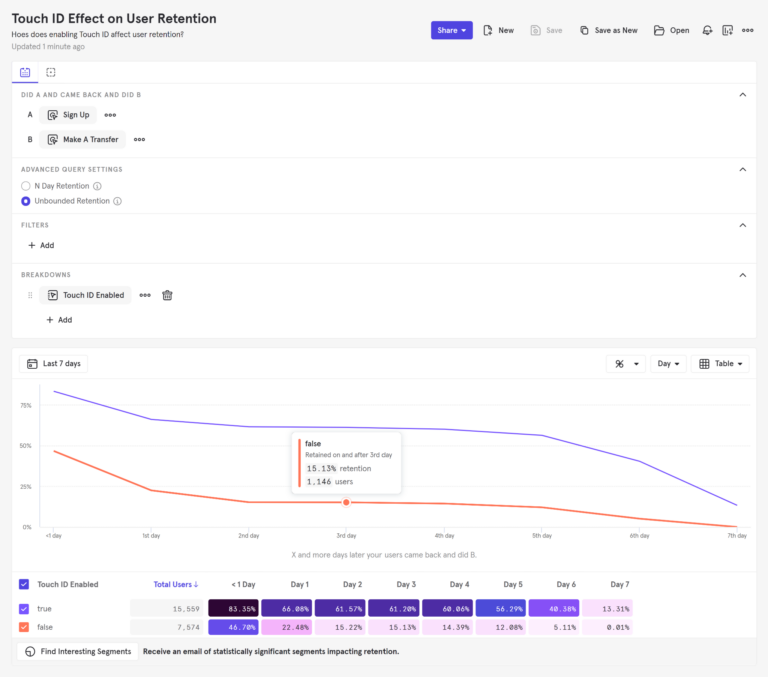
Mixpanel's proprietary Arb database is what makes self-serve analysis practical rather than theoretical. Queries return in seconds where a data warehouse would take minutes, so product managers can explore behavioral data without writing SQL or waiting on engineering.
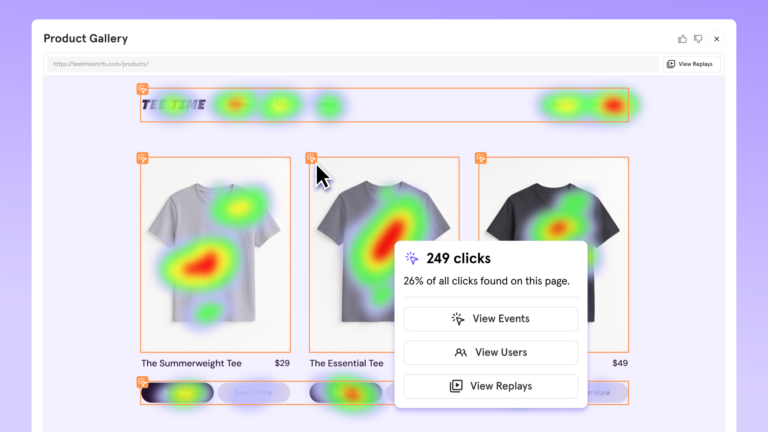
Funnels, Retention, Flows, and Insights cover the core behavioral questions: conversion paths, engagement over time, and how users actually move through the product. Session Replay with Heatmaps connects those patterns to real user sessions, so teams can watch the behavior behind the numbers.
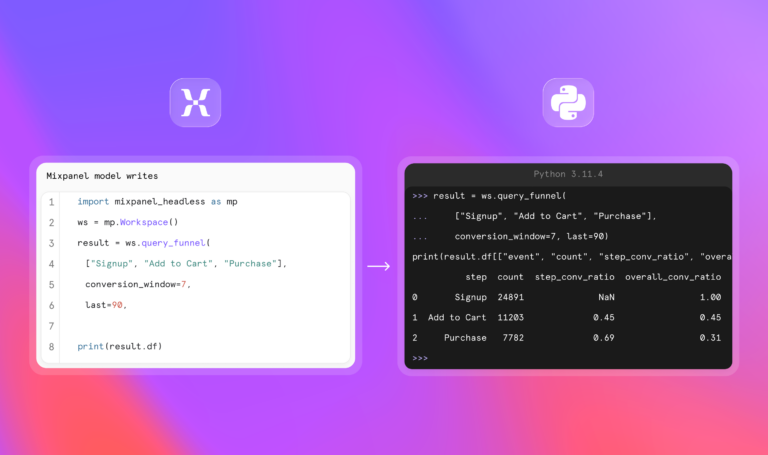
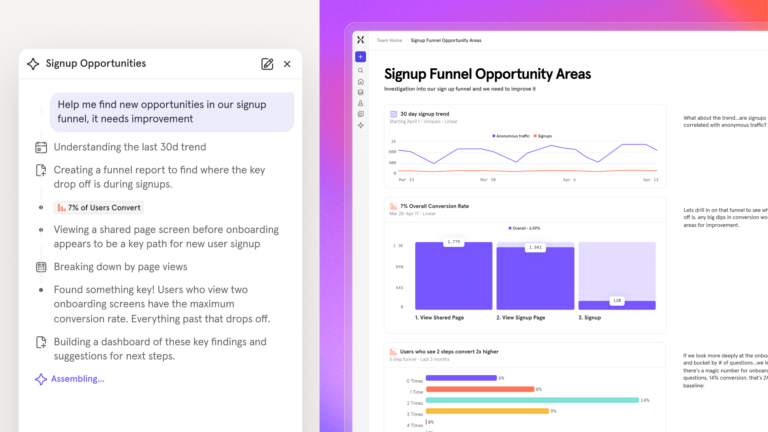
Mixpanel AI monitors metrics continuously and surfaces what needs attention without being asked. For engineering and AI-native teams, Mixpanel Headless exposes the full analytics layer as a typed Python SDK, giving AI coding agents direct programmatic access to every funnel, cohort, and experiment.
Learn more: How long does it take to implement Mixpanel?
Key Mixpanel features
- Fast, accurate queries at scale without compromise: up to 7x times faster
- Advanced Funnel, Flows, and Retention analysis
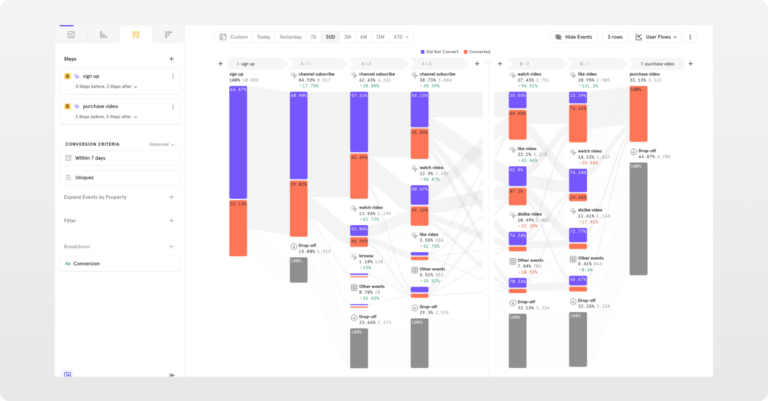
- Session Replay with server-side stitching and heatmaps
- Integrated experimentation with feature flags
- Real-time dashboards and alerts
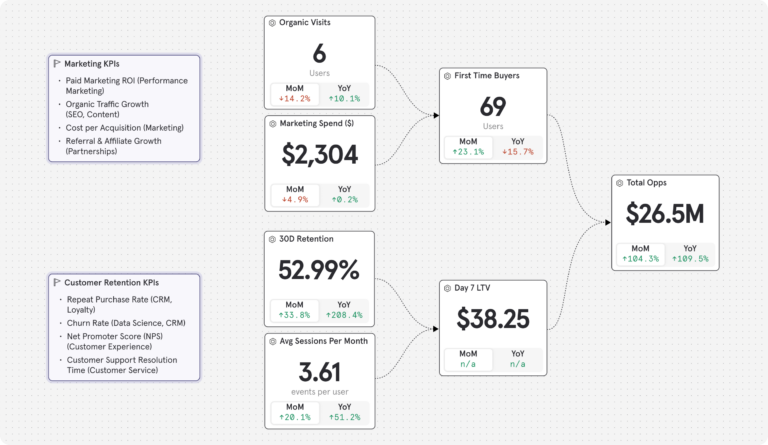
- Metric Trees: A real-time, interactive framework of your growth strategy showing how each input metric impacts your North Star metric
- Mixpanel Headless: A Python SDK giving direct programmatic access to every funnel, cohort, retention curve, and experiment in Mixpanel
- Mixpanel AI: An always-on product analytics that monitors metrics continuously and surfaces anomalies before you ask
- Retroactive property updates and borrowed properties
- Data warehouse connectors
- Cohort analysis and user segmentation
- Advanced alerting and root cause analysis
- Automated data quality governance
How much does Mixpanel cost?
Free, Growth, and Enterprise plans are available.
Mixpanel’s paid plans:
- Growth: 1M events included, $0.28 per 1K events after that (volume discounts available). Unlimited reports, 20K monthly session replays, cohorts, and more.
- Enterprise: Unlimited events, advanced analytics, comprehensive data governance and security, and premium support.
Experiments and feature flags are included on all plans. The Free plan includes 1,000 monthly experiment users (MEUs) and up to 10 active flags. Growth starts at 5,000 MEUs and 50 active flags, with the option to scale to 100,000 MEUs via Plan Builder.
See all Mixpanel pricing for the full breakdown.
| If you're an early-stage startup, Mixpanel pricing is even better: Companies founded in the last five years, with up to $8 million in funding and no other Mixpanel offers already used, can get their first year free on the Startup Plan. Check the Startup Program for current terms or apply immediately. |
Mixpanel vs. PostHog: How they stack up
| Feature | MIXPANEL | PostHog |
|---|---|---|
| Instant setup with autocapture | ||
| Product, mobile, and web analytics | ||
| Experiments (run and analyze) | ||
| Feature flags | ||
| Session replay | ||
| Heatmaps | ||
| 10,000+ free monthly session replays | ||
| Proprietary database for fast querying | ||
| Mirror mode for warehouse connectors | ||
| Metric Trees | ||
| Borrowed properties | ||
| Automated data quality governance | ||
| Out-of-the-box reports for marketing and success | ||
| Email support on all plans | ||
| Free training on Mixpanel University | ||
| AI & automation | ||
| Always-on AI agent | ||
| Context-aware AI (knows your metrics & events) | ||
| Programmatic SDK for AI coding agents (Headless) | ||
| Pricing & usability | ||
| Self-hosted deployment | ||
| Learning curve | Easier | Developer-focused |
| Pricing | Event-based, transparent | Event-based, free tier |
What customers have to say
We chose Mixpanel because it provides the purest form of analytics – clear, event-based insights without unnecessary complexity. It allows our teams to track exactly what matters, build funnels and retention cohorts with precision, and make decisions based on real user behaviour in real time.”
Without Mixpanel we would be less efficient in making our data actionable which would have all sorts of ramifications impacting our growth. From our product-led growth strategy to our product development life cycle and strategic roadmap planning, Mixpanel is critical to our success.”
I’ve been using Mixpanel throughout my entire career in product management (6+ years), and to me, data-driven product management equals Mixpanel.
Without it, I wouldn’t be able to confidently ship serious features — nor truly understand what’s happening in production. I rely on Mixpanel to gather user feedback, monitor overall product health, identify patterns, debug stuff, and recruit users for qualitative research.
I use it almost every day. It’s intuitive, easy to use, and clearly built by people who understand what product managers and researchers need.
| The verdict: Is Mixpanel right for your team? Mixpanel is a strong fit for teams prioritizing self-serve analytics, fast querying, and product adoption workflows without heavy engineering involvement. |
2. Amplitude
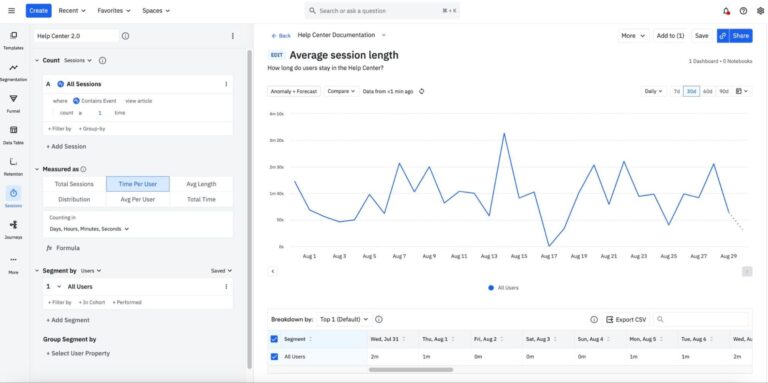
Amplitude is a robust product analytics platform built for behavioral analysis and event tracking. It helps product managers understand user behavior, build complex funnels, and track retention without writing SQL.
Key features
- Event-based tracking
- Advanced behavioral funnels
- Cohort analysis and retention
- A/B testing and feature flags
- Customer data platform
- AI-powered insights
Pricing overview
Amplitude offers a solid free tier (up to 100k maximum transition units, or MTUs). Paid plans scale based on features and event volume, which can quickly become expensive for growing startups.
Every Amplitude plan includes unlimited feature flags, Session Replay, and their customer data platform (CDP), which gives customers access to insights-driven customer data at scale.
Amplitude vs. PostHog: How they stack up
| Feature | AMPLITUDE | POSTHOG |
|---|---|---|
| Event-based analytics | ||
| Behavioral funnels | ||
| Retention analysis | ||
| Session replay | ||
| A/B testing & feature flags | ||
| Cohort analysis | Limited | |
| Non-technical self-serve analysis | Limited | |
| Customer data platform (CDP) | ||
| Self-hosted deployment | ||
| Open-source | ||
| SQL-based custom queries | Limited | |
| Learning curve | Steeper | Developer-focused |
| Pricing model | MTU-based, scales steeply | Event-based, free tier |
What Amplitude customers have to say
| The verdict: Is Amplitude right for your team? Amplitude may work for mature product teams that need highly scalable, rigorous product analytics and have the engineering teams to maintain deliberate event tracking. If you want deep data visualization and trust your event taxonomy, it may suit teams with the technical resources to configure and maintain it. However, its steeper learning curve and event-volume pricing mean it can be a heavier investment than many teams need. |
Want to learn more? See how Amplitude compares to Mixpanel.
3. Fullstory
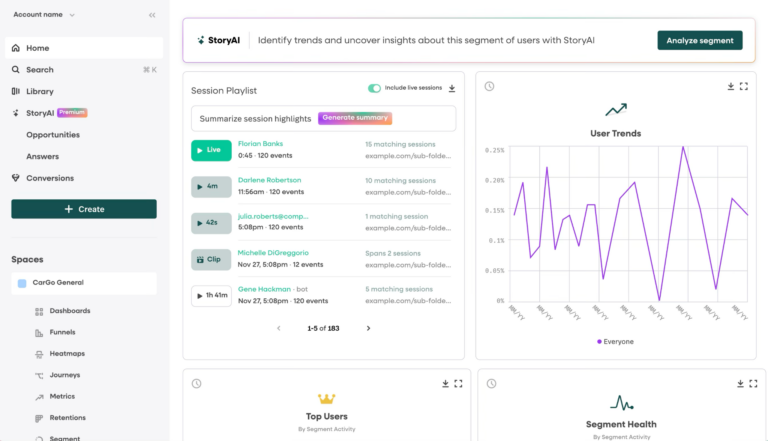
Fullstory is a digital experience platform heavily focused on qualitative insights. It automatically captures user interactions to help teams optimize the user experience, surface hidden friction, and troubleshoot bugs.
Key features
- Session replays
- Rage click and error tracking
- Heatmaps and user journeys
- Autocapture and event analytics
- In-app guides and surveys
Pricing overview
Fullstory has a free plan with basic session replay capabilities. Paid plans (Business, Advanced, Enterprise) utilize a custom pricing structure based on user sessions and data retention.
Fullstory vs PostHog: How they stack up
| Feature | FULLSTORY | POSTHOG |
|---|---|---|
| Session replay | ||
| Heatmaps | ||
| Rage click & frustration detection | Limited | |
| Automatic interaction capture | ||
| Behavioral funnels | ||
| Retention analysis | Limited | |
| A/B testing & feature flags | ||
| Self-hosted deployment | ||
| Open-source | ||
| SQL-based queries (HogQL) | ||
| Primary strength | UX research & qualitative | Quantitative & developer tools |
What Fullstory customers have to say
| The verdict: Is Fullstory right for your team? Fullstory can be suitable if your primary goal is understanding the "why" behind user behavior through session replay and visual troubleshooting. However, if you need deep metric analysis, SQL access, or an all-in-one platform to run experiments, a more comprehensive behavioral analytics solution will be a better fit. |
4. Heap (by ContentSquare)
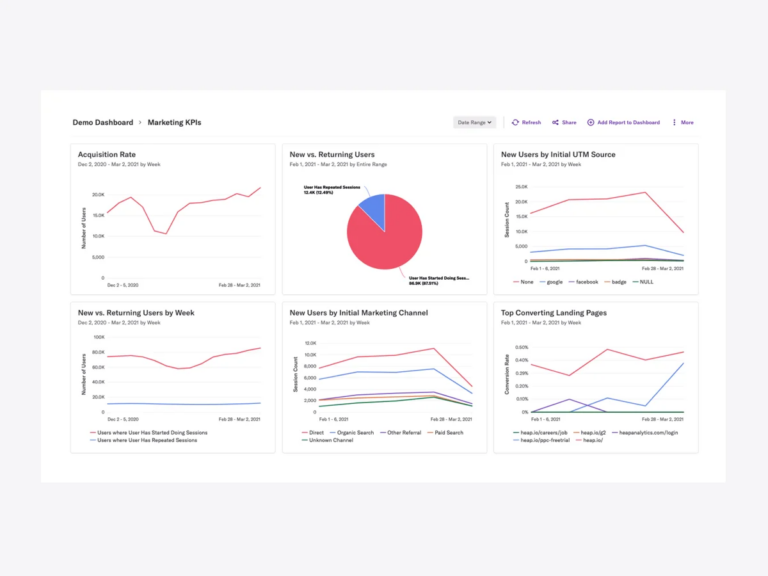
Heap is a scalable analytics platform known for its retroactive autocapture capabilities. It automatically collects all user interactions from day one, allowing teams to build custom dashboards without constant engineering updates.
Key features
- Automatic data capture
- Retroactive reporting and analysis
- Visual event definition
- Data science workflows and journey mapping
- Unified user profiles
- Session replays
Pricing overview
Heap provides a free tier for up to 10k monthly sessions. Paid plans scale based on session volume and access to advanced analytics features.
Heap vs PostHog: How they stack up
| Feature | HEAP | POSTHOG |
|---|---|---|
| Automatic event capture (autocapture) | ||
| Session replay | ||
| Behavioral funnels | ||
| Retention analysis | ||
| Retroactive event definition | Limited | |
| Non-technical self-serve | Limited | |
| A/B testing & feature flags | ||
| Self-hosted deployment | ||
| Open-source | ||
| SQL access (HogQL) | ||
| Deployment | SaaS only | Cloud or self-hosted |
What Heap customers have to say
| The verdict: Is Heap right for your team? Heap may work for product and marketing teams who want immediate visibility into user behavior without waiting on engineering teams to instrument events. If you want to retroactively analyze funnels and drop-offs without touching code, Heap can do the job. But it won't replace PostHog if your developers need to deploy new features behind feature flags. |
5. Google Analytics
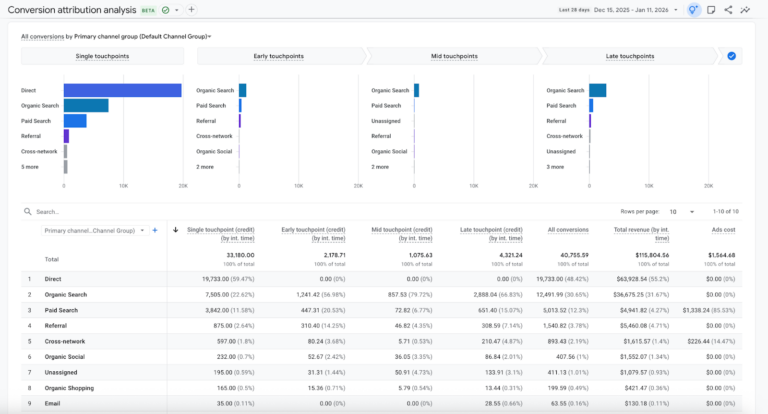
GA4 is the industry standard for web analytics and marketing attribution. While it recently shifted to an event-based model, it is primarily designed to track website traffic, acquisition channels, and high-level conversion metrics rather than deep product usage.
Key features
- Cross-platform tracking
- Marketing attribution
- BigQuery integration
- Traffic, acquisition, engagement, and monetization reports
- Ecommerce tracking
Pricing overview
The standard version of Google Analytics is completely free, making it ubiquitous for startups. The enterprise 360 tier is custom-priced and aimed at massive organizations.
Google Analytics vs PostHog: How they stack up
| Feature | GOOGLE ANALYTICS | POSTHOG |
|---|---|---|
| Event-based analytics | ||
| Marketing attribution | Limited | |
| Cross-platform tracking | ||
| Ecommerce tracking | Limited | |
| Free tier | ||
| Session replay | Limited | |
| Heatmaps | ||
| A/B testing & feature flags | ||
| Self-hosted deployment | ||
| Open-source | ||
| Primary use case | Marketing & acquisition | Product & engineering |
What Google Analytics customers have to say
| The verdict: Is Google Analytics right for your team? You should use GA4 alongside a dedicated product analytics tool, not as a direct replacement. It’s unmatched for understanding where your users come from and how marketing channels perform, but is less suited for when product teams need to analyze complex user behavior, watch session recordings, or build better products. |
Want to learn more? See how GA4 compares to Mixpanel.
6. LogRocket
LogRocket combines session replay, error tracking, and basic product analytics into one platform. It is designed to help engineering and product teams reproduce bugs instantly and understand the technical root cause of bad user experiences.
Key features
- Session replay
- Frontend error tracking
- Performance monitoring
- Event tracking and funnels
- Galileo AI
Pricing overview
LogRocket has a free plan available for up to 1,000 sessions. Paid plans increase based on session volume and data retention needs.
PostHog vs LogRocket: How they stack up
| Feature | LOGROCKET | POSTHOG |
|---|---|---|
| Session replay | ||
| Heatmaps | ||
| Frontend error tracking | ||
| Rage click detection | Limited | |
| Performance monitoring | Limited | |
| Behavioral funnels | ||
| Product analytics depth | Limited | |
| A/B testing & feature flags | ||
| Self-hosted deployment | ||
| Open-source | ||
| Primary strength | Debugging & error tracking | Product analytics & experiments |
What LogRocket customers have to say
| The verdict: Is LogRocket right for your team? LogRocket may work if your primary pain point is reproducing bugs and monitoring frontend performance, though teams that also need funnel depth, retention analysis, or experimentation will likely find Mixpanel a more complete fit. It gives engineering teams the exact context they need for debugging. However, if you need to run sophisticated A/B tests or track long-term retention workflows, you will quickly outgrow its analytics capabilities. |
Which solution fits your situation?
We want fast, powerful, and reliable product insights without a complicated setup → Mixpanel?
Mixpanel is built for product teams that need to understand user behavior and act quickly. Its event-based model covers funnels, retention, and cohort analysis in a self-serve interface. You don’t need a dedicated data engineer to maintain infrastructure. PostHog is a great developer tool, but product managers shouldn’t have to learn SQL or wait on engineering just to see if a feature is being used. Mixpanel’s self-service design means you get answers yourself, instantly.
We need deep, rigorous analytics and have the engineering bandwidth to maintain it → Amplitude?
Amplitude offers depth for mature product teams. The tradeoff is has a steeper learning curve and pricing curve than most alternatives.
We can’t instrument tracking and need data immediately → Heap?
Heap’s retroactive autocapture is useful when engineering cycles are frozen, and you need behavioral data right now. The trade-off is that once it’s time to dig deeper, the analytical capabilities are more limited than PostHog’s.
We need to reproduce front-end errors and monitor technical performance → LogRocket?
LogRocket can be suitable if your primary pain point is debugging and tracking JavaScript errors, though teams needing full behavioral analytics alongside debugging tend to find Mixpanel a more complete solution. The gap shows up when you need to run complex A/B tests or track long-term retention workflows.
We want to know how users actually experience the product to diagnose UX issues → Fullstory?
Fullstory’s session replay can work well for researching UX and finding friction points, though other competitors offer session replay that covers the same use case alongside full behavioral analytics. The tradeoff is that it is primarily observational rather than analytical.
Our focus is marketing attribution and website traffic → Google Analytics 4?
GA4 covers marketing attribution and web traffic measurement well, and it’s free. It falls completely short when product teams need to analyze complex user behavior, watch session recordings, or manage feature flags.
Switching to Mixpanel: What to expect in your first 30 days
For teams moving away from engineering-heavy analytics workflows, the biggest win is usually faster access to answers across product, growth, and customer teams. If that’s your priority, Mixpanel offers a faster path to self-serve analytics without the need to maintain infrastructure.
Once you decide to change analytics platforms, it can be daunting to untangle your analytics from PostHog’s all-in-one platform or migrate data off of a self-hosted setup.
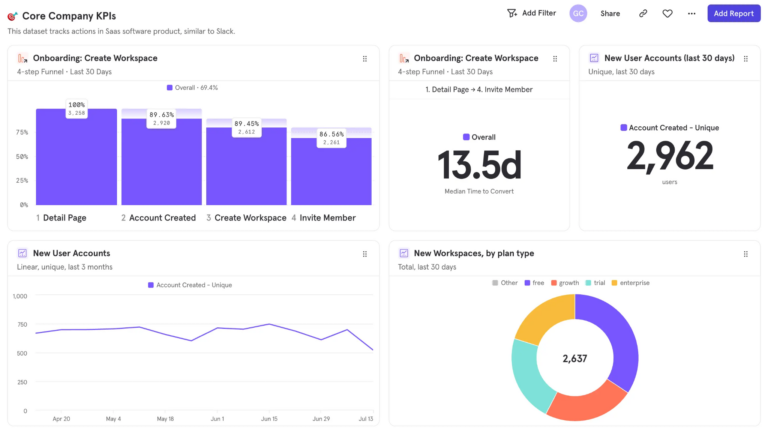
But the reality is that once started, the transition can happen fast. Define core events, export data from PostHog, import your data, and rebuild workflows to make the shift.
| It only takes a few minutes to get started with Mixpanel and begin collecting self-serve insights. Book a demo or get started for free today. |