

9 product analytics platforms compared (use cases, features, and differentiators)

The best product analytics platforms don’t just tell you what happened. They tell you why—and make the next experiment one click away.
That's a higher bar than most tools meet. Choosing a solution with in-depth behavioral analytics matters, but the opportunities to deliver that analysis have expanded: Modern platforms now combine event tracking with session replay, experimentation, AI, autocapture, product adoption, and UX analytics. The difference between tools is less about the feature list and more about how deeply each one supports the work of actually making product decisions.
Here is a comparison of nine platforms—their use cases, strengths, and where each one fits.
Best product analytics tools at a glance
| Product | Best for | Key differentiator | Free plan / trial | Starting price |
|---|---|---|---|---|
| Mixpanel | Product and growth teams that need deep, self-serve behavioral analytics | Behavioral analytics, AI, session replay, Agent Intelligence for AI-native products, experimentation, and Metric Trees in a connected product decision workflow | Free plan1M events/mo · 10K replays | $0.28 / 1K events after 1M free |
| Amplitude | Enterprise teams with complex analytics and governance needs | Advanced data modeling and governed event tracking at scale, with experimentation and AI | Free plan2M events/mo · 10K replays | Growth & Enterprise: custom |
| Heap | Teams that want autocapture and retroactive behavioral analysis | Automatically captures interactions so teams can define and analyze events retrospectively | Free plan10K sessions/mo · 6 mo history | Growth: estimate after install Pro / Premier: custom |
| PostHog | Developer-led teams | Analytics + feature flags + experiments + error tracking + replay in one open-source platform | Free plan1M events/mo · 5K replays | Usage-based pay-as-you-go |
| Pendo | Teams focused on in-app adoption and guidance | Analytics + in-app guides, onboarding flows, feedback, and roadmaps in one platform | Free planUp to 500 MAUs | Base / Core / Ultimate Custom MAU-based pricing |
| Fullstory | Teams diagnosing digital experience problems | High-fidelity session replay + experience signals (rage clicks, frustration) + behavioral search | Free plan30K sessions/mo · 12 mo retention | Business / Advanced / Enterprise Pricing on request |
| LogRocket | Teams combining analytics with frontend debugging | Connects funnels and replay with console errors, network logs, and performance data | 14-day trialNo free plan | From $176/month Scales with sessions |
| UXCam | Mobile-first businesses | Mobile analytics + session replay + heatmaps built specifically for app experiences | Free plan3K sessions/mo | Custom session-based pricing |
| Userpilot | SaaS teams combining analytics with onboarding | Analytics directly connected to in-app onboarding, messaging, surveys, and feature announcements | 14-day trialNo free plan | Starter: $299/mo (2K MAUs) Growth from $849/mo |
Product analytics solutions valuation criteria
There are several important criteria to compare product analytics solutions.
- Analytics depth: How well the platform helps teams understand user behavior, conversion funnels, retention, and product adoption
- Ease of use: How easily product teams can investigate questions without relying heavily on analysts or engineers
- Data collection: The platform's approach to event tracking, autocapture, and maintaining reliable product data
- Additional context: Whether analytics connect naturally to replay, experimentation, agent analytics, and in-app engagement, or other ways to understand and improve the user experience
- AI capabilities: Whether the platform’s AI features meaningfully helps teams investigate data, surface insights, or take action rather than simply summarize dashboards
- Integrations, governance, and scalability: How well the solution fits into the wider data stack and whether pricing and governance work for growing organizations
What product analytics tools do
Product analytics solutions help teams understand how users interact with a product by identifying and analyzing key behaviors, friction signals, and drop-off points. PMs also use product analytics to measure activation, feature adoption, user engagement, and retention.
Collecting and understanding all of this information helps product teams deliver customer value and achieve key business outcomes like revenue and growth goals.
Product analytics vs. web analytics
Modern product analytics solutions deliver a more complete picture than traditional web analytics tools do. Web analytics like Google Analytics focus more heavily on traffic, acquisition, page views, and website conversions.
Product analytics goes deeper into user interactions with features and workflows over time, as well as conversion rates.
Some teams choose one or the other. Other teams use a web analytics tool alongside a dedicated product analytics platform.
| What product intelligence can do: 10 product analytics use cases for 2026 |
|---|
Key features to look for in a product analytics tool
As a baseline requirement, product analytics platforms need to deliver in-depth behavioral analytics. That includes features like funnel analysis, retention analysis, and user segmentation, which help product teams understand how different users interact with the product.
In order to get accurate, useful behavioral insights, you need to look at how each platform tracks behavior. Do they use intentional event tracking, autocapture, or both? This can impact the data collected and the insights generated.
Next, what qualitative insights does the solution capture? Can you look at session replays, generate heat maps, or evaluate how users are engaging with a product’s AI agent? These features can help you go deeper in understanding both individual user journeys and broader user challenges.
Experimentation features are useful for teams that want to test product changes and measure their impact. Some teams use a separate experimentation solution, while others choose a product intelligence platform that does both to keep their data, experimentation, and analysis fully connected.
AI has also become an integral part of product analytics software. Nearly all solutions will offer some AI functionality, but the ones to look out for offer AI features that go beyond the basics to help investigate change, uncover patterns, or suggest what to examine next.
Finally, make sure the solution you choose fits the existing tech stack and provides sufficient control over data quality and access.
9 best product analytics tools on the market right now
1. Mixpanel
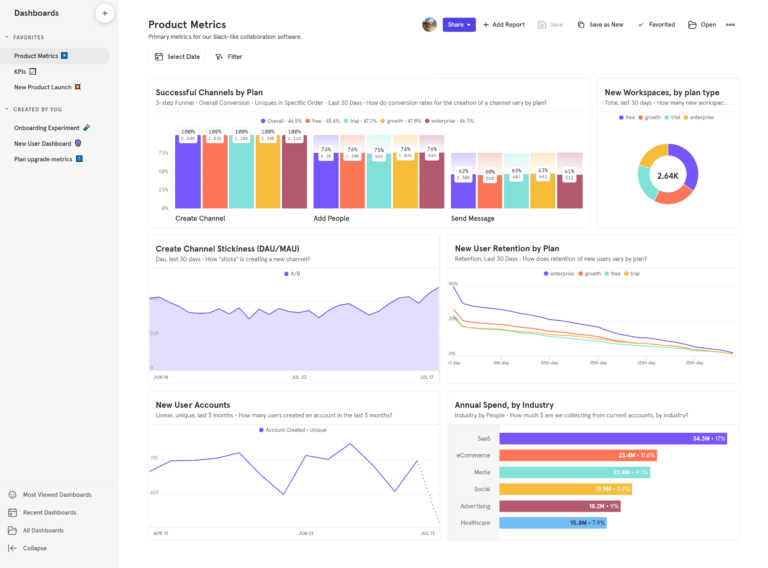
What is Mixpanel?
Mixpanel is a product intelligence platform that combines behavioral analytics with AI, session replay, experimentation, and metric management. Its core strength is helping product teams understand what users are doing and then move quickly from an observation to an explanation and next action.
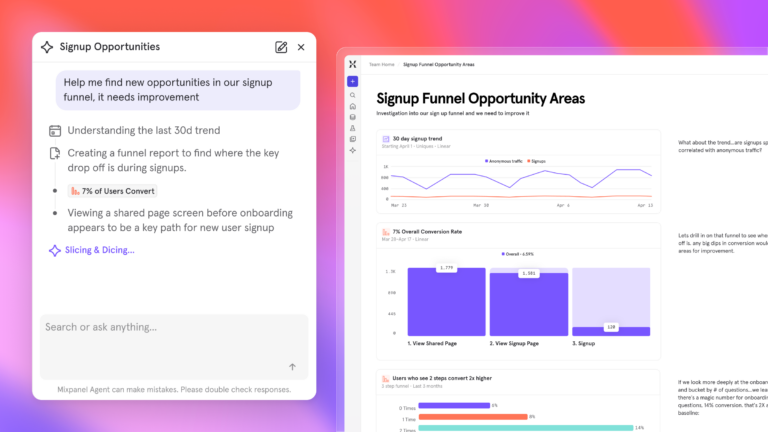
The newer Mixpanel AI layer extends this further by continuously analyzing product data and making product intelligence available both inside Mixpanel and in the solutions teams already use.
How Mixpanel works
Mixpanel is built around an event-based data model: Every user action—a button click, a screen view, a checkout step—can be captured as a named event with properties attached. This structure lets product teams move from broad to specific in seconds. Rather than waiting for a data analyst to build a custom query, a PM can open Funnels, add the relevant steps, filter by user segment, and see exactly where conversion breaks without writing a line of SQL.
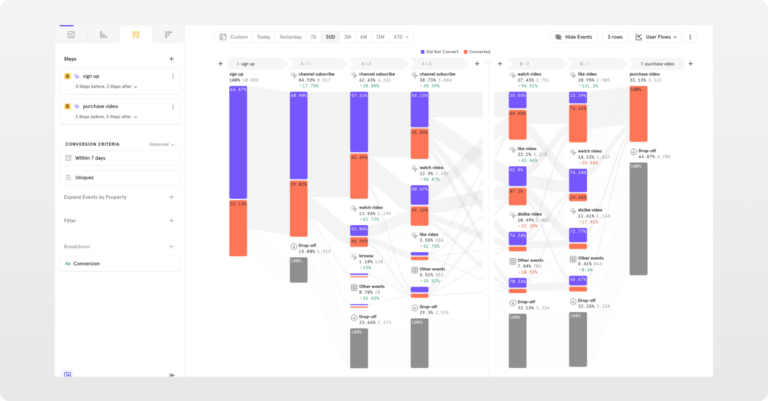
The day-to-day workflow starts with instrumentation. Teams add Mixpanel’s SDK to their web or mobile app—or connect directly from a data warehouse—then use Lexicon to organize and describe the event library so everyone on the team understands what each event means and trusts the numbers they’re looking at. From there, investigation is interactive. A product manager might notice a retention dip in the Retention report, click into the affected cohort, build a Flow to see where those users went next, and pull up Session Replay to watch three or four of them navigate that exact path—all within the same platform.
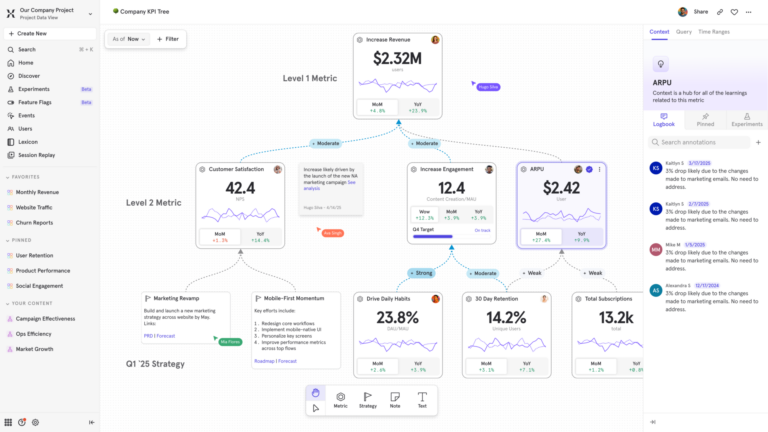
What separates Mixpanel from tools with comparable feature lists is the depth of the analysis layer. Funnels accept unlimited steps and filter by any combination of event and user properties. Retention curves break down by acquisition cohort, plan tier, or any dimension that matters. Metric Trees connect day-to-day product behaviors to the business goals they feed, so a team can trace a change in onboarding conversion all the way to its revenue impact. Mixpanel AI extends this further—continuously monitoring product data and surfacing explanations, anomaly alerts, and suggested next steps without waiting to be asked.
Key features
- Funnels, Retention, and Flows: Mixpanel’s core analytics reports let teams measure conversion and retention with unlimited funnel steps, cohort-level breakdowns, and retroactive filtering. Flows map what users do before or after any event—useful for diagnosing drop-off and understanding discovery paths. Teams investigate questions interactively through self-serve behavioral analysis rather than waiting for analyst-built queries.
- Mixpanel AI: Mixpanel AI combines Mixpanel Agent, including specialized sub-agents, with a business-aware Context Engine to monitor product data, investigate questions, and surface relevant insights. Mixpanel AI also includes Mixpanel MCP Server to bring insights where you work and Mixpanel Headless that enables programmatic analytics for human and agent analysts.
- Session Replay, Heatmaps, and Autocapture: Session Replay connects quantitative analysis with what users actually experienced. Magic Playlists automatically surface and organize relevant sessions around particular behaviors, reducing the need to manually search recordings. Heatmaps reveal click and scroll patterns by page. Autocapture records user interactions from the moment the SDK is installed, reducing upfront instrumentation work.
- Agent Intelligence: As AI agents become a core part of the products teams ship, Mixpanel's Agent Intelligence extends product analytics to cover how users experience those agents—tracking where AI interactions succeed, where they break down, and how they connect to downstream product behaviors and outcomes. Teams can analyze AI agent usage the same way they analyze any other part of the product.
- Experiments and Metric Trees: Mixpanel extends the workflow from analysis into decision-making. Experiments help teams test whether a proposed change improves outcomes, while Metric Trees and AI Metric Trees connect day-to-day product behaviors with higher-level business goals.
- Data infrastructure: Borrowed Properties join user or lookup table data onto events at query time—enabling analysis that would otherwise require re-instrumentation. Data Warehouse Connectors sync with Snowflake, BigQuery, and Redshift, and can mirror raw event data bidirectionally into the warehouse.
How much does Mixpanel cost?
Mixpanel offers both free and paid plans.
Free tier: No time limit, up to 1M monthly events, 10k session replays, and 5 saved reports per seat.
Paid tiers:
- Growth: 1M monthly events included free; $0.28 per 1K events after that when billed monthly, with lower rates on annual billing and volume discounts available. Unlimited reports, 20K monthly session replays, cohorts, and more.
- Enterprise: 1T monthly events, advanced analytics, comprehensive data governance and security, and premium support.
| Special startup up pricing: Early-stage companies that were founded less than five years ago, have up to $8M in total funding, and haven’t redeemed any other offers can receive their first year free on the Startup Plan. |
|---|
What customers say
2. Amplitude
What is Amplitude?
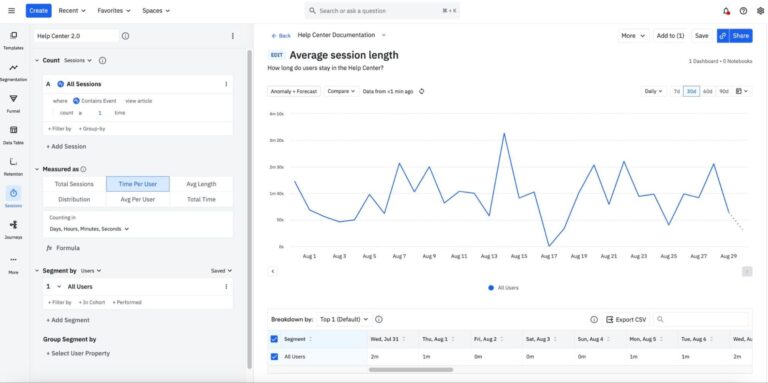
Amplitude is a sophisticated behavioral analytics platform built for product teams that need advanced data modeling and governed event tracking at scale. It helps product managers turn behavioral data into actionable insights without requiring SQL expertise.
Key features
- Product analytics: Helps teams understand where users drop off during onboarding, which features drive engagement, and what behaviors correlate with retention.
- Experimentation: Lets teams run experiments and analyze results in the same platform, making it easier to connect product changes with measurable outcomes.
- AI Agents: Uses AI analysts to surface important trends and potential issues proactively, helping teams find insights without having to manually query their data.
- Session Replay: Lets teams watch individual user sessions to see what happened before a conversion or drop-off, adding context to quantitative product data.
Pricing
Amplitude offers a free plan with 2M events per month and 10K monthly session replays. The Plus plan starts at $0 and scales with event volume, while the Growth and Enterprise plans are custom quoted based on event volume and feature needs.
What customers say
3. Heap
What is Heap?
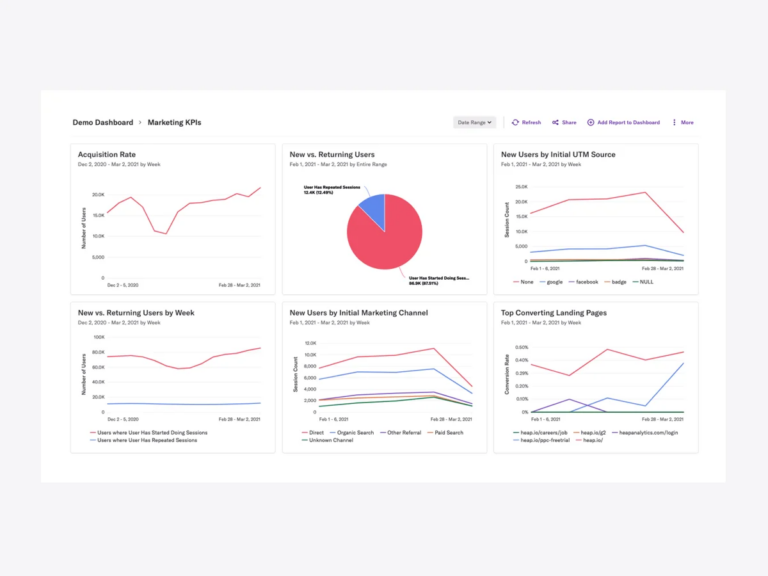
Heap is a product analytics platform best known for its autocapture approach. Instead of requiring teams to decide every interaction they want to track upfront, Heap automatically collects a broad set of user interactions with a single snippet installation, so teams can decide what to analyze later.
Key features
- Autocapture: Automatically captures user interactions, giving teams a complete behavioral dataset without extensive tracking setup.
- Retroactive analysis: Allows PMs to analyze past behavior and create new events without waiting for additional data collection.
- Session Replay: Shows exactly what users did at key moments to diagnose friction and understand why they converted or dropped off. Available as an add-on on the Pro and Premier plans.
- Heap Illuminate: A data science layer that uses behavioral data to automatically identify patterns and highlight friction points within product journeys.
- Friction tracking: Automatically identifies which steps in a funnel cause the highest user drop-off.
Pricing
Heap has free and paid plans. Heap’s free plan is capped at 10,000 monthly sessions and includes six months of data history with unlimited enrichment sources. On the Growth plan, Heap gives a price estimate once you install its tracking snippet. Pro and Premier use custom session-based pricing; contact Heap sales for a quote.
What customers say
4. PostHog
What is PostHog?
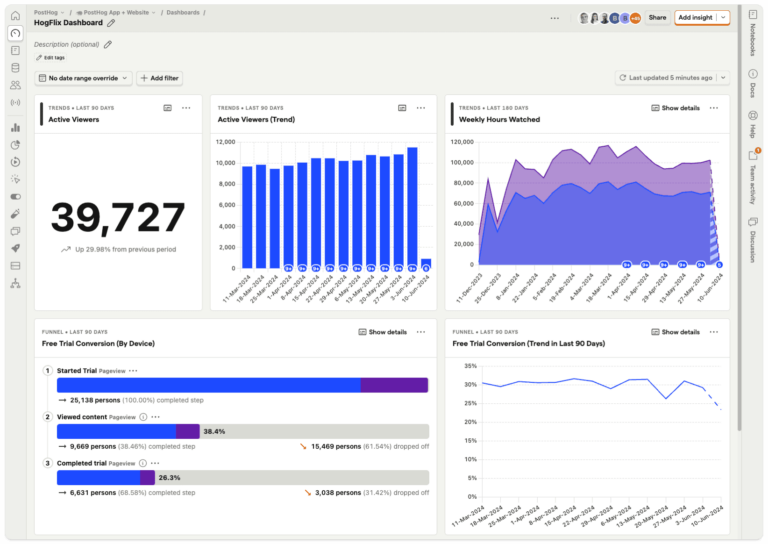
PostHog is a developer-focused, open-source product platform with analytics capabilities that serves over 100,000 users. It combines product analytics with tools that engineering and product teams commonly need to ship, test, and monitor software.
Key features
- Product analytics: Gives product and engineering teams behavioral data about how users engage with the product.
- Experiments and feature flags: Connects feature delivery with A/B testing so teams can measure whether changes meaningfully improve outcomes.
- Paths: Shows the most common sequences of events users take before or after a specific action.
- HogQL for custom queries: Uses SQL-like queries to build custom analyses, calculate complex metrics, and explore patterns beyond PostHog’s standard reports.
- Integrated developer stack: Session Replay, error tracking, warehouse capabilities, and other engineering-oriented tools make PostHog particularly attractive to teams wanting fewer separate platforms.
Pricing
PostHog has free and paid plans. The free plan includes one project and one-year data retention. The pay-as-you-go plan is a usage-based option with up to six projects and seven-year data retention. You get 1 million free product analytics events per month and 5,000 free session replay recordings.
What customers say
5. Pendo
What is Pendo?
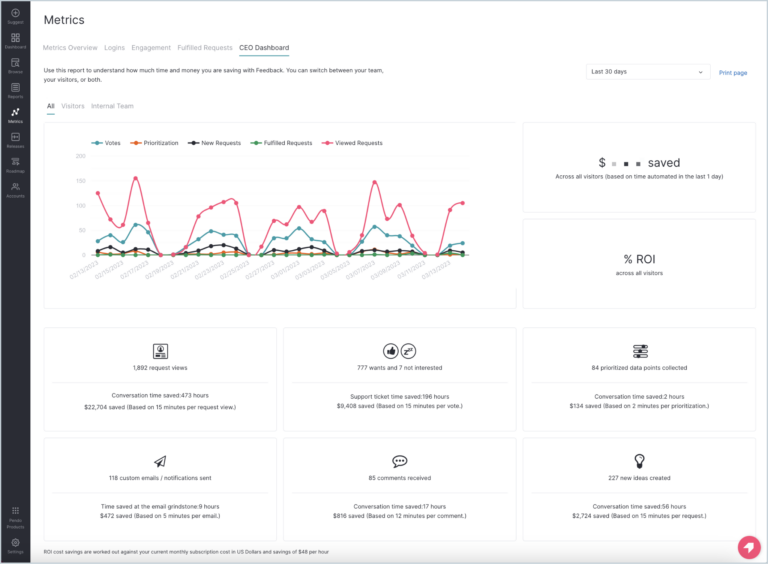
Pendo is an all-in-one product experience platform that combines product analytics with in-app guidance, onboarding, feedback, and session replay, helping teams identify user behavior and then act on it through targeted in-app experiences.
Key features
- In-app guides and onboarding: Teams can respond to behavioral insights with targeted walkthroughs, tooltips, onboarding, and other in-product messaging
- Visual tracking layers: Tags UI elements visually to measure feature adoption without coding
- Autocapture: Pendo collects user interactions automatically, allowing teams to analyze historical behavior without manually tagging every event in advance
- Visual design studio: Define trackable features by clicking elements directly in the product interface through Pendo’s browser extension
- Roadmaps: Share upcoming product plans with users and gather feedback on future features
Pricing
Pendo offers free and paid plans. Pendo’s free plan covers up to 500 monthly active users. The three paid tiers are custom-quoted based on monthly active users, with Base, Core, and Ultimate options.
What customers say
6. Fullstory: Best for session replays
What is Fullstory?
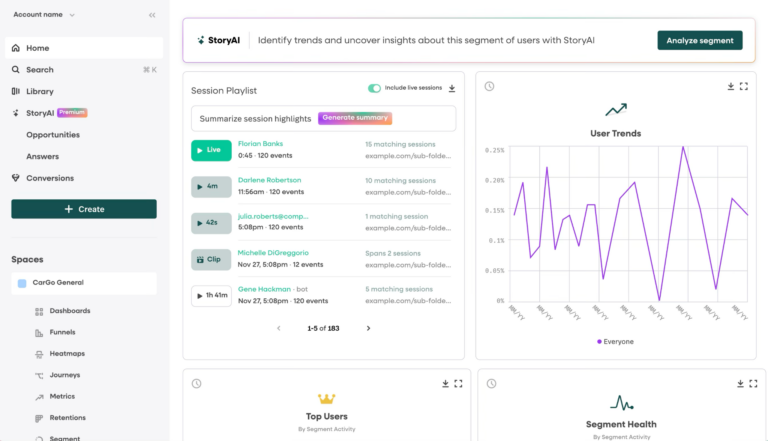
Fullstory is a digital experience platform that combines product analytics with a particularly strong session-based view of user behavior. It is most useful when teams want to understand not only that a problem occurred, but what individual users experienced when it happened.
Key features
- Session Replay: Reconstructs user sessions in high fidelity to pinpoint friction and understand what happened at key moments.
- Autocapture: Automatically captures user interactions, reducing the need for manual event instrumentation.
- Journey and funnel analysis: Maps user journeys and conversion funnels to identify where users drop off.
- Experience signals: Uses heatmaps, rage clicks, and frustration signals to surface potential usability issues.
- OmniSearch: Lets teams search behavioral data using natural-language queries to find relevant user behaviors and sessions.
- AI session summaries: Uses AI to summarize session activity and help teams identify key issues faster.
Pricing
Fullstory’s free plan includes up to 30k sessions per month and 12 months of data retention.
Fullstory’s Analytics product has three paid plans (Business, Advanced, and Enterprise), with pricing available on request.
What customers say
7. LogRocket
What is LogRocket?
LogRocket combines product analytics with session replay and technical diagnostics. This helps product and engineering teams quickly pinpoint why users drop off by connecting funnels and session replays with frontend errors, network activity, and performance issues.
Key features
- Product analytics: Analyzes funnels, conversion, retention, and user behavior to identify where users struggle or drop off.
- Session Replay: Allows product teams to watch user sessions alongside technical data to see exactly what users experienced.
- Error and performance monitoring: Connects frontend errors, performance issues, and Core Web Vitals to user-facing problems.
- Technical debugging: Inspects network requests, console errors, and application state alongside session replays to pinpoint root causes.
- Galileo AI: Automatically surfaces technical and usability issues that are affecting users and helps teams prioritize the most impactful problems.
Pricing
LogRocket offers a 14-day free trial; its pricing page doesn’t currently list a free plan. Paid plans start at $176 per month and scale with the number of sessions captured.
The final price also depends on seats, retention length, and add-ons:
- The Core plan includes clickmaps, heatmaps, path analysis, and conversion funnels.
- Pro adds Galileo AI for summaries and issue detection.
- Enterprise includes additional security and support.
What customers say
8. UXCam
What is UXCam?
UXCam is a product and experience analytics platform with particularly strong roots in mobile apps. It combines quantitative product measurement with visual analysis of how users interact with mobile experiences.
Key features
- Mobile product analytics: Tracks product KPIs, feature adoption, and user behavior with a strong focus on app experiences.
- Session Replay: Lets teams move from an analytics signal into the real mobile sessions behind it.
- Heatmaps: Visualizes how users interact with screens and interface elements.
- Tara AI: UXCam’s AI analyst monitors product behavior and surfaces issues that may require attention.
Pricing
In addition to free and paid plans, UXCam also offers a 14-day free trial that gives users access to all platform features and 100,000 sessions.
UXCam’s free plan includes two app keys, 3,000 sessions per month, and standard features that include a customizable dashboard with up to six reports, session recordings, and user analytics. Paid plans are custom quoted based on monthly sessions.
What customers say
9. Userpilot: Best for in-app experiences
What is Userpilot?
Userpilot began primarily as a product adoption and onboarding platform but now offers a much broader product analytics suite. Its main advantage is the ability to understand product behavior and then act on that insight through onboarding, messaging, or other in-app experiences. Userpilot stands out for its segmentation-driven experiences and micro-surveys that help drive activation and feature adoption.
Key features
- In-app onboarding and engagement: Allows teams to build interactive walkthroughs, checklists, tooltips, slideouts, and onboarding.
- Product analytics: Helps SaaS teams measure product adoption, activation, and retention
- User feedback and surveys: PMs can create in-app surveys tied to their analytics dashboard, including NPS and CSAT.
- Lia AI: Userpilot's AI analyst can answer product questions, build analyses, identify drivers, and connect findings with in-app actions.
Pricing
14-day free trial, plus paid Starter ($299/month for up to 2,000 MAUs), Growth (from $849/month), and Enterprise plans (custom pricing). Visit their pricing page for detailed info on what’s included in each plan.
What customers say
Which platform fits your situation?
You need self-serve behavioral analytics with AI-powered investigation → Mixpanel?
If behavioral analytics is the core workflow—rather than a supporting feature—and you want an always-on AI that monitors product data and surfaces explanations proactively, Mixpanel is built for that. It’s strongest for product teams that need to move from observation to action quickly: investigating a metric change, building a funnel in minutes without SQL, connecting session replays to quantitative data, and testing hypotheses with built-in experiments.
Your team is enterprise-scale with complex data governance needs → Amplitude?
Amplitude suits large organizations with significant investment in data infrastructure and established event taxonomies. Its data modeling depth and governance tooling make it well-suited for teams that have the resources to maintain a sophisticated analytics setup and need advanced behavioral segmentation at scale. That depth comes with complexity: Teams without dedicated data resources often find adoption slow, and non-technical stakeholders lean heavily on analysts to build and interpret reports.
You want to capture everything first and decide what to analyze later → Heap?
Heap's core strength is retroactive analysis. If your team frequently discovers after the fact that a key interaction was never instrumented, Heap's autocapture approach reduces that risk. It's best for teams that prioritize breadth of capture over precision of event tracking. The tradeoff is data precision—autocapture gives broad coverage but rarely produces the clean event taxonomy needed for reliable cohort, funnel, and retention analysis without significant cleanup work.
Your team is engineering-led and wants one platform for analytics, flags, and debugging → PostHog?
PostHog appeals to developer-heavy teams that want product analytics alongside the tools used to build and release software—feature flags, A/B testing, error tracking, and session replay. The open-source, self-hosted option is also a meaningful advantage for teams with strict data residency requirements. The tradeoff is accessibility: PostHog's SQL-first analysis and developer-facing UX mean non-technical product managers often rely on engineering to get answers—the same bottleneck many teams are trying to remove.
Influencing user behavior inside the app is as important as measuring it → Pendo or Userpilot?
Pendo and Userpilot both combine analytics with in-app engagement: guided walkthroughs, onboarding checklists, tooltips, and targeted messaging that responds to behavioral data. Choose Pendo for larger enterprise deployments with mature product teams; choose Userpilot for SaaS teams that want a faster setup and tighter connection between analytics and adoption flows. Both are less suited to teams whose primary need is deep behavioral analytics—multi-step funnel analysis, cohort retention, and experimentation—rather than in-app delivery.
Understanding the qualitative “why” is your primary use case → Fullstory?
Fullstory is at its best when session replay is the center of the workflow rather than a supporting feature. Experience signals like rage clicks, dead clicks, and frustration heatmaps make it well-suited for UX research and experience optimization teams. Most teams run Fullstory alongside a dedicated product analytics platform for funnel, retention, and experimentation work—it complements rather than replaces quantitative analysis.
Your team needs analytics and frontend debugging in the same view → LogRocket?
LogRocket connects product analytics and session replay with console logs, network activity, and Core Web Vitals. If engineering and product regularly need to diagnose the same incidents—and want to understand both the user experience and the technical root cause simultaneously—LogRocket reduces the handoff between teams. Teams that also need self-serve behavioral analytics—cohort retention, multi-step funnel analysis, and experimentation across user segments—typically pair LogRocket with a dedicated product analytics platform.
Your product is primarily mobile → UXCam?
UXCam is built for mobile-first teams that want behavioral analytics, session replay, and heatmaps designed specifically for app interactions rather than adapted from a web-first platform. Its mobile-native SDK and touch-based heatmaps give it an edge for teams where the app is the primary product surface. For teams whose product spans web and mobile, or who need deeper funnel, retention, and experimentation analysis, a cross-platform product analytics platform is a better fit.
Why Mixpanel stands out for modern product teams
Each platform on this list optimizes for something specific. Heap emphasizes flexible autocapture. Fullstory and LogRocket lean into experience diagnosis. Pendo and Userpilot connect analytics with in-app adoption. PostHog appeals to engineering-led teams. These are real strengths—and the right choice depends on which problem sits at the center of your work.
Mixpanel is designed for product teams where behavioral analytics is the core workflow, not a supporting feature. That means unlimited funnels with cohort-level breakdowns, Retention curves that reveal why users churn, and Metric Trees that connect day-to-day product behaviors to the business goals they feed. Borrowed Properties let teams run analysis that would otherwise require re-instrumentation. Data Warehouse Connectors keep Mixpanel data in sync with the broader stack. And Mixpanel AI continuously monitors product data and surfaces explanations and next steps—rather than waiting to be queried. For product teams building AI-powered products, Agent Intelligence extends that same behavioral analysis to the AI agents they ship—so teams can understand how users experience AI interactions with the same depth available for every other part of the product.
For teams that want to move faster from observation to action, and that want AI to be part of the investigation rather than a summary layer on top of it, Mixpanel is built for that workflow.
| Contact Mixpanel to book a demo or get started for free. |
|---|
FAQs
Do I need a product analytics tool if I already use Google Analytics?
GA4 may be sufficient for teams monitoring website activity, but it falls short for teams that need deeper, product-focused behavioral analysis.
What is the difference between product analytics and product adoption software?
Product analytics helps teams measure and analyze user behavior, and product adoption software focuses on influencing behavior through onboarding, in-app guidance, and engagement tools that help users discover and adopt features. The distinction is increasingly blurred as product analytics solutions add adoption features and vice versa.
Do product analytics tools include session replay?
Many now do, but the role and depth of replay varies significantly between platforms.
Can product analytics tools analyze both web and mobile products?
Many platforms support both, but mobile-specific analytics, replay, and SDK capabilities vary.